B2B SaaS SEO is the work of ranking pages that match how software buyers search, then turning those visits into free trials and booked demos. The pages that do most of this work are product-led, such as integration, comparison, use case and template pages.
In 2026, many software buyers ask an AI chatbot for a shortlist before they open Google. In G2’s March 2026 survey of 1,076 buyers, 51% said they start research with a chatbot more often than with Google. Your pages now need to rank in search and also give AI tools clear facts to quote.
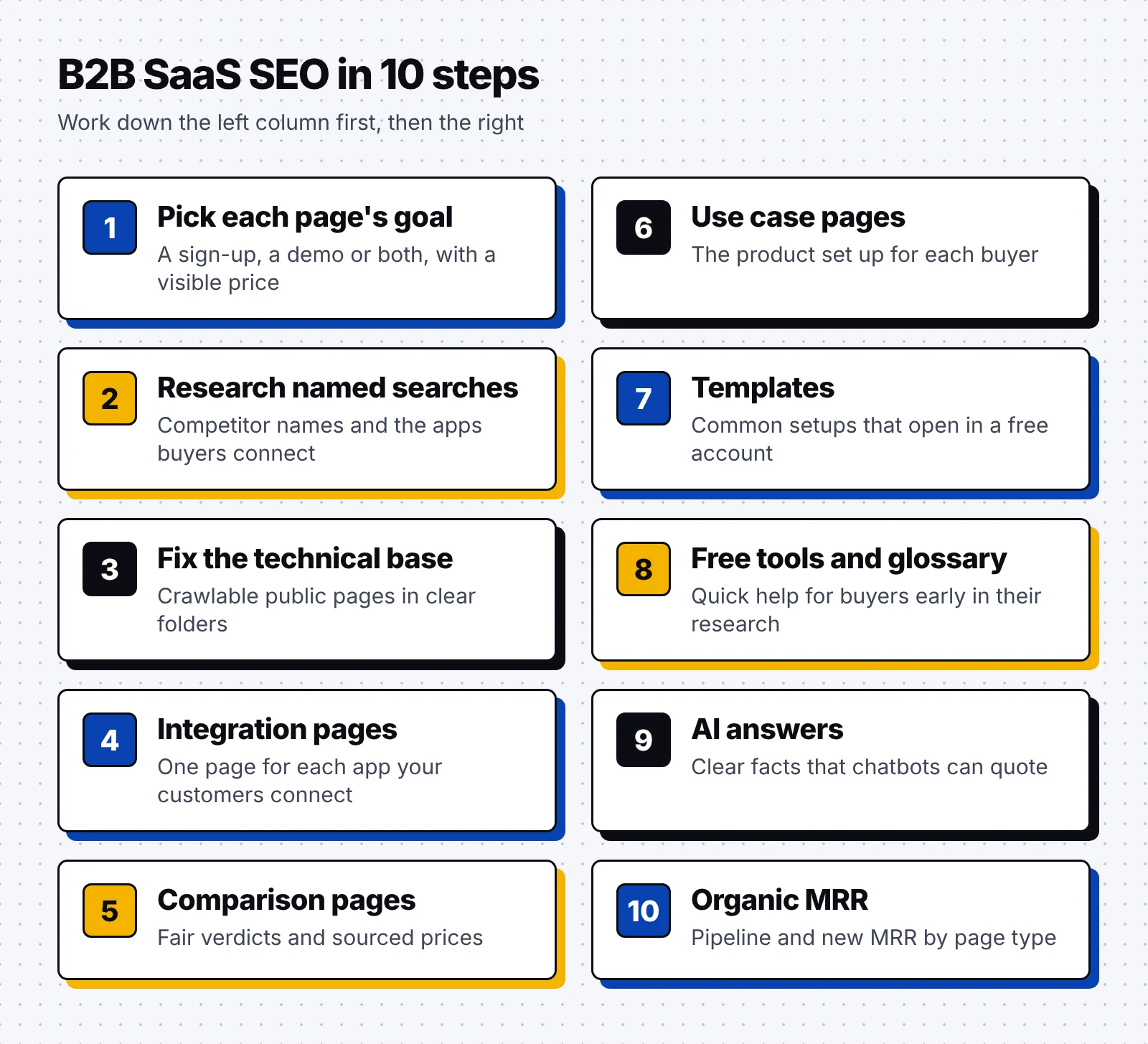
- Decide for every page whether the visitor should start a trial, book a demo or pick between the two.
- Plan your first pages around the names buyers search for, such as competitors and the apps they already use.
- Integration, comparison, use case and template pages reach buyers who are already choosing a tool.
- Free tools and glossary pages reach earlier researchers, while clear facts help AI chatbots describe your product correctly.
- Judge the work by the pipeline and new MRR that start with an organic visit, grouped by page type.
Why B2B SaaS SEO matters for software companies
Software buyers narrow their options early, so your product has to be visible while they research. In TrustRadius research from 2026, 83% of buyers shortlisted three or fewer products, which leaves little room for a vendor they never found.
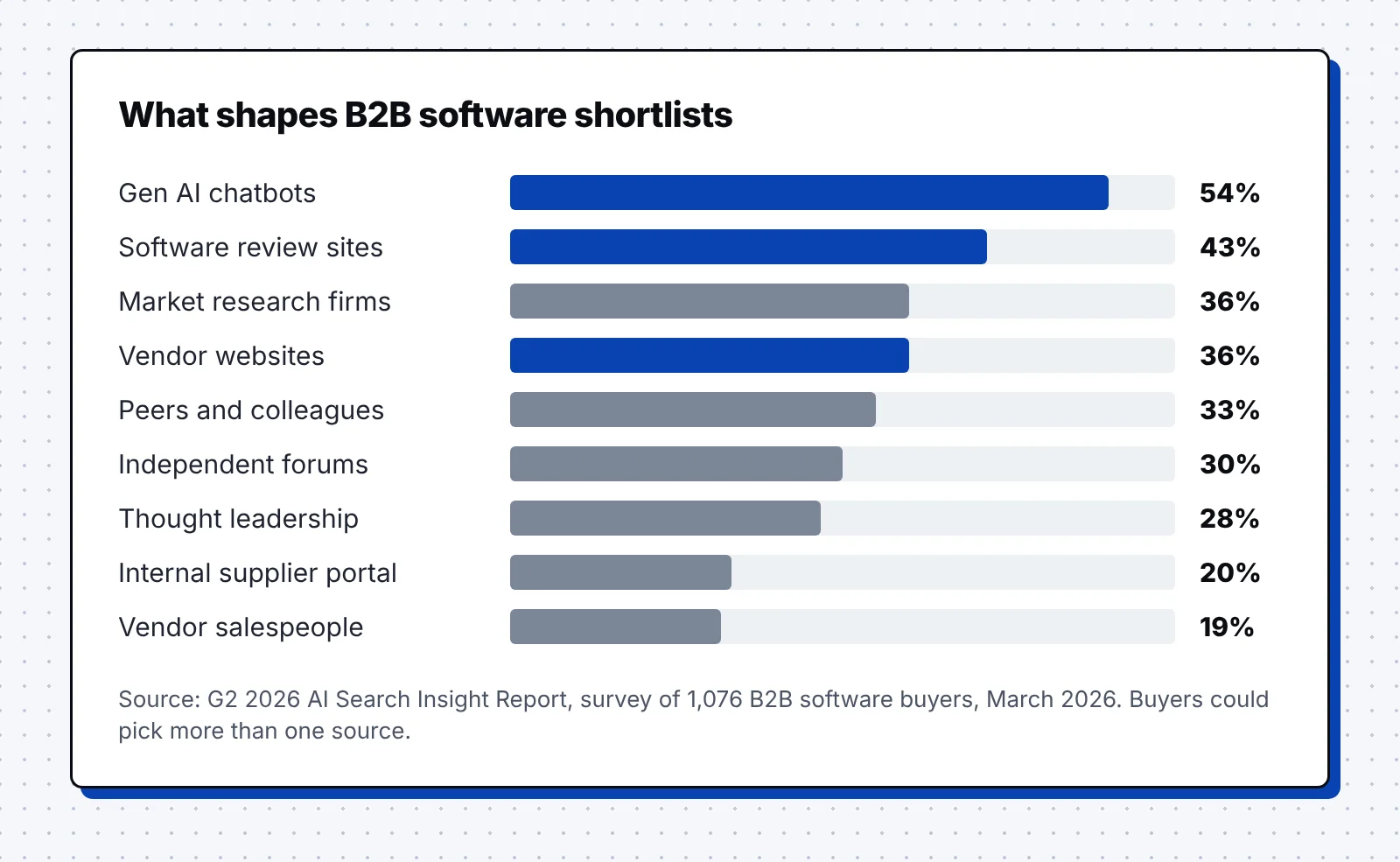
Those shortlists now take shape in AI chatbots as well as in Google. Chatbots topped G2’s list of sources that shape shortlists at 54% of buyers, ahead of review sites at 43% and vendor websites at 36%.
Airtable is a software company that lets teams build business apps on a database that looks like a spreadsheet. In 2023, CEO Howie Liu wrote that its self-serve business "continues to grow, driven by inbound customer demand." Our Airtable SEO breakdown shows how its template and use case pages turn searches into that demand.
Recurring revenue also changes the math, since a page that keeps ranking can add new MRR month after month. SaaS SEO follows the same basics as any B2B program, and our B2B SEO strategy guide covers them in full.
How to do B2B SaaS SEO: 10 steps
We recommend working through the 10 steps in order, since each step uses the research and pages from the steps before it.
1. Match each page to a sign-up, a demo or both
Product-led growth (PLG) companies and sales-led companies need different pages, because their visitors take different next steps. A product-led company wants a free sign-up, while a sales-led company wants a booked meeting with its team.
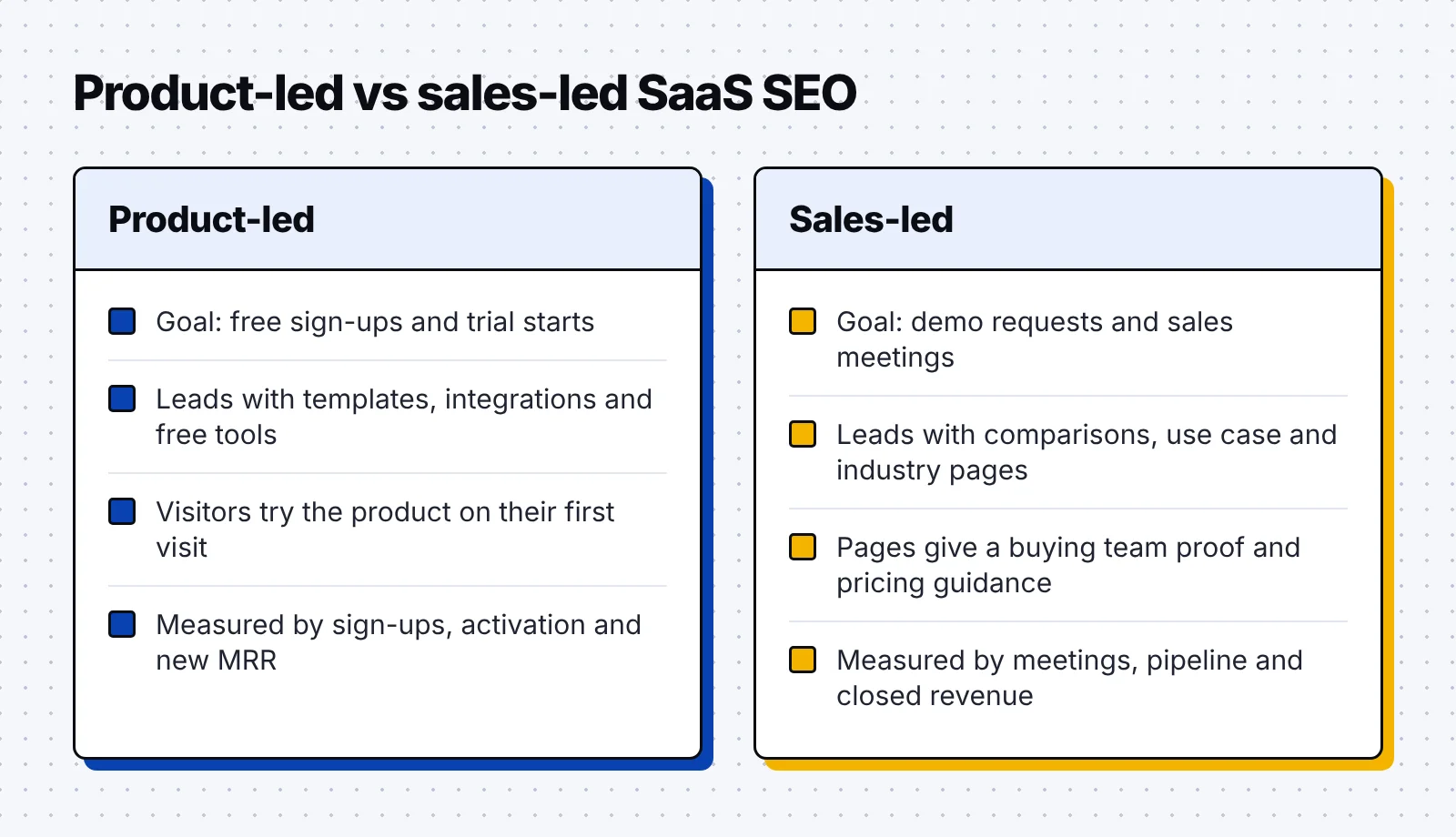
Luckily, you don’t have to pick one motion for the whole site. Many SaaS companies run a free plan for small teams and a sales team for larger accounts. Map each page to the next step that its readers usually want:
- Lead with a sign-up: Make a free sign-up the main button when one person can set up the product alone on the first visit. Template and integration pages usually fit this pattern, since visitors want to try the product.
- Lead with a demo: Make a demo request the main button when setup needs a security review or help from several teams. Comparison and industry pages aimed at larger accounts often fit this pattern best.
- Show a starting price: Buyers have named transparent pricing as their top wish for vendors four years in a row. Show a starting price or pricing model, even when the final price needs a quote.
- Keep demo forms short: Ask only for the details your sales team needs, then show a calendar link right after the form.
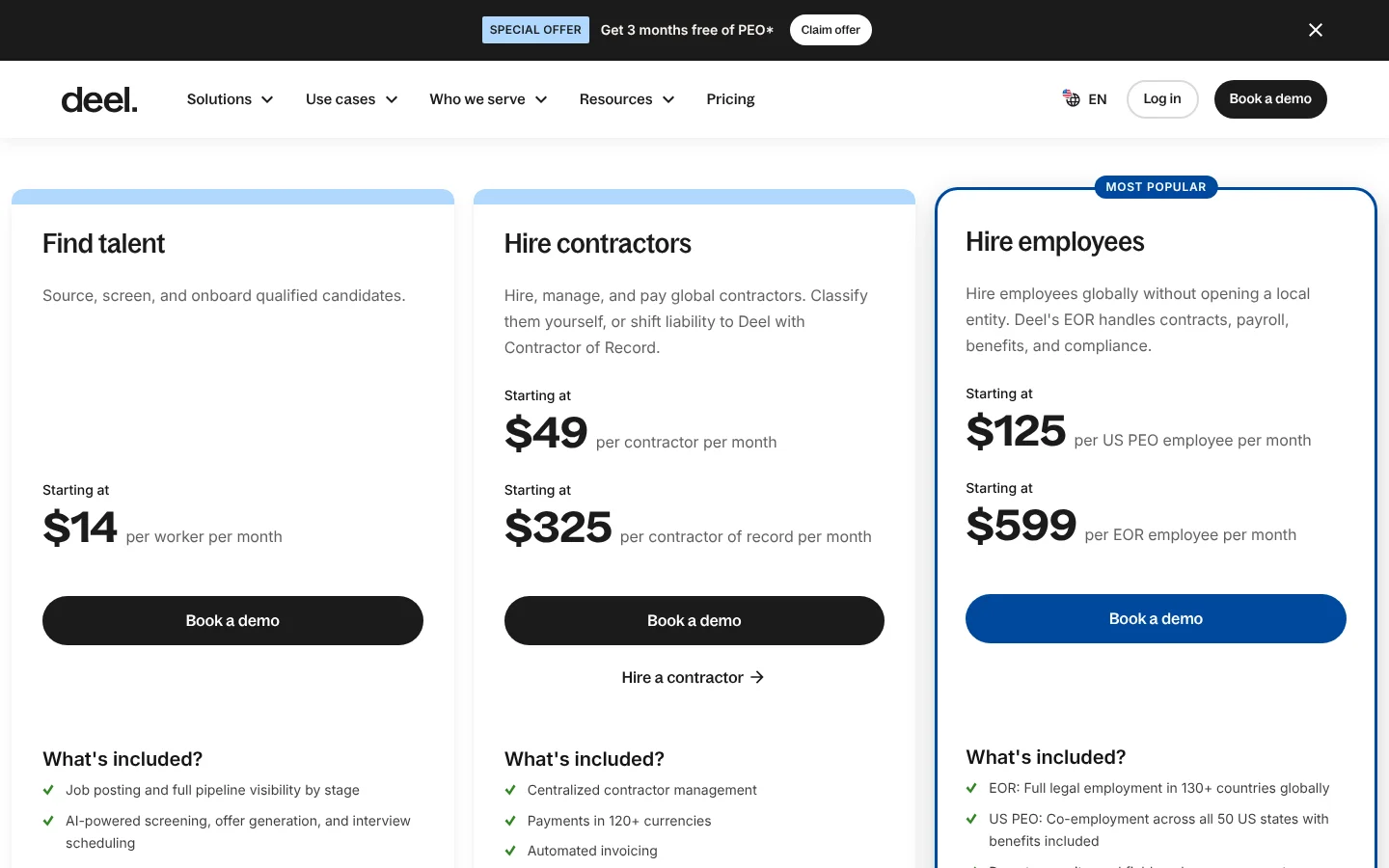
Deel is a global HR and payroll software company that helps businesses hire and pay people in other countries. Each hiring plan shows a starting price, such as $49 per contractor per month, above a Book a demo button. That mix suits a sales-led product, since buyers can check the cost before they spend time on a call.
2. Find the searches buyers make by name
Software buyers often search for named things, like a competitor they want to replace or an app they need to connect. These searches carry clear intent, and each search pattern points to one type of page.
The same patterns appear in AI chatbots, where 33% of buyers in G2’s survey opened with a category prompt and 31% with a competitor. Another 9% asked about the tools a product works with, which is the question an integration page answers.
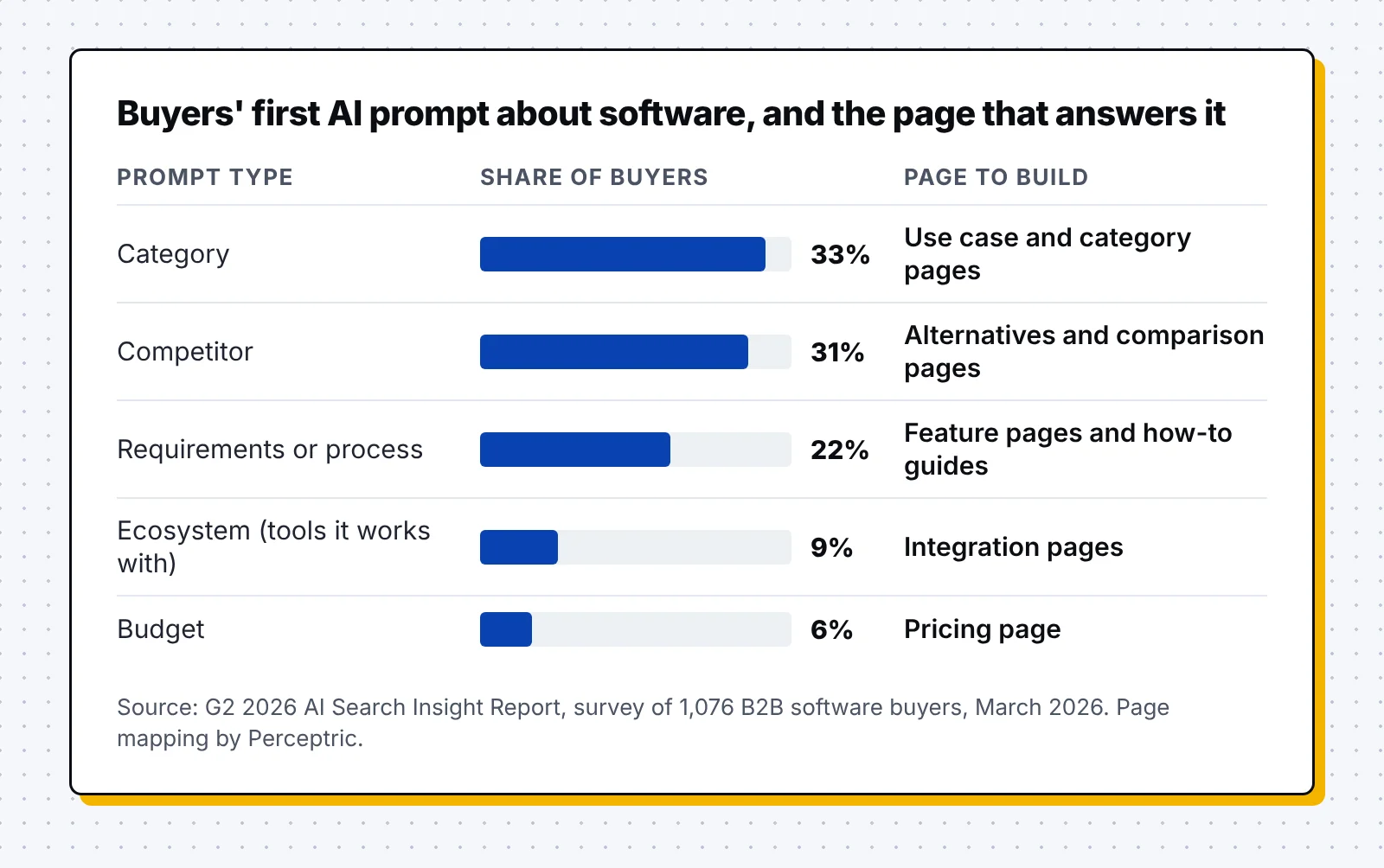
Build your keyword list from the names and jobs your buyers already mention:
- List your competitors: Ask sales which product names come up on calls, then check searches such as "[competitor] alternatives" and "[your product] vs [competitor]." People who type these searches already know the category and are comparing vendors.
- List the apps your customers connect: Pull the most used integrations from your product data. Each one points to searches such as "hubspot slack integration" or "connect gmail to slack."
- List the jobs your product does: Write down the tasks people finish with your product, then add words like "template" or "for agencies." Those extra words show which kind of page the searcher expects to find.
- Give each keyword one page: Map every main search to a single URL, so two of your pages never compete for the same result.
3. Build a technical base that crawlers and AI tools can read
Product-led pages only bring in buyers when search engines and AI crawlers can find and read them. SaaS sites often span a marketing site, an app, docs and a help center, so crawl problems can hide whole page types.
- Keep public pages outside the login: Put templates and integration pages on the public site, where crawlers can reach them without an account.
- Give each page type its own folder: Use clean paths such as /integrations/ and /compare/ for each page type. Folders make it easy to group pages in Search Console and report results by page type later.
- Serve key facts in the HTML: Put product names and starting prices in the HTML your server sends, so every crawler can read them. Our B2B tech SEO guide covers rendering and docs in more depth.
- Watch the page indexing report: Thankfully, the page indexing report in Google Search Console shows which pages Google chose to leave out. Check it after each new batch, and fix or merge weak pages before you add more.
4. Publish integration pages for the apps your customers use
Integration searches come from people who already use a tool and want yours to fit in. A page for each integration answers that search and shows your product working inside the buyer’s current stack.
- Start with the most used apps: Rank integrations by how many customers use them, and build those pages first.
- Show what moves between the tools: Explain the integration with real examples of data moving from one app to the other.
- Add setup steps and one button: List the setup steps on the page, then add a button that starts the connection in a free account.
- Add pair pages with unique data: A page for each pair of apps works when each one holds its own setup steps and workflows. Google’s spam policies define scaled content abuse as pages "generated for the primary purpose of manipulating search rankings and not helping users."
- Launch in small batches: Publish a first batch, watch how many pages Google indexes, and expand once those pages earn impressions. Keep pages without unique data out of the sitemap, with a noindex tag, until they improve.
n8n is a workflow automation software company that lets teams connect apps and build automated processes. It offers more than 2,000 integrations, with a page for each app and pages for many pairs of apps.
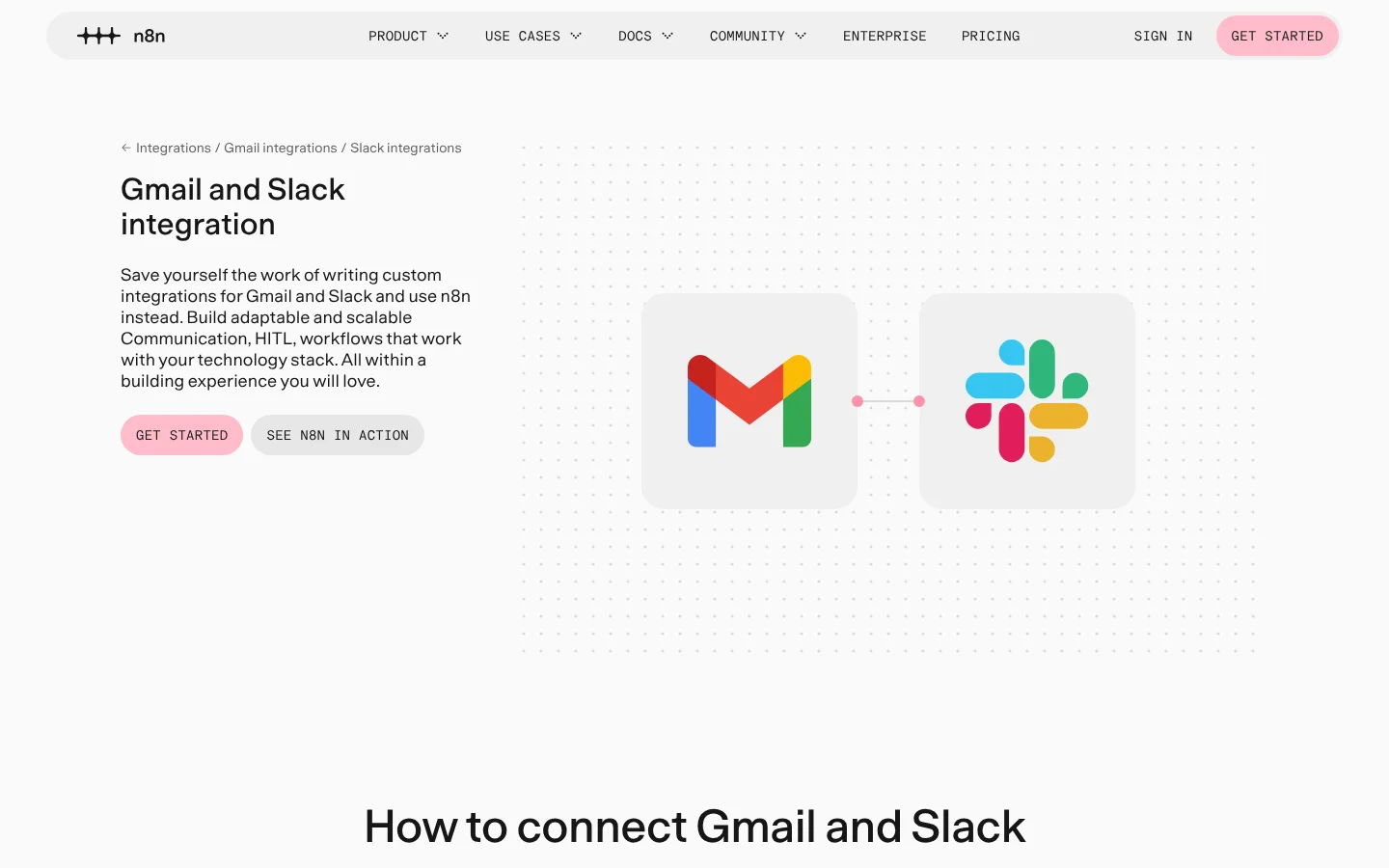
On the Gmail and Slack page, setup takes five steps, and visitors can copy ready-made workflows or browse the actions each app supports. The main button reads "Get Started," so a search for the pair can end inside the product.
5. Write fair alternatives and comparison pages
Comparison searches come from buyers who know the category and are choosing between vendors. They check these pages against review sites and AI answers, so every claim and price on the page needs to be accurate.
- Open with a short verdict: Say in two or three sentences which type of buyer fits each product. Readers who only scan the top still leave with a clear answer.
- Add a sourced pricing table: Compare features and prices in a table, and list your sources with a last checked date. Review the table every quarter, and update it whenever either product changes its plans.
- Say where the other product fits: Name the buyers who would be better served by the competitor. Fair notes like these make the rest of your page easier for buyers to trust.
- Help buyers switch: Add import steps or a migration offer for buyers who are ready to move from a competitor.
- Cover "alternatives" searches: Publish a "[competitor] alternatives" page for each main competitor, with your product listed beside other fair options.
ClickUp is a productivity software company that brings projects, docs, chat and AI into one workspace. Its compare hub links to more than 20 comparison pages, from monday.com and Asana to Notion and Jira.
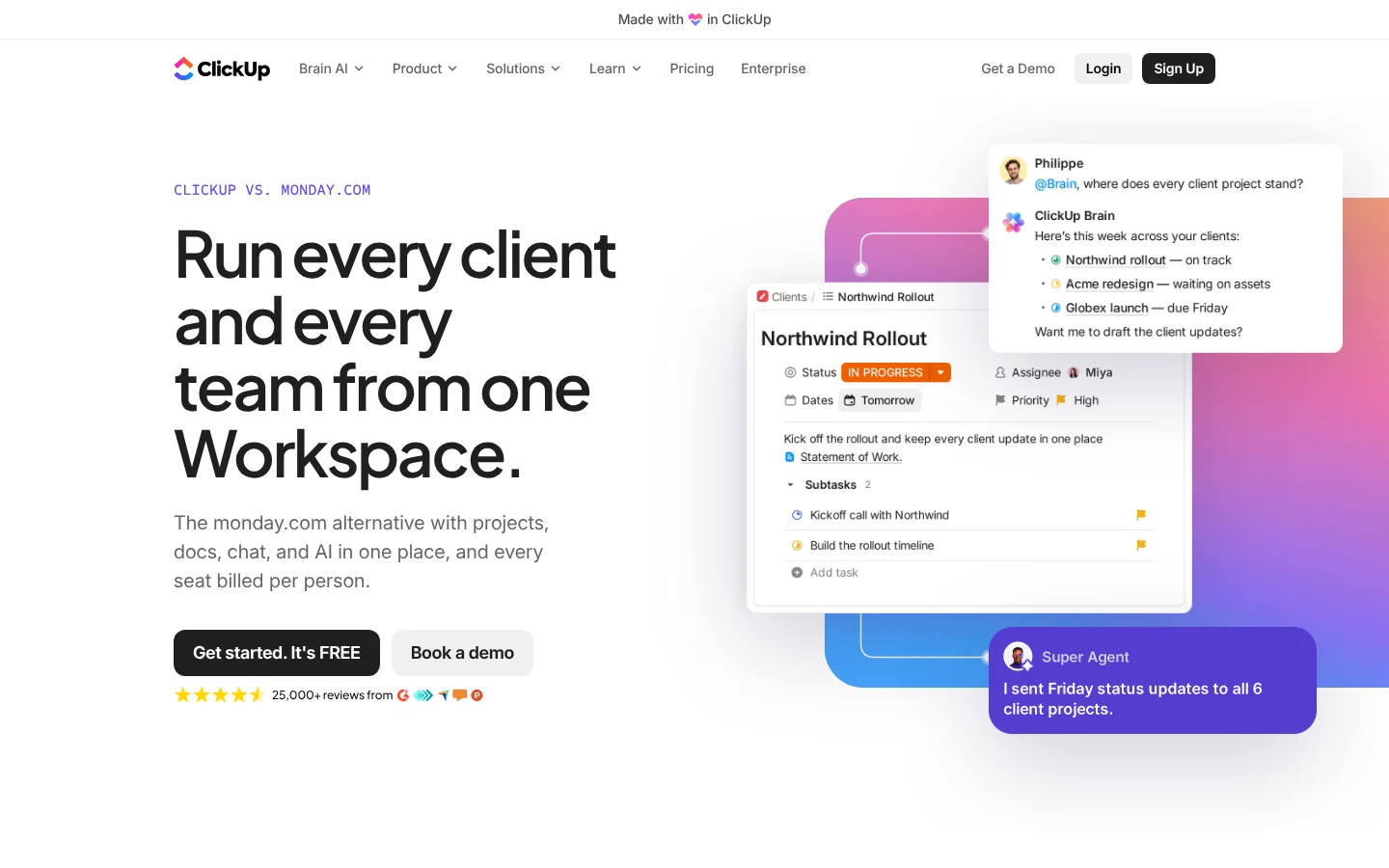
The monday.com comparison opens with a verdict that names monday.com a sound choice for small teams that prefer visual boards. Its pricing figures come with a source list and a checked date of September 28, 2026.
Near the end, the page walks buyers through moving from monday.com to ClickUp. Our guide to BOFU content covers how to write comparison pages like this so they convert.
6. Create use case and industry pages
Use case and industry pages answer searches like "project tracking for agencies" or "payroll software for restaurants." They work best when the product appears set up for that buyer, with a matching template and a customer from the same field.
Interestingly, sales-led companies often get the most from these pages, since one product can serve industries with very different rules. A healthcare page can explain privacy and compliance needs, while a retail page can focus on shift scheduling.
- Pick industries from your customer list: Sort closed deals by industry and team type, then build pages for the groups that buy most often.
- Show the product set up for that buyer: Use screenshots with the fields and sample data that buyer would see. A page for law firms, for example, can show matters and billable hours.
- Name the rules buyers work under: Cover the compliance or security checks that shape buying in each industry. These details give the buying team a reason to book a call.
- Link to a matching template: Point each use case page to a template for the same job, so a self-serve visitor can start right away.
7. Turn common setups into templates
Template searches carry clear intent, since the searcher wants a ready-made way to do a job today. A template page that opens in your product turns that search into a free account.
- Match the title to the search: Name each page after the search it targets, such as "content calendar template." Put that same phrase in the title tag and in the page’s main heading.
- Preview the template with real data: Fill the preview with realistic sample data, so the visitor sees the finished result before signing up.
- Open the template in one click: Make the main button copy the template into a free account, with no extra form in between.
- Invite customers to share theirs: Let customers publish their best setups on public pages under their own names.
Notion is a workspace software company that combines documents and project tracking in one tool. Its marketplace holds 6,696 marketing templates alone, including 1,205 content calendar templates made by Notion and its creator community.
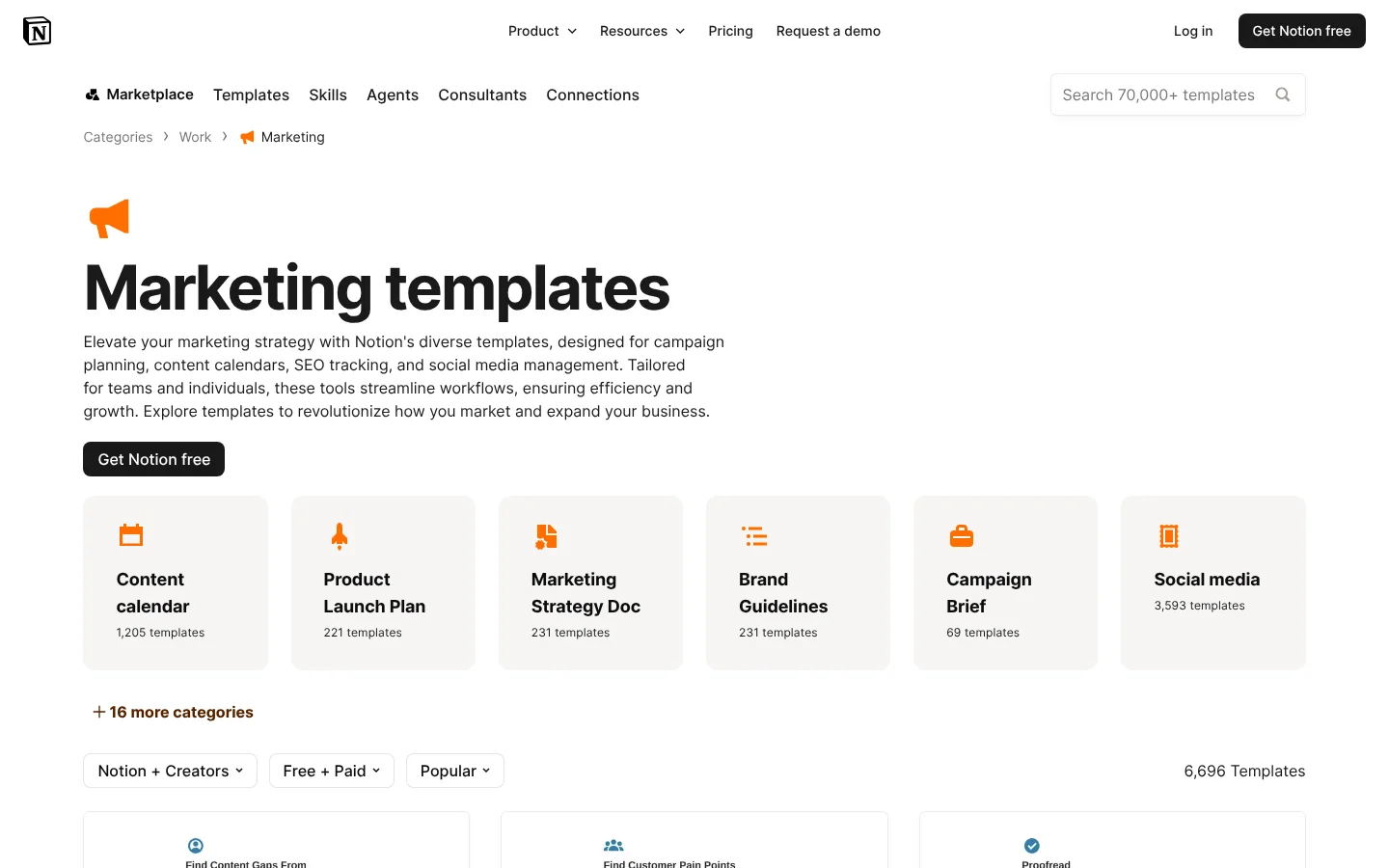
The category page offers a "Get Notion free" button above the templates, so a template search leads straight to a free account.
8. Offer free tools and glossary pages for early research
A free tool earns links and repeat visits because it solves a small task fast. Glossary pages reach readers even earlier, when they search "what is" for a term in your field.
- Pick one small task: Choose a task your buyers search for that your product does in full, such as finding keywords or estimating savings.
- Gate the full report: Give a useful first answer for free, then ask for a sign-up or business email to see the full report.
- Define the term first: Open each glossary entry with a one-sentence definition that answers the search.
- Show the term at work: Add an example from your buyer’s daily work, then link to the product feature that handles it.
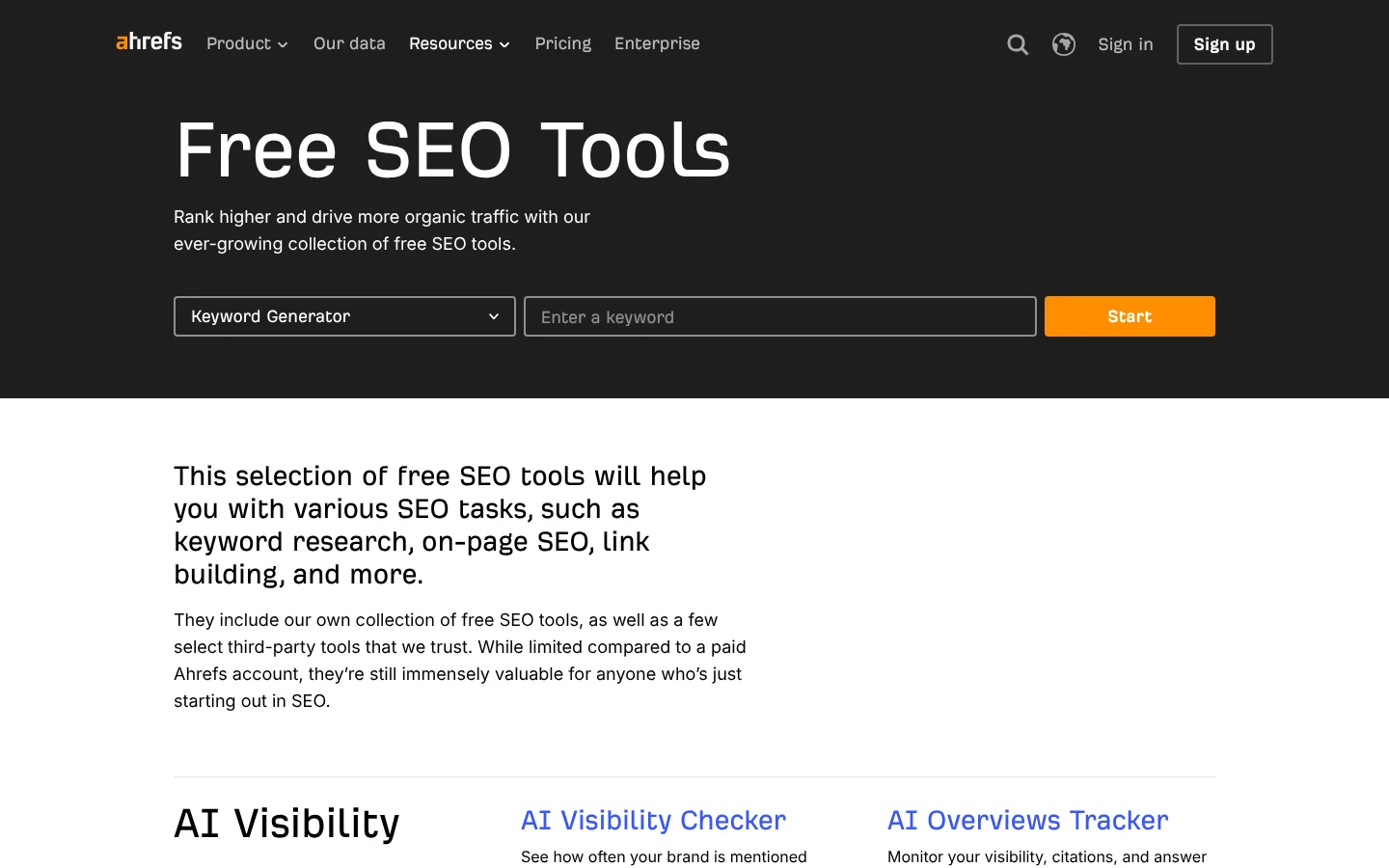
Ahrefs is an SEO software company that helps marketers research keywords and track their visibility in search and AI answers. Its free SEO tools include a Keyword Generator and a Backlink Checker, with a sign-up offer for the full product.
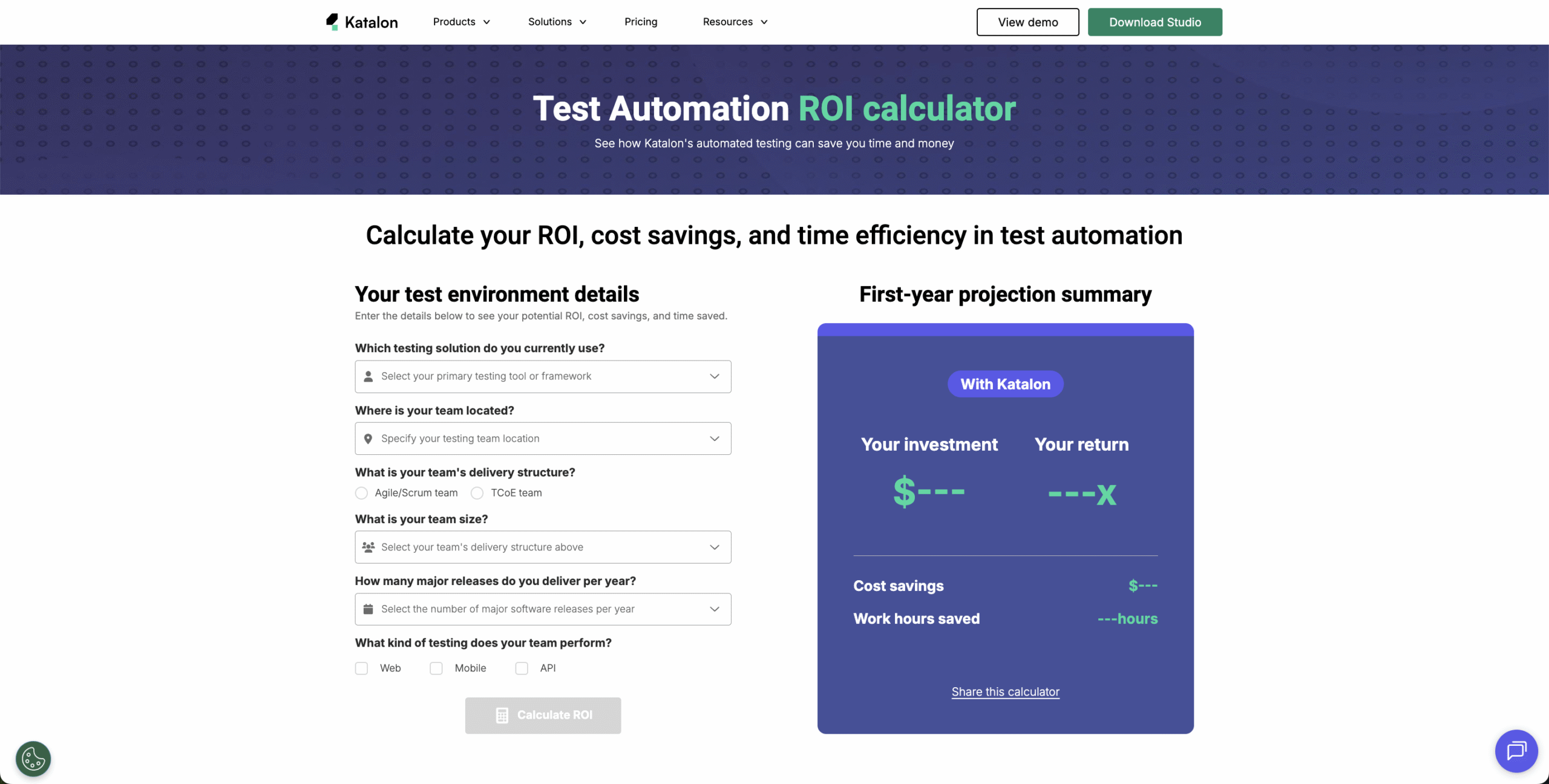
Katalon is a test automation software company that helps teams build and run automated tests. Happily, its test automation ROI calculator shows the same idea working for a sales-led product. It turns a buyer’s team size and release count into a savings estimate, then offers a full report for a business email.
Deel’s Global Work Glossary covers HR and hiring terms from "1099 employee" to "work visa," with an A to Z index. Each entry puts the Deel name in front of early researchers long before they need a demo.
9. Give AI answers clear facts to quote
Pew Research Center found that Google users clicked a traditional result on 8% of visits with an AI summary, against 15% of visits without one. Understandably, that makes it more important for AI answers to name your product and describe it correctly.
- State the basics in plain text: Say who the product is for and what it costs to start, on crawlable pages.
- Keep comparison and integration pages current: These pages answer the competitor and ecosystem prompts that buyers type. Update them whenever your prices change or a partner app adds new features.
- Grow your reviews: Ask customers for reviews on the sites your buyers read, since 74% of buyers use reviews to inform a purchase.
- Use the same names everywhere: Describe your product and plans with the same words on your site and on every review profile. Consistent names help AI tools connect each fact they find to your brand.
- Check AI answers every month: Ask ChatGPT, Gemini, Claude and Perplexity the prompts your buyers use, and note how each one describes your product. When an answer gets a fact wrong, fix the page that the fact came from.
Our guide to GEO for B2B SaaS covers AI search tactics in more depth.
10. Track pipeline and MRR from organic visits
The main SaaS SEO metric is revenue from organic visitors, tracked from the first visit to the paid plan or closed deal. Rankings and traffic still matter as early signs that revenue will follow.
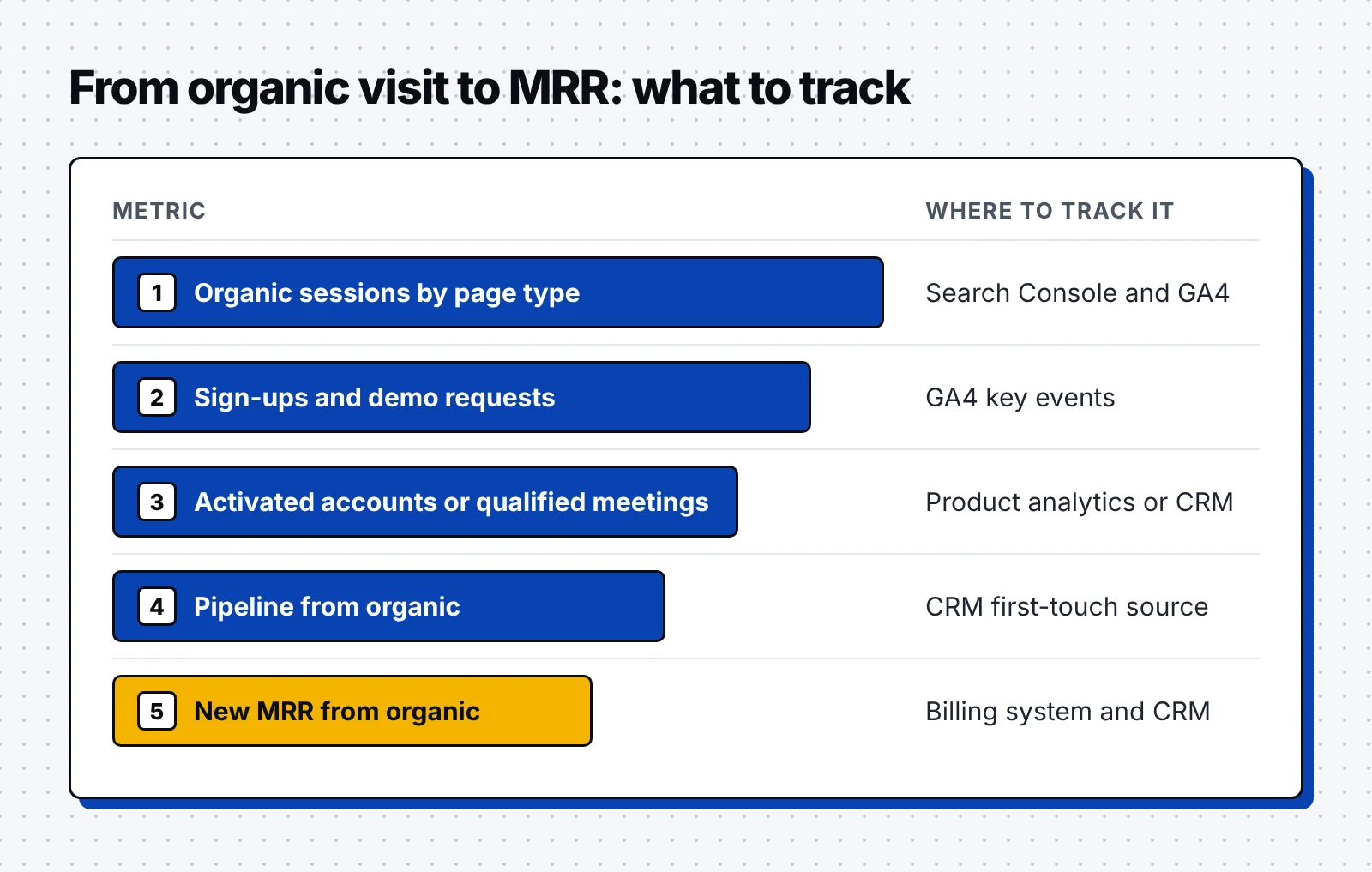
- Group pages by type: Report organic sessions and clicks from Search Console by page type, using the folders from step 3.
- Count conversions from organic: Track sign-ups and demo requests that began with an organic visit, then the activated accounts or qualified meetings that follow.
- Follow leads into the CRM: Store each new lead’s landing page in your CRM, then report pipeline from deals whose first touch was organic.
- Report new MRR from organic: Tie paid plans and closed deals back to their first organic visit, using your billing system and CRM.
- Ask how buyers found you: Fortunately, a "How did you hear about us?" field on demo forms also catches buyers who came from AI chatbots.
Our case study shows how one SEO and GEO program generated about $500K in pipeline in six months for a B2B SaaS company.
Put the 10 steps to work
Use this list as a checklist when you plan each quarter of B2B SaaS SEO work:
- Map every page to a sign-up, a demo or both, and show a starting price.
- Build a keyword list from competitor names and the apps your customers connect.
- Keep public pages crawlable and grouped in one folder per page type.
- Publish integration pages for your most used apps, then add pair pages in small batches.
- Write a fair comparison page for each main competitor, with a sourced pricing table.
- Create use case and industry pages that show the product set up for each buyer.
- Turn your most common setups into templates that open in a free account.
- Ship one free tool and a glossary for buyers early in their research.
- Check every month how AI chatbots describe your product, and fix the source pages.
- Report pipeline and new MRR from organic visits, grouped by page type.
FAQ
What pages should a B2B SaaS company build first?
Start with comparison and integration pages, because the people searching for them are already choosing a tool. Then add templates and free tools that match the jobs your product does.
Is SEO worth it for B2B SaaS?
Yes, for most SaaS companies, because buyers research software through search and AI chatbots before they talk to sales. One good page can bring in sign-ups or demos for years, which suits a business built on recurring revenue.
What is the difference between product-led and sales-led SaaS SEO?
Product-led SEO aims for free sign-ups and trials, so its pages put the product to work right away. Sales-led SEO aims for demo requests, so its pages give a buying team more proof and pricing guidance.
Does programmatic SEO work for SaaS?
Yes, when every page holds unique data a buyer can use, such as an integration pair with its own setup steps. Pages that only swap a keyword into the same text risk breaking Google's scaled content abuse policy.
How do you measure SEO results for a SaaS company?
Measure the sign-ups, pipeline and new MRR that start with an organic visit, grouped by page type. Use your analytics tool for the first visit and your CRM or billing system for the revenue.
Start by listing your top five competitors and the five apps your customers connect most, then build those pages first. If you want help turning them into trials and demos, book a free AI visibility audit with our team.