

BOFU content is the set of pages B2B buyers use to choose a vendor, such as comparison, pricing, case study, ROI, demo and security pages. It answers a buying group's final questions before a sales call, so each page reaches fewer people and turns more of them into pipeline.
In 2026, more of that vendor research happens inside AI assistants, which build their answers from public pages like yours. In a March 2026 survey of 1,076 software buyers, 51% started their research in an AI chatbot more often than in Google.
- BOFU content answers the questions buyers ask when they choose a vendor, about price, fit, proof, risk and the work to switch.
- Find BOFU keywords in sales calls and Search Console, since these terms show low volume and come from buyers close to a decision.
- Pricing and demo pages convert visitors at several times the site average, so build or improve them early.
- Give every comparison and ROI page dated facts a buyer can check, since buyers and AI answers both rely on them.
- Judge each page by the opportunities and pipeline it creates or supports in your CRM, with rankings and AI mentions as early signals.
Why BOFU content matters for B2B teams
BOFU pages reach buyers at the point where their choice can still change. The same G2 survey found that 69% of buyers chose a different vendor than they first planned.
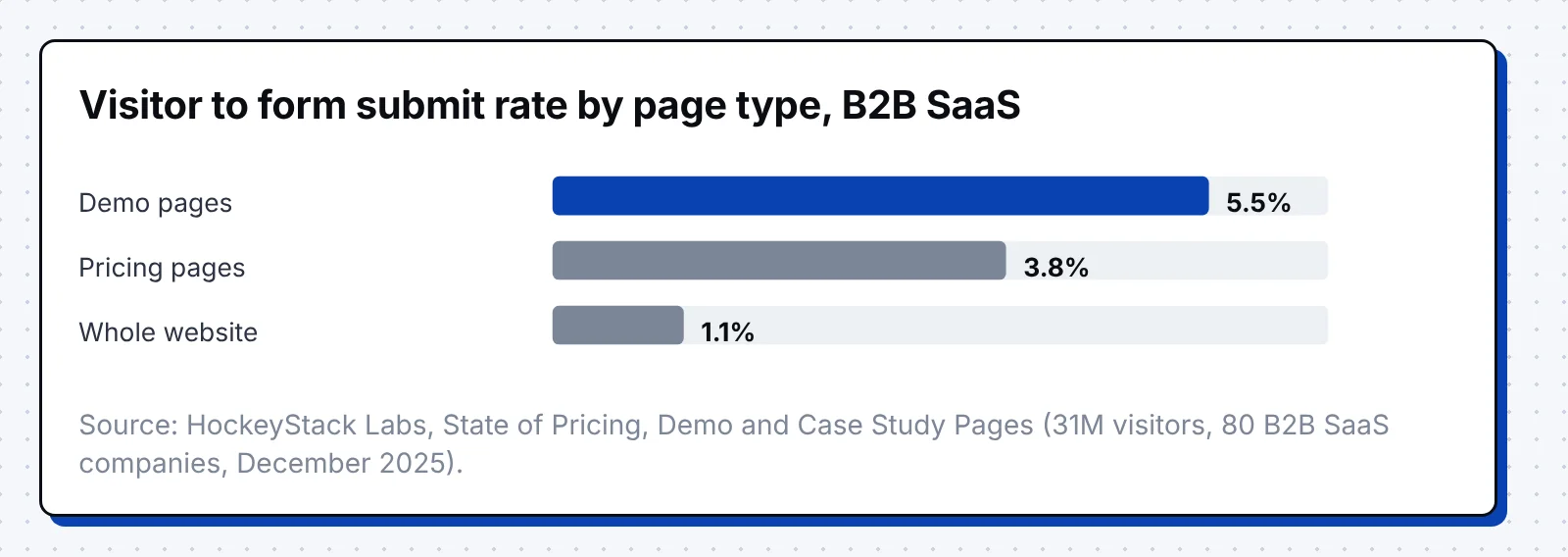
HockeyStack Labs tracked 31 million visitors across 80 B2B SaaS companies and found that these pages convert better than the rest of a B2B site. Demo pages turned 5.5% of visitors into form submissions, against 1.1% for the whole website. Pricing pages converted 3.8% of visitors and drew 16.5% of all website traffic.
Vercel is a cloud platform company that helps developers build and deploy web apps. In June 2025, ChatGPT was the source of around 10% of new Vercel signups. AI answers built from public product pages now send buyers who are ready to sign up.
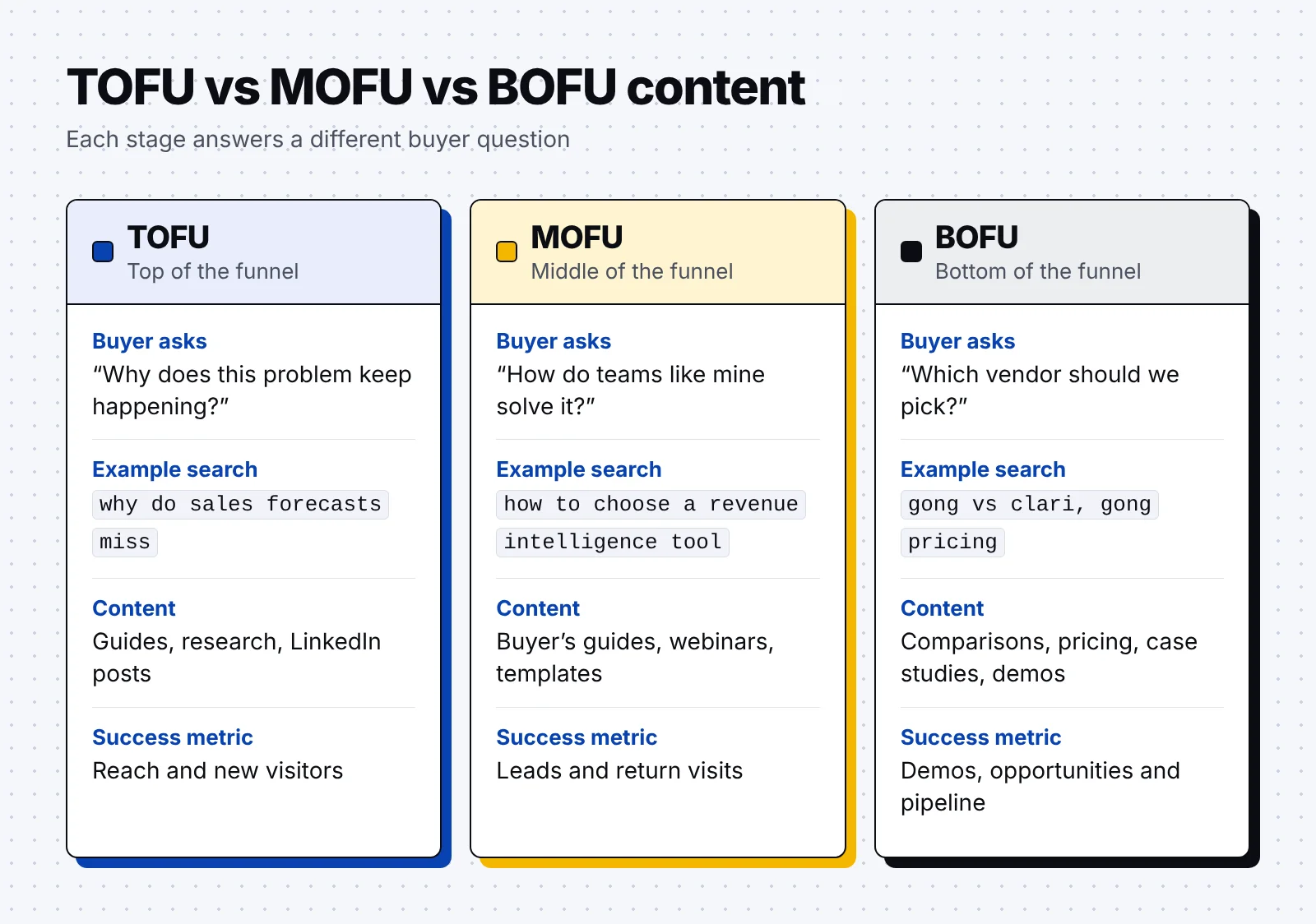
BOFU content also differs from top and middle of the funnel content in the question it answers and the metric that judges it. Our guide to the B2B content marketing funnel shows how the stages connect, and B2B tech content marketing covers awareness content for technical buyers.
How to create BOFU content: 8 steps
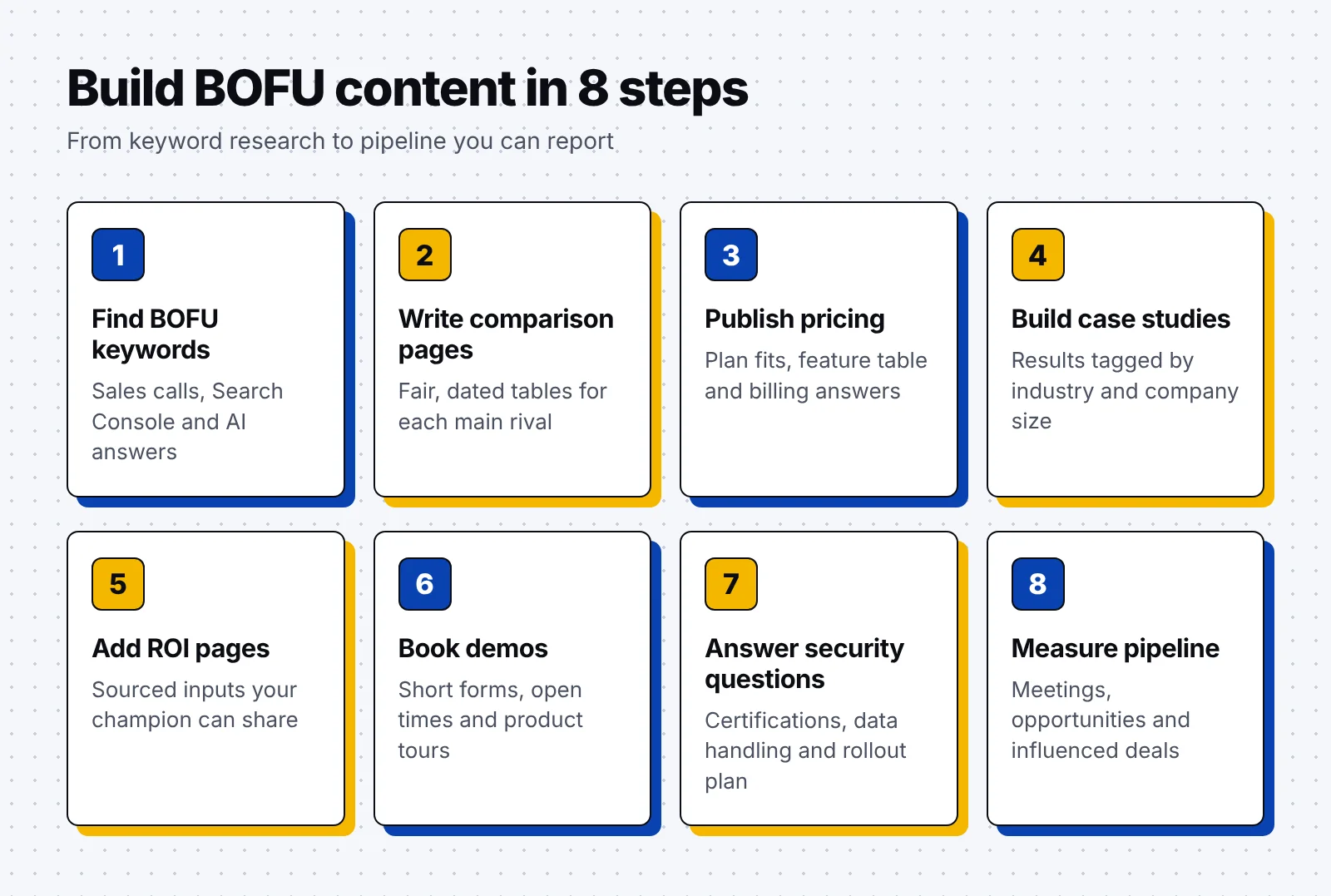
The eight steps below take you from BOFU keyword research to a set of decision pages that you can measure by pipeline.
1. Find BOFU keywords in sales calls and search data
BOFU keywords name a vendor, a price or a decision, so they tend to show low search volume and high intent. The best starting list is the set of questions buyers already ask your sales team, matched to the searches people type.
- Start with your deals: List the rivals you meet most in won and lost deals, then add "vs", "alternatives" and "competitors" to each name. A call recording vendor might start with "Gong vs Clari" and "Gong alternatives".
- Mine sales calls: Pull late-stage questions from call notes and recordings, such as "How long does setup take?" or "Do you have SOC 2?" A question that comes up every week deserves its own page or section.
- Filter Search Console: Filter your Google Search Console queries with a regex such as vs|alternative|pricing|cost|review. The results show BOFU terms you already rank for, often on pages that were built for other topics.
- Check review sites: Open the G2 and Capterra pages in your category to see which products buyers compare with yours. Each pair that shows up often is a candidate for a comparison page.
- Ask AI assistants: Put your buyers' questions to ChatGPT, Perplexity and Google AI Mode, and note which brands and pages each answer cites. Repeat the check each month, since the brands and pages each assistant cites can change.
- Add product modifiers: Add your product name to modifiers such as "pricing", "reviews", "demo" and "SOC 2". These branded terms come from buyers who already know you and want one last answer.
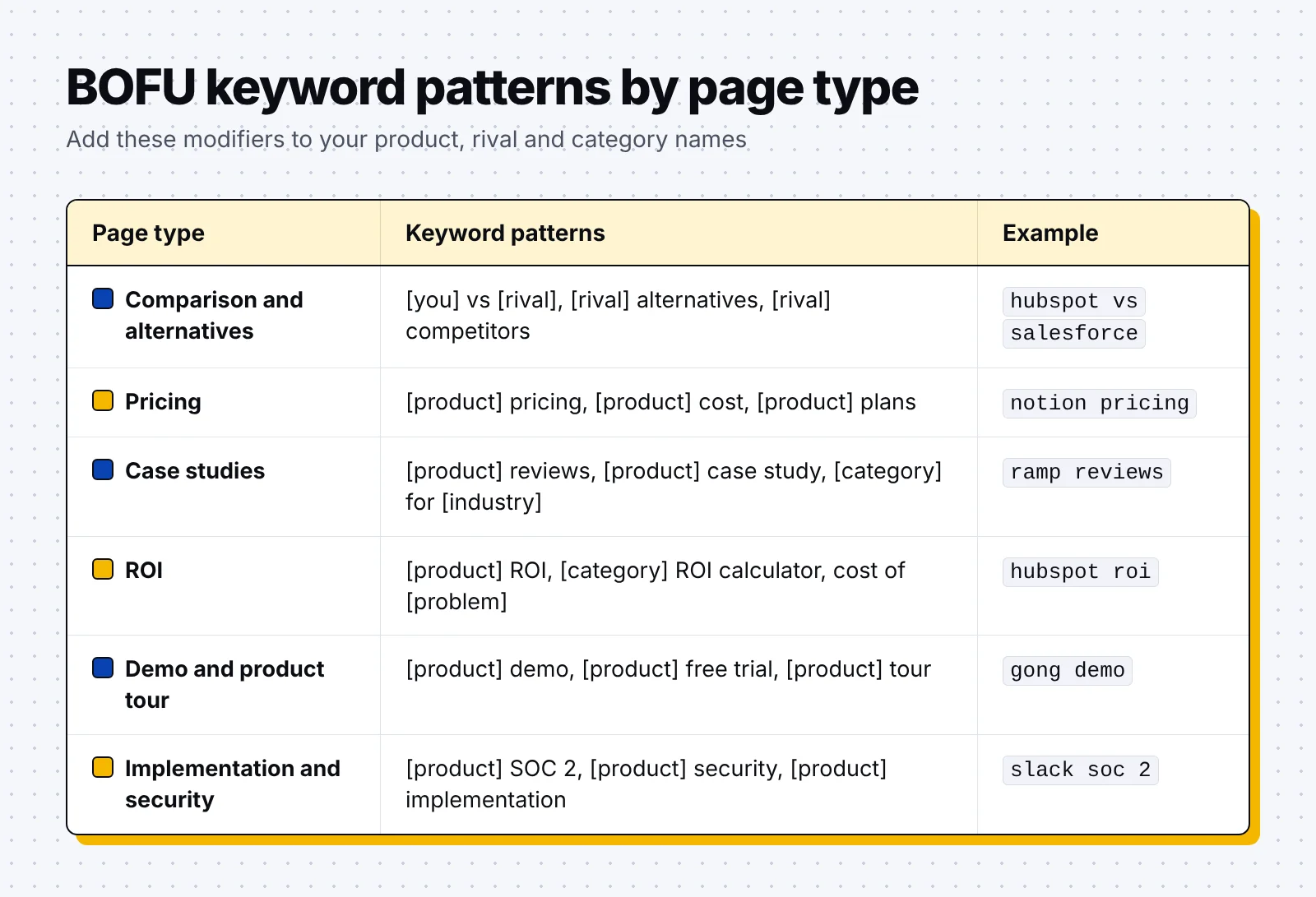
Our guide to B2B keyword research covers the wider process, from seed lists to search intent. Luckily, a full B2B SEO strategy builds the authority and internal links that help these low volume pages rank.
2. Write comparison and alternatives pages buyers can check
A comparison page helps a buyer choose between you and one named rival, so every claim on it should be one the buyer can verify. An alternatives page covers several options for buyers who want to leave one product. A fair summary of each option keeps the page useful to buyers and credible to AI answers.
- Name the fit first: Say who each product suits best in the first two sentences of the page. For example, one tool may suit large teams with a full time admin, while yours suits smaller teams that want to start within a week.
- Add a dated table: Compare features, prices and limits in a table with a "last checked" date, and update it every quarter. Link to the rival's own pricing page so buyers can check each figure.
- Show switcher proof: Add quotes or numbers from customers who moved from the rival to you. A quote from a team that switched answers the question a buyer will bring to the first call.
- Answer migration questions: Cover data import, contract timing and setup time in an FAQ near the bottom. These questions often decide a deal once a buyer has picked a favorite.
- End with one next step: Close with a demo or trial button and a link to your pricing page. Repeat the same button near the top for buyers who decide early.
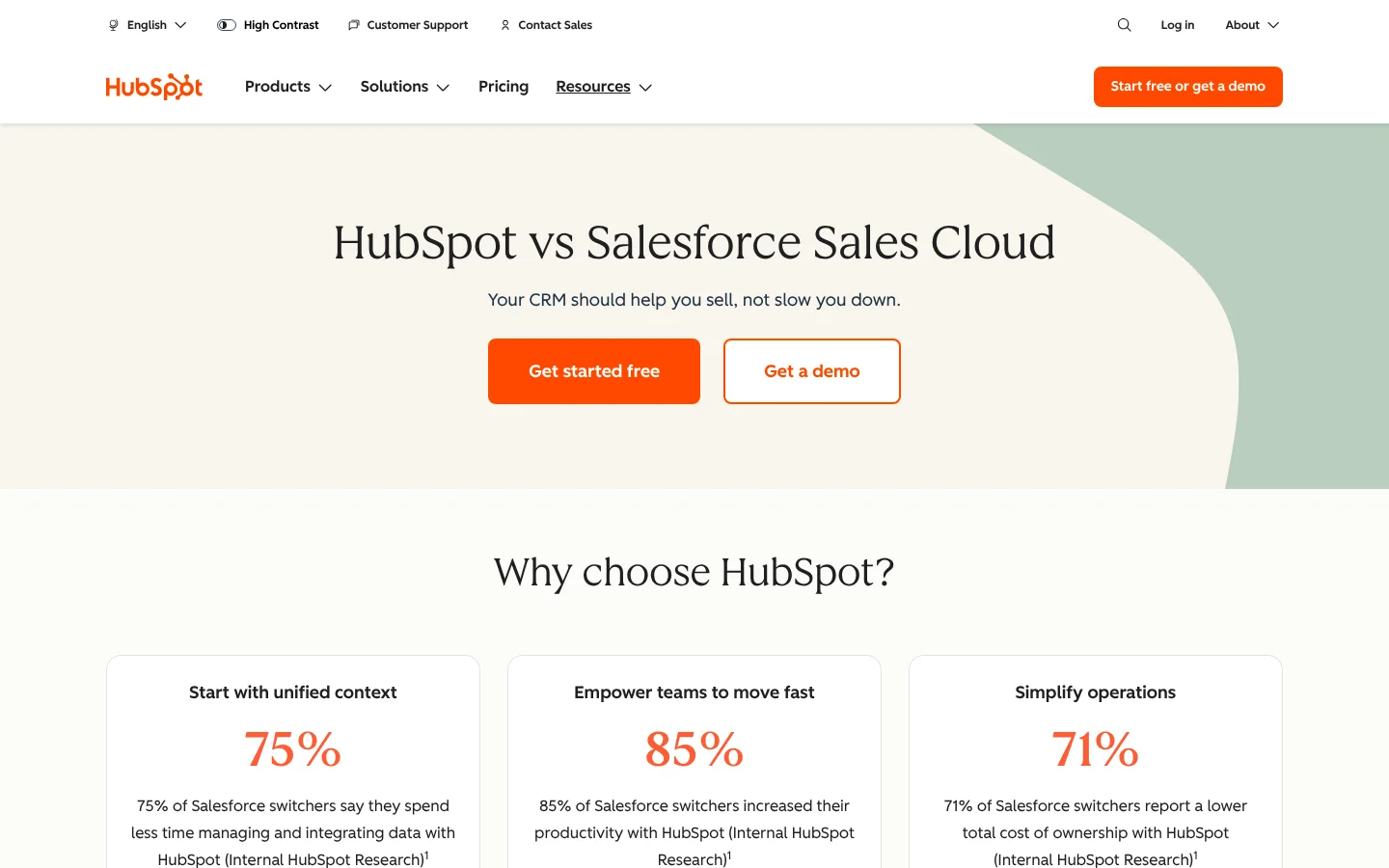
HubSpot is a CRM software company that sells tools for marketing, sales and service teams. Its HubSpot vs Salesforce Sales Cloud page opens with "Get started free" and "Get a demo" buttons above three stats on Salesforce switchers.
Below them, customer quotes, review site badges and an FAQ on migration and integration answer the questions a buyer would bring to a sales call.

3. Publish a pricing page buyers can use without a call
A pricing page lets a buyer estimate cost before talking to sales. Show plan names, prices or starting prices, what each plan includes and what changes the price, such as seats or usage.
In the HockeyStack data, leads from pricing pages with prices became pipeline 17.5% of the time, against 10.3% for pages without prices. Pages without prices collected more form fills, 4.6% against 2.8%, so the choice depends on whether you need more leads or better ones.
- Give each plan a fit: Say who each plan is for in one line, such as "for small teams getting started". Buyers find their plan faster when the fit comes before the feature list.
- Add a full feature table: List every feature by plan in a table below the plan cards. A full table lets a buyer check one feature without booking a call.
- Answer billing questions: Add an FAQ on billing, seats, contracts and refunds below the feature table. Explain how paid seats are counted and what happens when a team grows during a contract.
- Show a path to sales: Give custom and enterprise plans a clear "Contact sales" button with a short form. Buyers with complex needs then reach the right rep in one step.
- Add proof near the plans: Place customer logos or one short customer quote right next to the plans. Proof at this point reassures buyers while they look at the price.
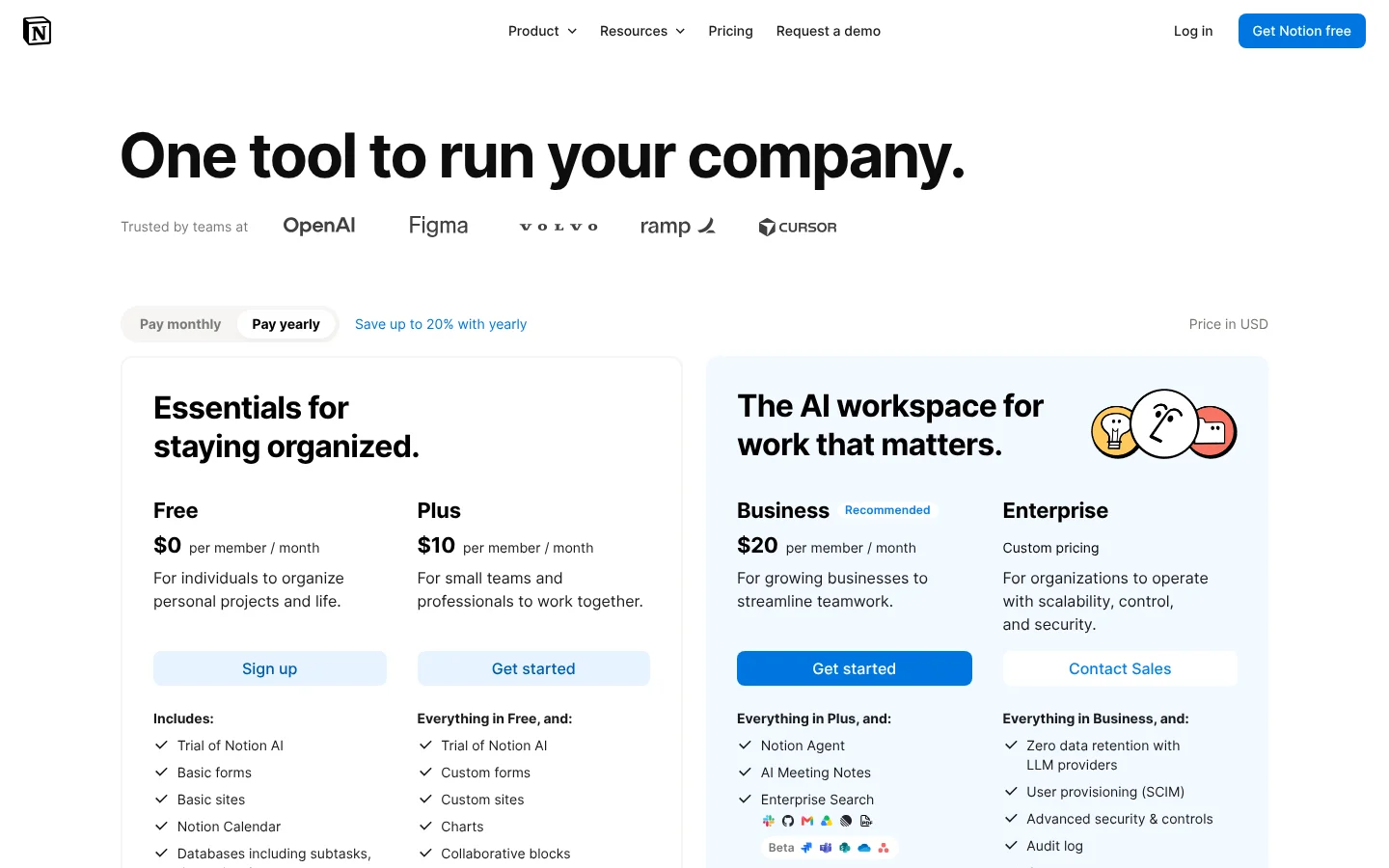
Notion is a software company that makes a connected workspace for notes, docs, wikis and projects. On its pricing page, four plans each get a one-line fit, from Free for individuals to Enterprise for organizations that need more control.
Below the plans, a feature table and 17 billing questions cover topics such as how paid seats are counted.
4. Build case studies buyers can match to their own company
A case study proves that a company like the buyer's got a result with your product. In the HockeyStack data, visitors who read a case study before converting were 18% more likely to become an opportunity. Thankfully, you can start with a few stories from your best-fit customers and add more each quarter.
- Lead with the number: Put one result in the title, such as hours saved or costs cut. Then explain the starting problem, and say how long the setup took from start to finish.
- Tag every story: Tag each story by industry, company size and use case so buyers can filter for a peer. A buyer at a regional bank will look for other banks first.
- Quote the right roles: Quote people in the same roles as your buyers, such as a finance lead for a finance tool. Each person in the buying group then hears from someone who does the same job.
- Make stories easy to share: Add a short summary block or a one page PDF that a champion can paste into an email. Sales can then send the story to a buyer in the middle of a deal.
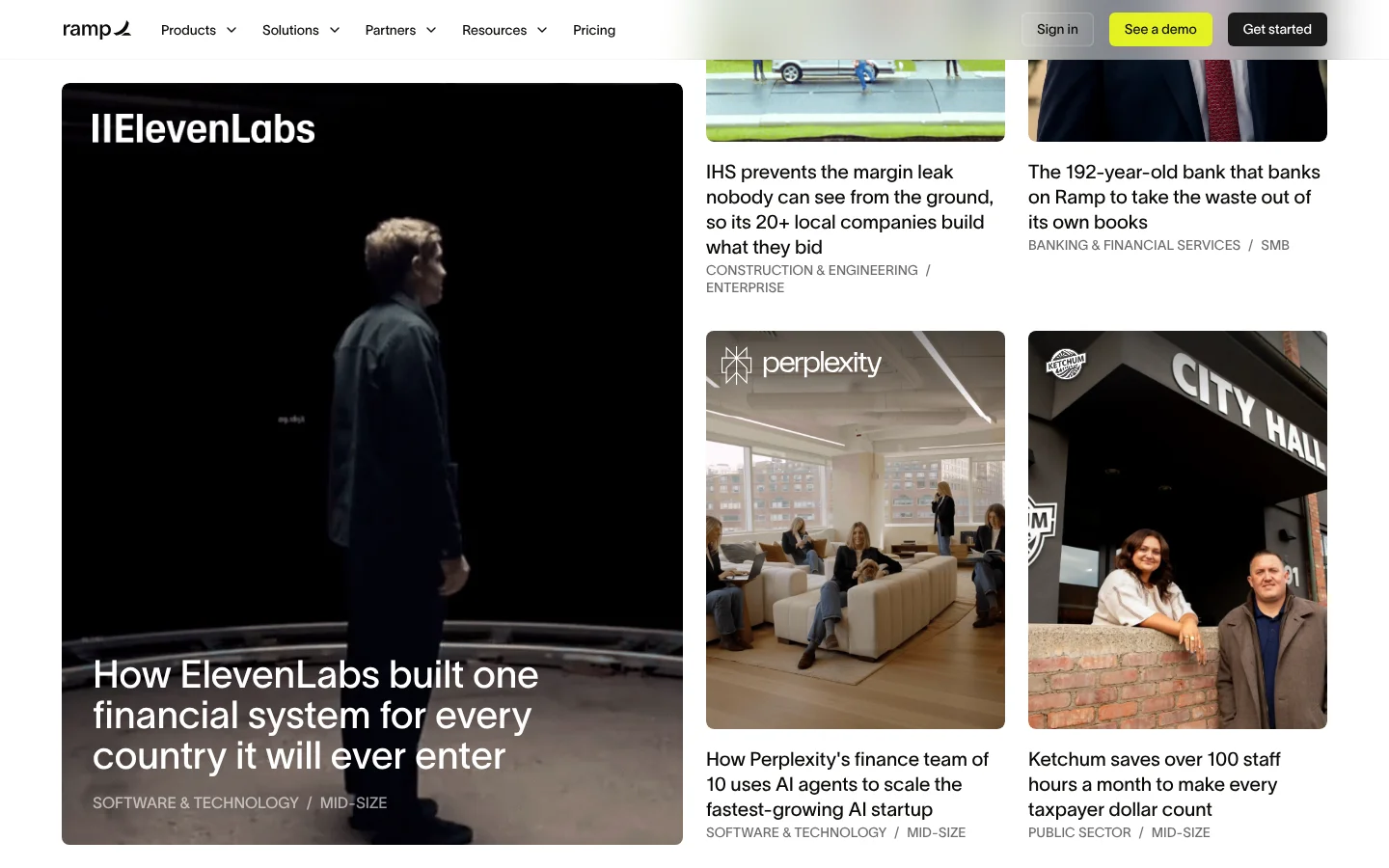
Ramp is a finance software company that offers corporate cards, expense management and bill payments. Its customer stories page tags each story by industry and company size, such as Public Sector and Mid-size.
Titles lead with the outcome, as in "Ketchum saves over 100 staff hours a month to make every taxpayer dollar count."
5. Give your champion an ROI page to share with finance
An ROI page gives your champion the numbers to justify the purchase to finance and leadership. We recommend a static page with a worked example first, since it is simple to keep accurate and easy to forward.
- List every input: Name each input, such as hours saved per user, team size or average deal value. Show where each one comes from so buyers can trust the total.
- Show the math: Show the formula and the result for two or three company sizes. A buyer on a small team should find a row close to their own.
- Source every number: Link the source of every figure, whether it comes from customer data or an outside study. Finance teams check where each number comes from before they accept a business case.
- Offer a shareable version: Add a spreadsheet or PDF that the buyer can forward to their finance team. Leave the inputs editable so the finance team can test its own numbers.
HubSpot's ROI page follows this pattern, with results such as 3x more leads after six months. It bases those figures on data from 268,000+ customers and notes that results vary.
6. Turn demo and product tour pages into booked meetings
A demo page is where a buyer's interest becomes a meeting with your sales team. Say who the demo is for, what it covers and how long it takes, so buyers know what they are booking.
- Ask for fewer fields: Ask only for the fields sales needs to route the meeting, such as work email and company size. Enrichment tools can fill in the rest after the form is sent.
- Show open times at once: Show a booking calendar right after the form, so buyers can pick a time while they are still on the page. Scheduling tools such as Calendly or Chili Piper can route each buyer to the right rep.
- Offer a self-guided tour: Add a product tour for buyers who want to look before they talk. Link it from pricing and comparison pages, where buyers often want to see the product.
- Set clear expectations: Describe the call in one line, such as "a 30 minute walkthrough of reporting for sales managers". Clear details help buyers decide which colleagues to invite to the call.
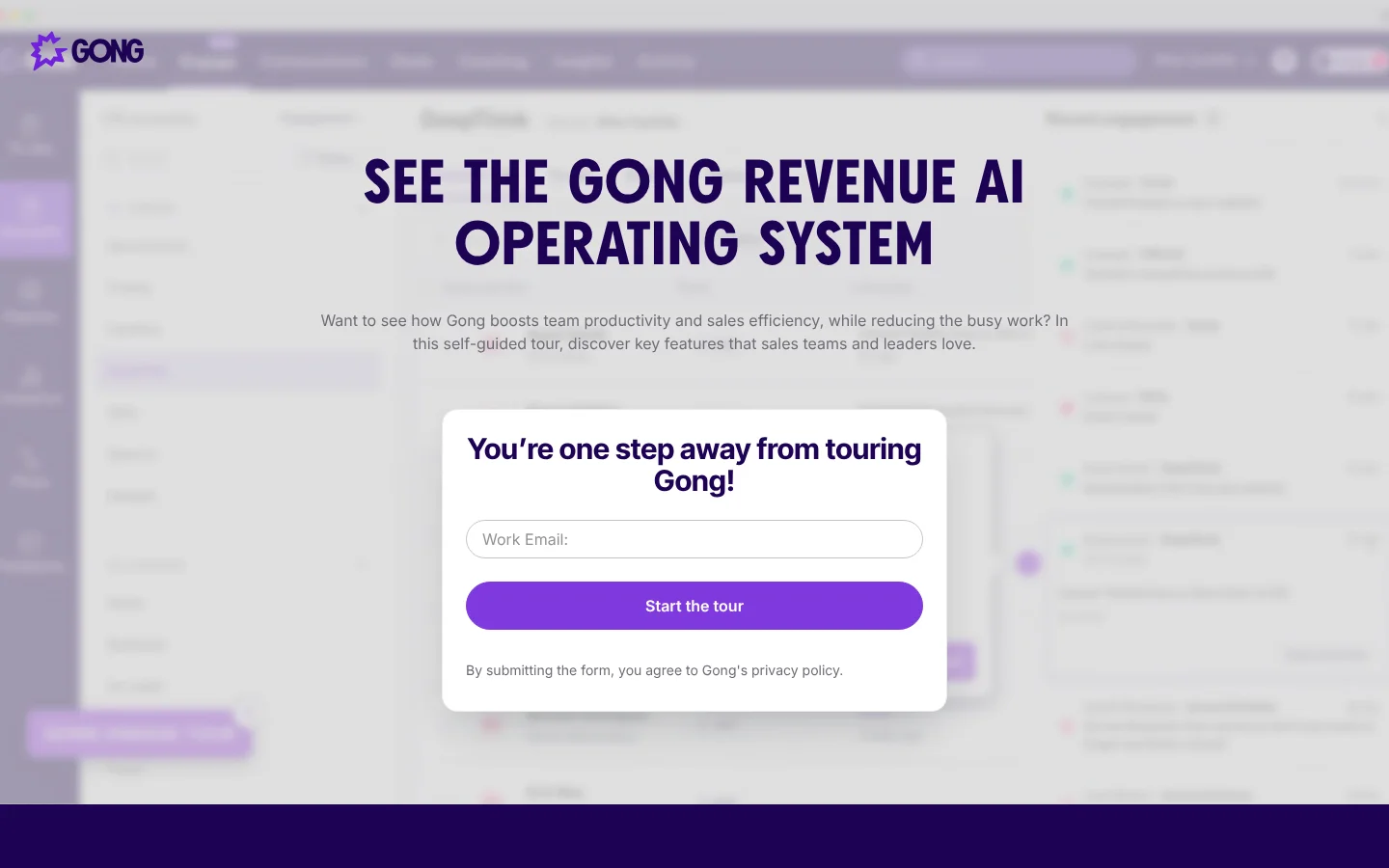
Gong is a revenue AI company that records and analyzes sales calls and emails for revenue teams. Its platform tour asks for a work email and then starts a self-guided tour of key features for sales teams and leaders.
7. Answer IT and legal questions on security and implementation pages
Security and implementation pages answer the IT, legal and onboarding questions that often come late in a deal. Publishing the answers saves your sales team from repeating them in every security review and gives AI answers accurate facts to quote.
- List certifications: Name certifications such as SOC 2 Type II or ISO 27001, with a way to request the reports. A short request form for the reports keeps the process fast for both sides.
- Explain data handling: Cover encryption, data residency, retention and access controls in plain words that legal can read. Add a contact for security questions so reviews reach the right person.
- Publish an implementation plan: Lay out the first weeks one week at a time, with who does what on each side. A buyer can then plan their own staff time before signing the contract.
- Cover integrations and support: List your integrations, migration help and the support level included in each plan. Link each integration to its setup guide so IT can check the details.
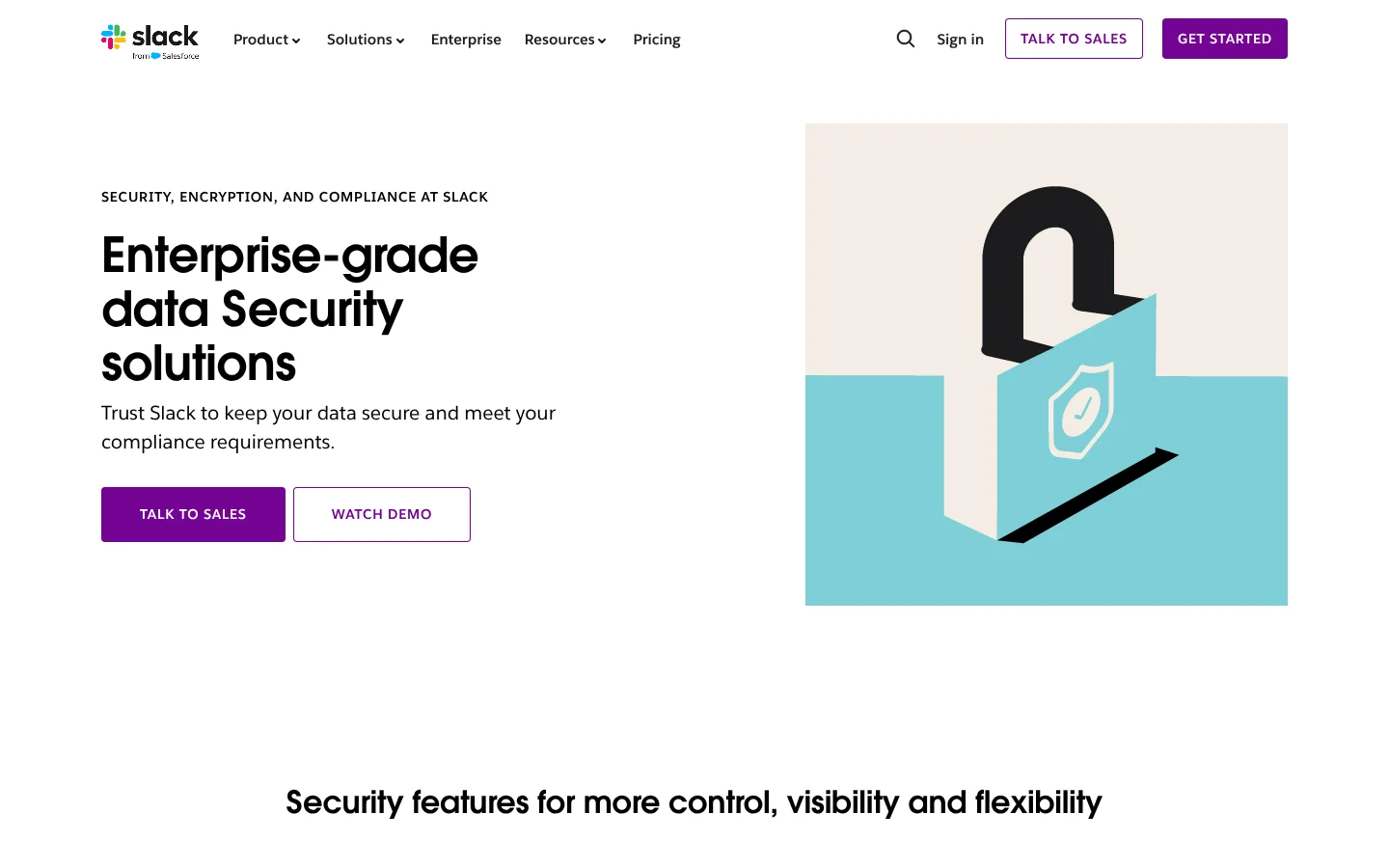
Slack is a messaging software company that organizes team chats into channels. Its security page groups features by identity, data protection and governance, then lists certifications from ISO 27001 to FedRAMP Moderate with links to reports.
8. Measure each BOFU page by the pipeline it creates
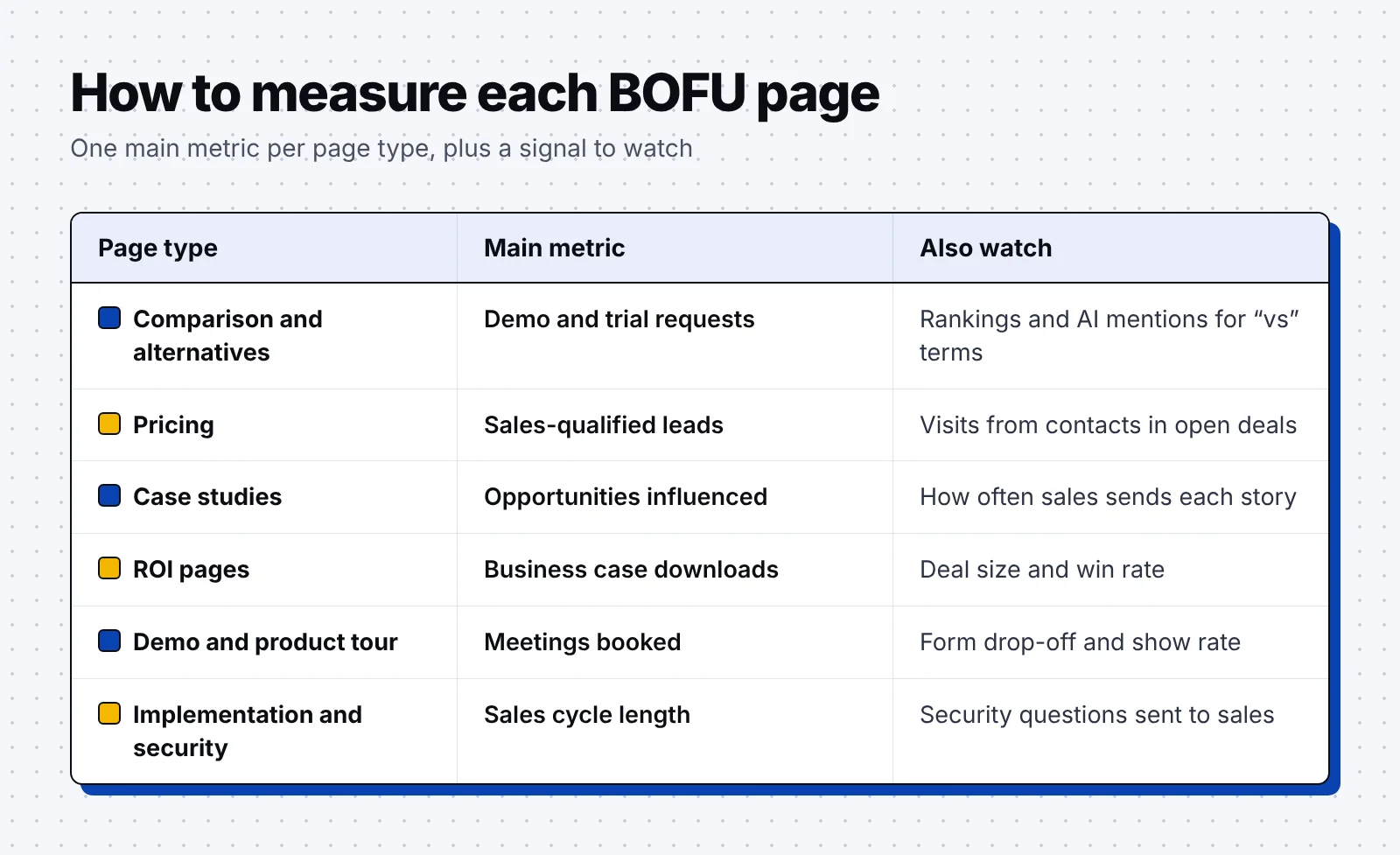
Judge BOFU pages by the pipeline they create and support, since a page with modest traffic can still help close large deals. Set up tracking before you publish, so each page collects data from its first visit.
- Track conversion rate: Measure the share of page views that become a demo, trial or contact request. Compare each page with your site average to find the pages that need work.
- Count meetings and opportunities: Pass the landing page into a hidden form field and send it to your CRM. Mark form submits as key events in GA4 so analytics and CRM numbers line up.
- Report influenced pipeline: Track the open deals whose contacts viewed the page while the deal was in progress. This view gives credit to pages that buyers read after the first call, such as security pages.
- Compare win rate and cycle length: Compare win rate and sales cycle length for deals that touched a page against deals that did not. The gap shows which pages help your sales team close more deals.
- Watch rankings and AI mentions: Track Google rankings and AI answer mentions for each BOFU term you target. These signals move before pipeline does, so they show early whether a new page is working.
- Ask how buyers found you: Add a "How did you hear about us?" free text field to demo forms. It catches AI answers and word of mouth that analytics tools miss.
In our SEO and GEO program for a B2B SaaS company, bottom-funnel content with form-to-CRM tracking produced $500K in pipeline within six months. For software companies, our B2B SaaS SEO guide covers the rest of the search program around these pages.
Put the 8 steps to work
Use this list as a checklist when you plan your next quarter of BOFU content:
- Find BOFU keywords in sales calls, Search Console, review sites and AI answers.
- Write a fair, dated comparison page for each rival you meet most.
- Publish a pricing page with plan fits, a feature table and billing answers.
- Build case studies that lead with a result and are tagged by industry and size.
- Give your champion a static ROI page with sourced inputs and a shareable file.
- Turn demo and tour pages into booked meetings with short forms and open times.
- Answer security and implementation questions on pages your sales team can send.
- Measure each page by meetings, opportunities and influenced pipeline in your CRM.
FAQ
What is BOFU content?
BOFU content is content for buyers who are choosing a vendor, such as comparison pages, pricing pages, case studies and demo pages. It answers the final questions about price, fit, proof and risk before a sales call.
What is the difference between TOFU, MOFU and BOFU content?
TOFU content explains a problem, MOFU content compares ways to solve it, and BOFU content helps buyers pick a specific vendor. Each stage has its own metric, from reach at the top to pipeline at the bottom.
What are examples of BOFU keywords?
Common BOFU keywords include "[competitor] alternatives", "[product] vs [competitor]", "[product] pricing", "[product] reviews" and "[product] SOC 2". They usually have low search volume and come from buyers close to a purchase.
How many BOFU pages should you start with?
Start with five to ten pages built around the questions your sales team hears most often. A pricing page and one comparison page for each main rival make a good first set. Add case studies, ROI and security pages as deals ask for them.
How do you measure BOFU content?
Measure BOFU content by the demos, opportunities and pipeline each page creates or supports in your CRM. Rankings, AI mentions and how often sales shares each page are useful secondary signals.
This month, list the questions your sales team hears most and check whether a page on your site answers each one. If you'd like help building those pages, book a discovery call with our team.