SEO for tech companies is the work of getting a technology firm’s pages to rank when buyers search for what it sells. For IT services firms, it means one clear page per service, industry and city, backed by proof and tracked to qualified sales calls.
Search is changing in 2026 as Google and AI assistants answer more questions before anyone clicks a link. In March 2025, Google users who saw an AI summary clicked a regular result in 8% of visits, against 15% for users who saw none. Your pages now need plain facts that AI tools can quote.
- Give every service, industry and service area its own page, because IT buyers search for the exact offer they need.
- Map each keyword pattern, from service and compliance terms to city names, to the one page that should rank for it.
- A complete Google Business Profile and a steady flow of reviews decide whether an MSP shows up in local map results.
- Case studies, certifications and partner listings give buyers and AI tools the outside proof they look for before a first call.
- Track every form, call and chat back to its landing page, so you judge each page by qualified meetings and pipeline.
Why SEO matters for IT services firms
IT services firms include managed service providers (MSPs), IT consulting firms, cybersecurity services firms, software development agencies and IT resellers. Their buyers hire a team they will trust with their systems, so their searches name a service, a problem or a compliance need.
Search also shapes the shortlist long before a buyer calls any provider. In 6sense’s 2025 survey of more than 4,000 B2B buyers, 94% of buying groups ranked preferred vendors before first contact. They bought from that early favorite 77% of the time, so your pages need to earn a place on the list early.
A SaaS buyer can often start a free trial the same day, while an IT services buyer books a call or asks for an assessment. If you sell a software product, our guide to B2B tech SEO covers product SEO instead.
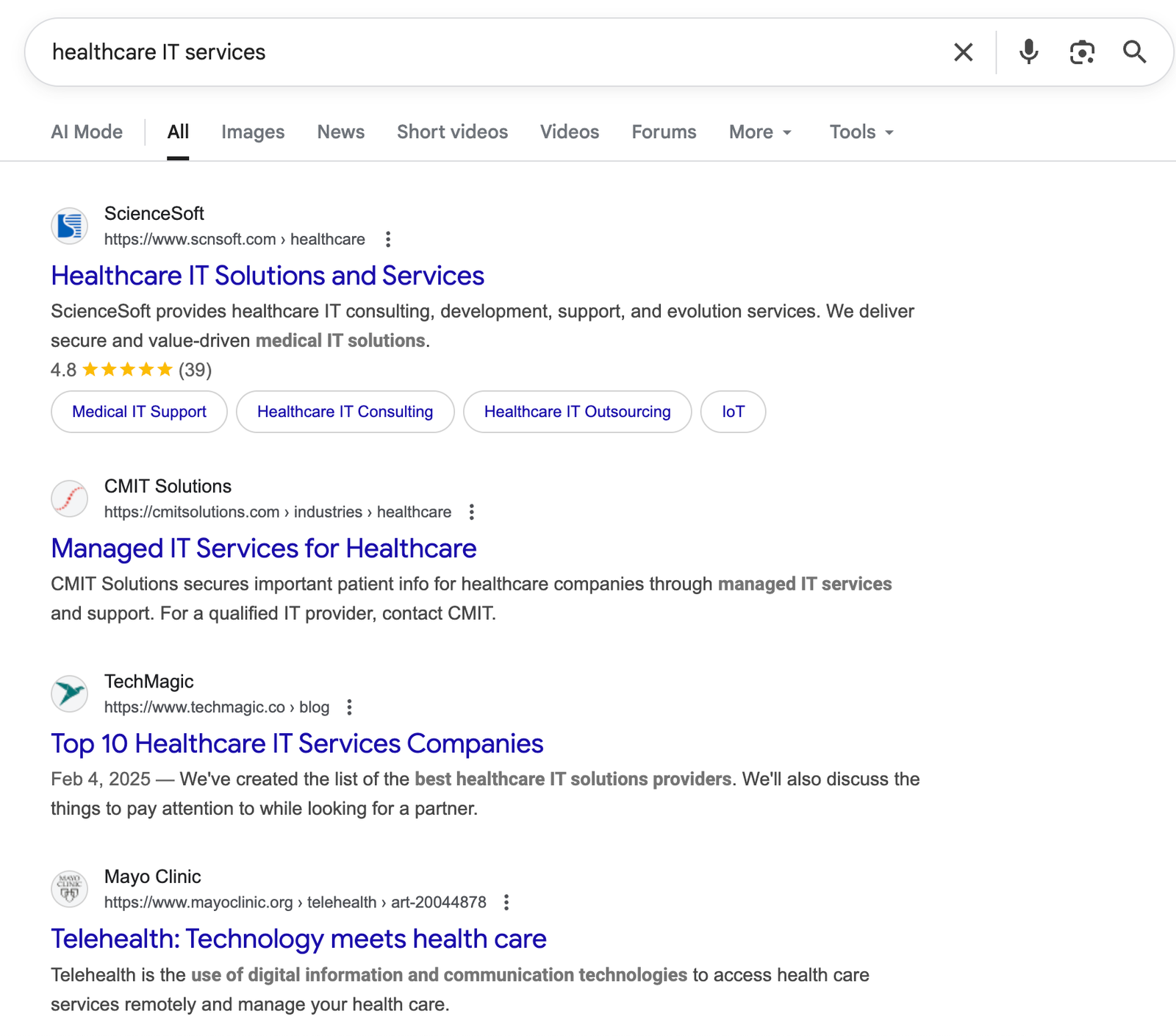
CMIT Solutions is a managed IT services company that serves small and mid-size businesses through more than 300 franchise locations in North America. Nearly a quarter of its business comes from healthcare, and its healthcare page ranked second on Google for "healthcare IT services" in September 2025.
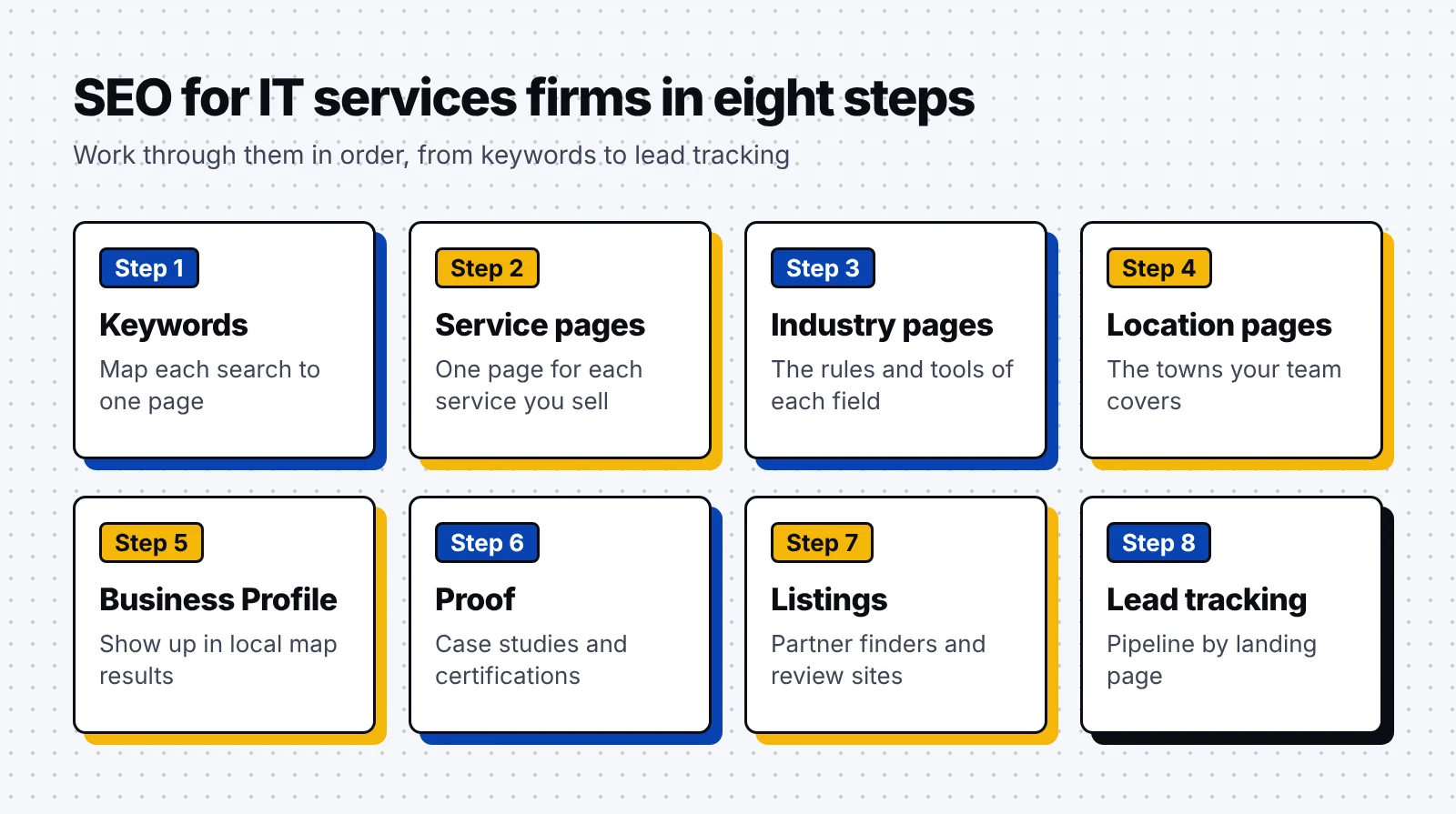
How to do SEO for IT services firms: 8 steps
Work through these steps in order, since each one builds the pages or the proof that the next step relies on.
1. Map keywords to the way IT services buyers search
We start with the words buyers type when they need a provider, then group them by the page that should rank. A clear map keeps two pages from competing for one search and shows which pages you still need to build.
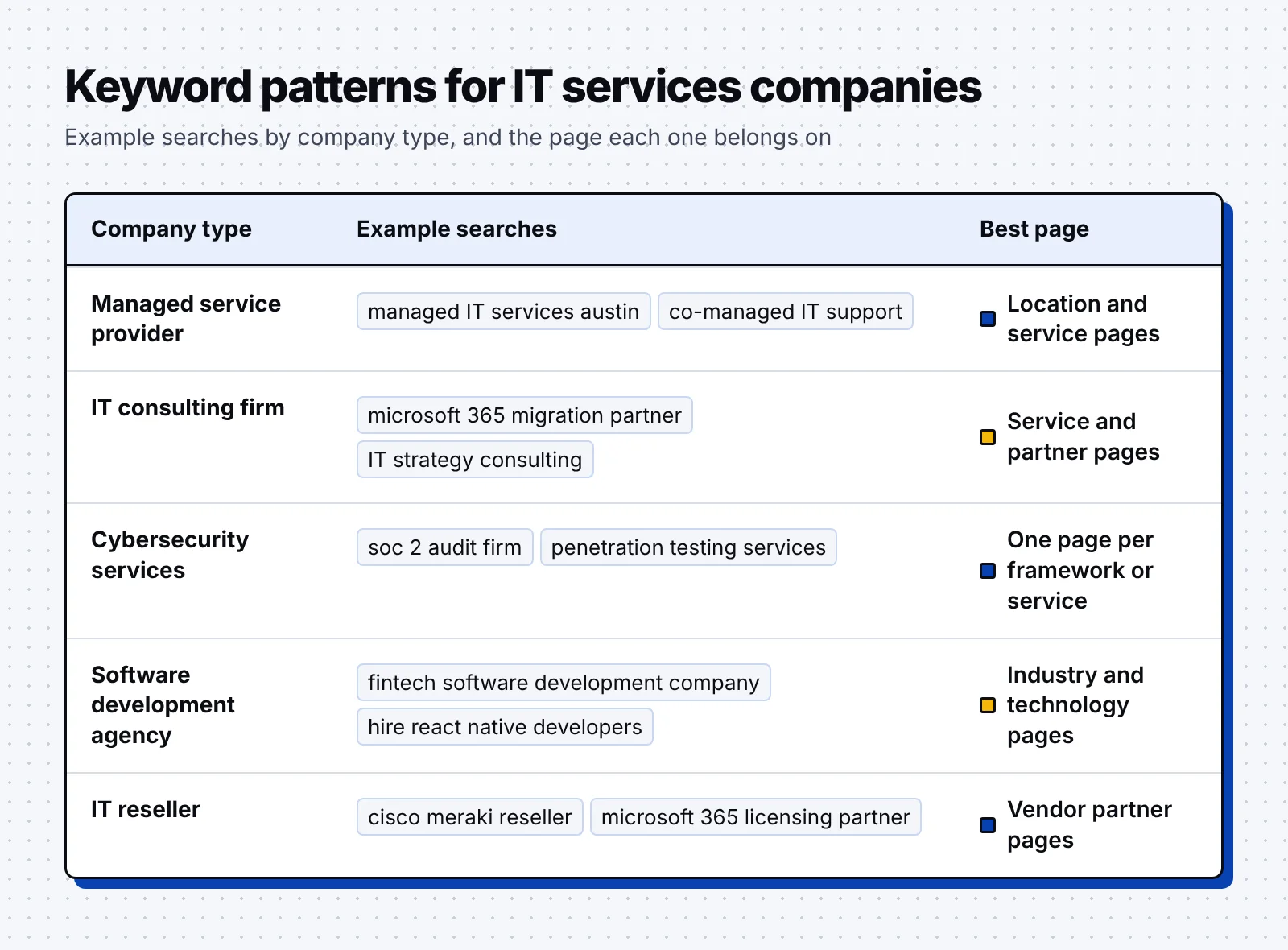
- List your service terms: Write down each service the way a buyer would name it, such as "co-managed IT services" or "penetration testing services." Each one gets its own service page in step 2.
- Pair services with fields and places: Add the industries and cities you serve, such as "IT services for law firms" or "managed IT services Austin." These searches map to industry and location pages.
- Cover compliance and platform terms: Buyers often search for a framework or a vendor, such as "CMMC consultant" or "Microsoft 365 migration partner." Give each one a page built around that need.
- Save problem terms for the blog: Searches such as "how to cut help desk tickets" suit blog posts that link to the matching service page.
- Note what each buyer role searches: An IT support analyst wants fewer tickets, while a CFO wants to know what a breach would cost. An audience map ties each role to a service and to blog topics.

To find the exact wording, search your main service, list the providers that rank and run their service pages through a keyword tool such as Semrush. One page often ranks for many versions of the same term, which shows you how buyers phrase it.

Luckily, long and specific service terms often face less competition than broad ones, which makes them good first targets. Our guide to B2B keyword research covers the full process, from seed terms to search intent.
2. Build one page for each service you sell
We recommend giving every service you sell its own page, because a buyer searching for "co-managed IT services" wants that exact offer. A single page that lists every service gives Google little reason to rank it for any one of them.

A strong service page answers the questions a buyer has before the first call:
- Define the scope: Say what the service includes and where it ends, such as which devices, hours and tools a managed plan covers.
- Name who it suits: Describe the company size, industry or tools you serve best, such as firms of 20 to 200 staff on Microsoft 365.
- Show the onboarding steps: Lay out how the first weeks work and how long they take, from the discovery call to the handover.
- Explain how you price it: Share a range, a starting point or the factors behind the price, so buyers can check fit before they call.
- Place proof near the form: Add a case study, a certification or a client quote close to the call to action. Then ask for a single next step, such as booking a consultation or requesting an assessment.
A-LIGN is a cybersecurity compliance company that audits organizations against frameworks such as SOC 2, ISO 27001, CMMC and FedRAMP. Its home page links to 37 service pages, one for each framework or service it offers.
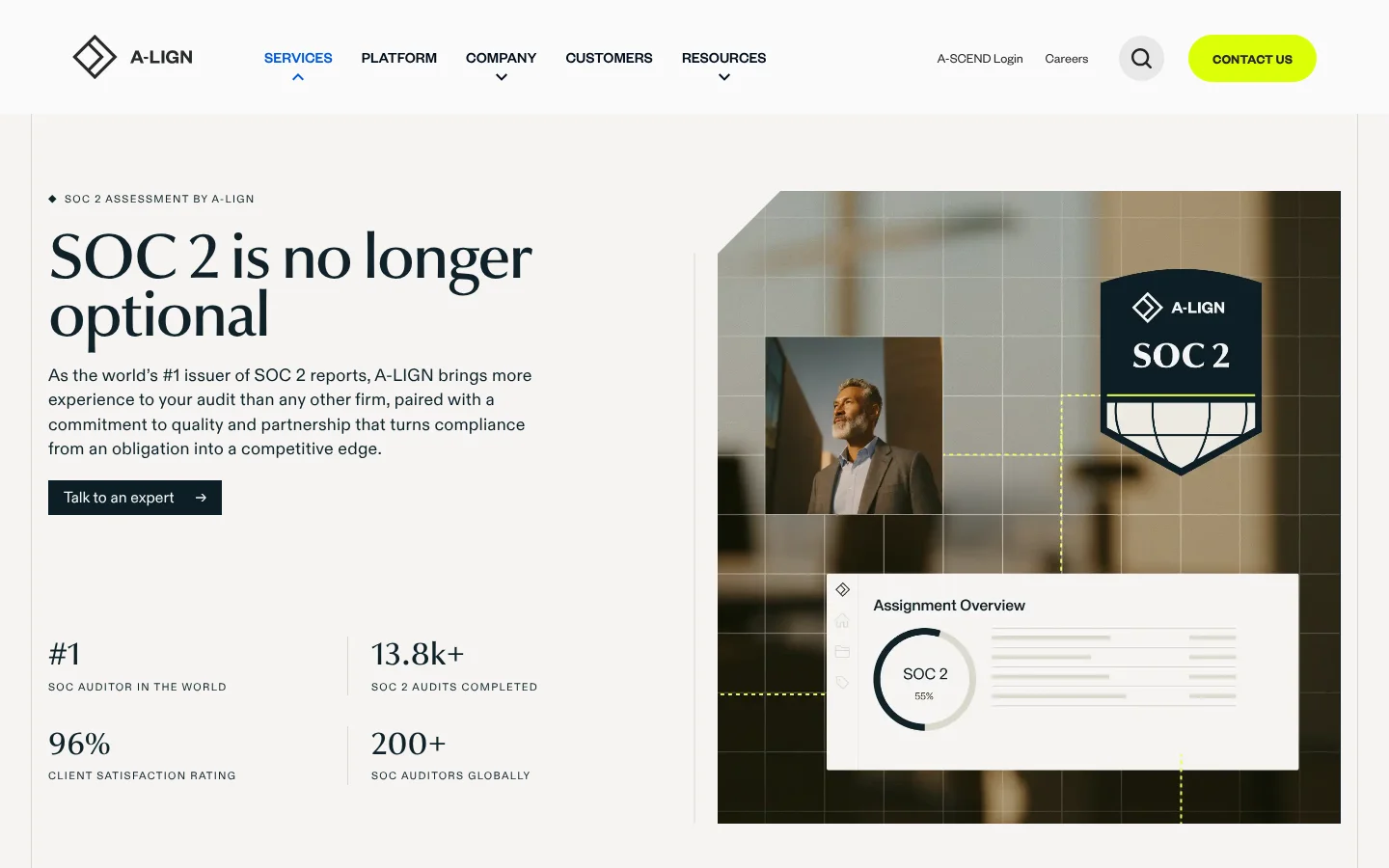
The SOC 2 page opens with numbers a buyer can weigh: more than 13,800 SOC 2 audits completed and more than 200 SOC auditors. A section below explains Type 1 and Type 2 reports, which first-time buyers need to understand before they ask for a quote.
Our guide to BOFU content shows how to write these bottom-of-funnel pages so they turn visits into booked calls.
3. Add industry pages for the sectors you serve
Industry pages target searches like "healthcare IT services," where buyers want a provider that already knows their rules and software. They also give your case studies a natural home, since a clinic manager wants to read about work for other clinics.
- Name the rules you work under: Mention the frameworks buyers in that field must meet, such as HIPAA for clinics or CMMC for defense suppliers.
- List the software they run: Show that you support the tools the field depends on, such as practice management systems for dental groups or ERP systems for manufacturers.
- Open with a fact that shows depth: Lead with something only an experienced provider could say. CMIT Solutions opens its healthcare page with the share of its business that comes from healthcare.
- Link case studies from that field: Add one or two projects from clients in the same field, with results they agreed to share.
- Write each page for its own field: Give every industry page its own examples, rules and proof, so it reads as more than a copy with a new name.
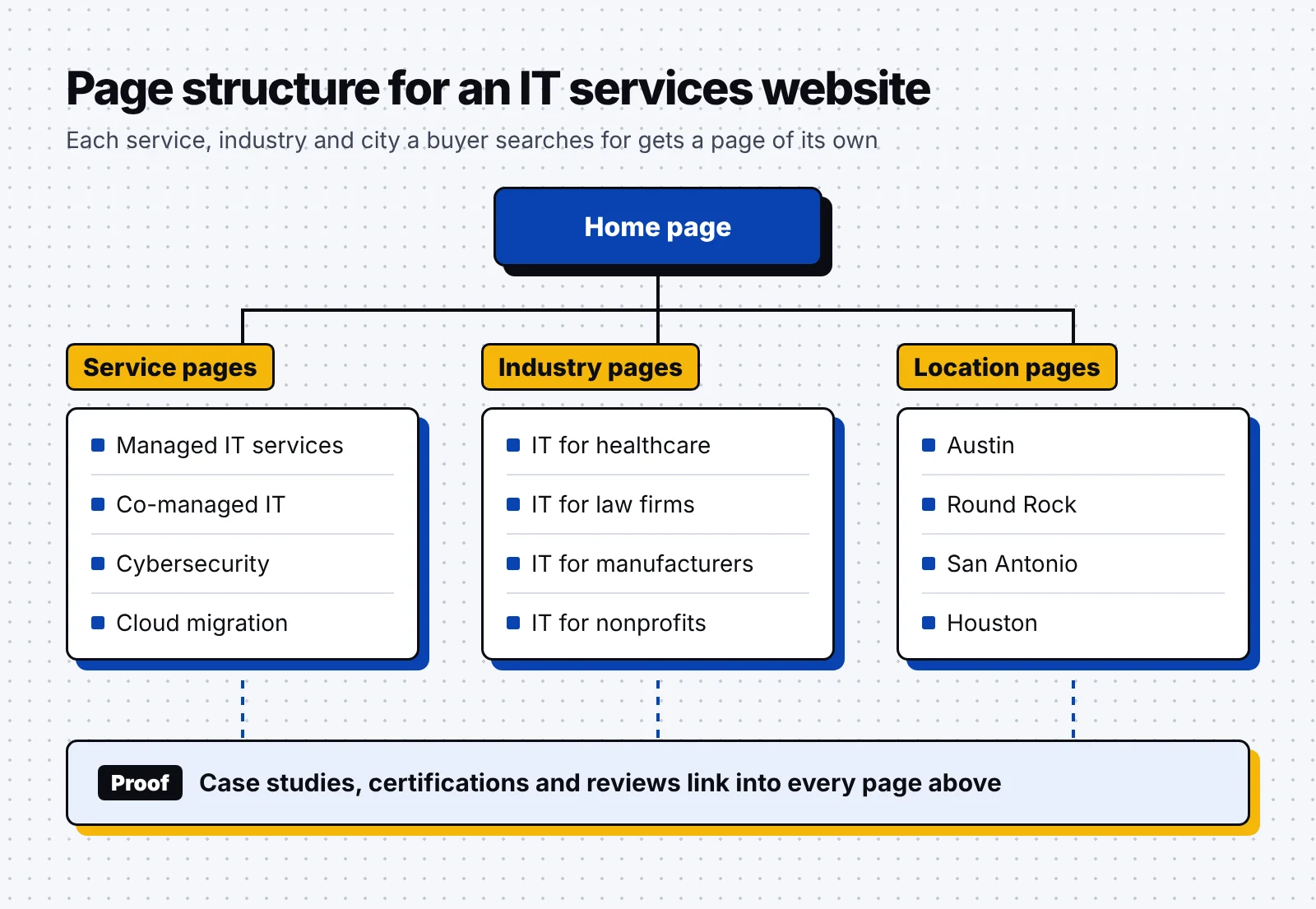
Industry pages sit next to your service and location pages, and the CMIT Solutions site has one for each of 19 industries. Your proof should link into every page type, as the diagram below shows.
4. Create location pages for the areas you cover
Location pages target searches with a city name, such as "managed IT services Austin," which matter most for MSPs that send technicians on site. Google’s spam policies list "pages targeted at specific regions or cities that funnel users to one page" as doorway abuse. Write each location page for its own place, with details a buyer there can check.
- Name the towns you cover: List the cities and suburbs your team serves, so the page matches the places buyers type into Google.
- State your response times: Say how fast you answer and whether technicians come on site, such as a set number of business hours for a first reply.
- Show local contact details: Use a local phone number and an address that matches your Google Business Profile.
- Introduce the local team: Add the names and roles of the staff who work in that area, with a photo where you have one.
- Build pages only where you work: Create a city page where you have clients, staff or a real response time to describe. Cover areas you only serve remotely on your main service pages.
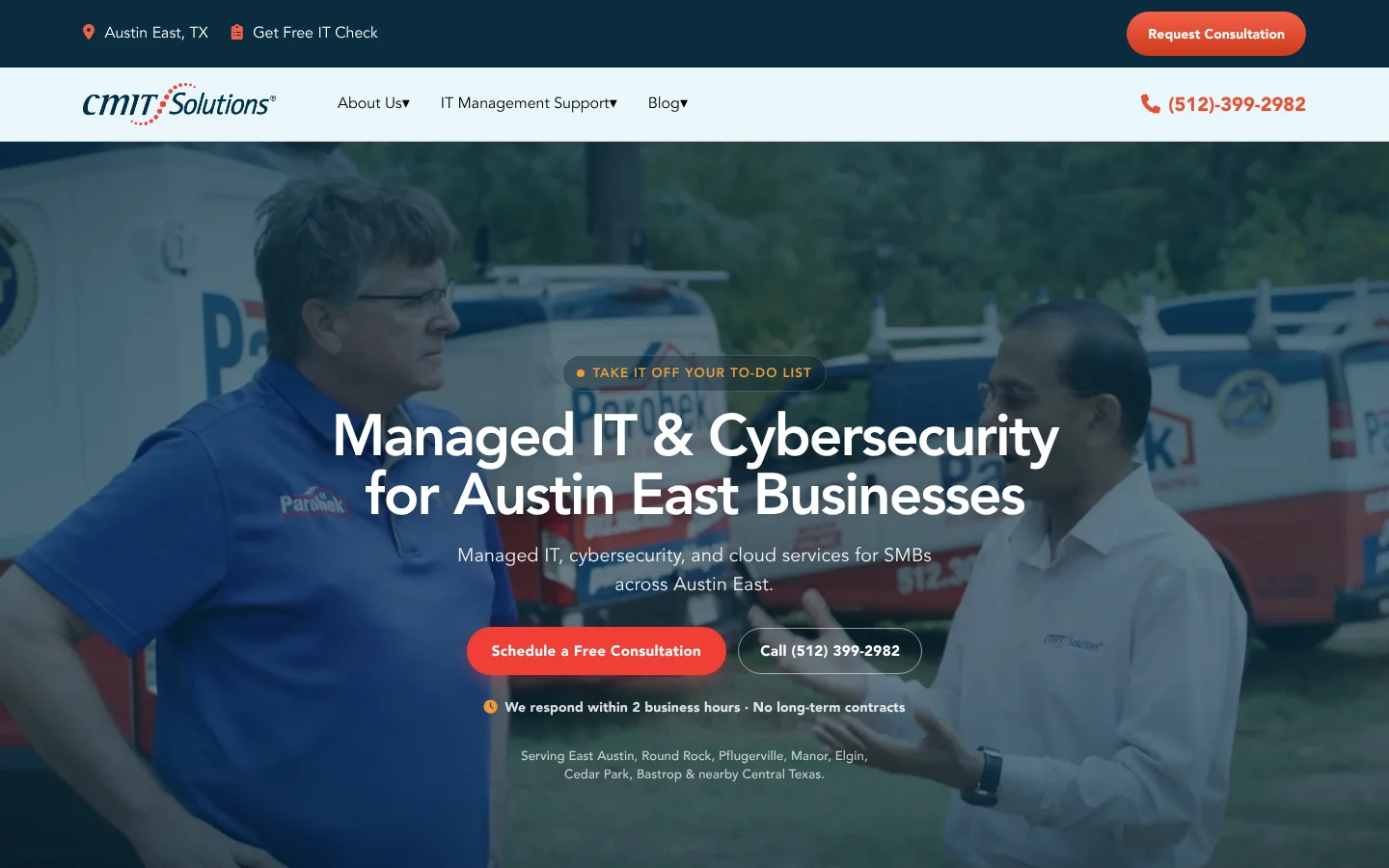
Each CMIT Solutions franchise office runs its own location page on the main site, written around the area it serves. The Austin East page names the towns it covers, from Round Rock to Bastrop. It also shows a local phone number and a promise to respond within two business hours.
5. Set up Google Business Profile for local search
Your Google Business Profile decides whether you appear in map results for searches like "IT support near me." Local results depend mainly on relevance, distance and popularity, and Google counts links and reviews toward how well-known a business is.
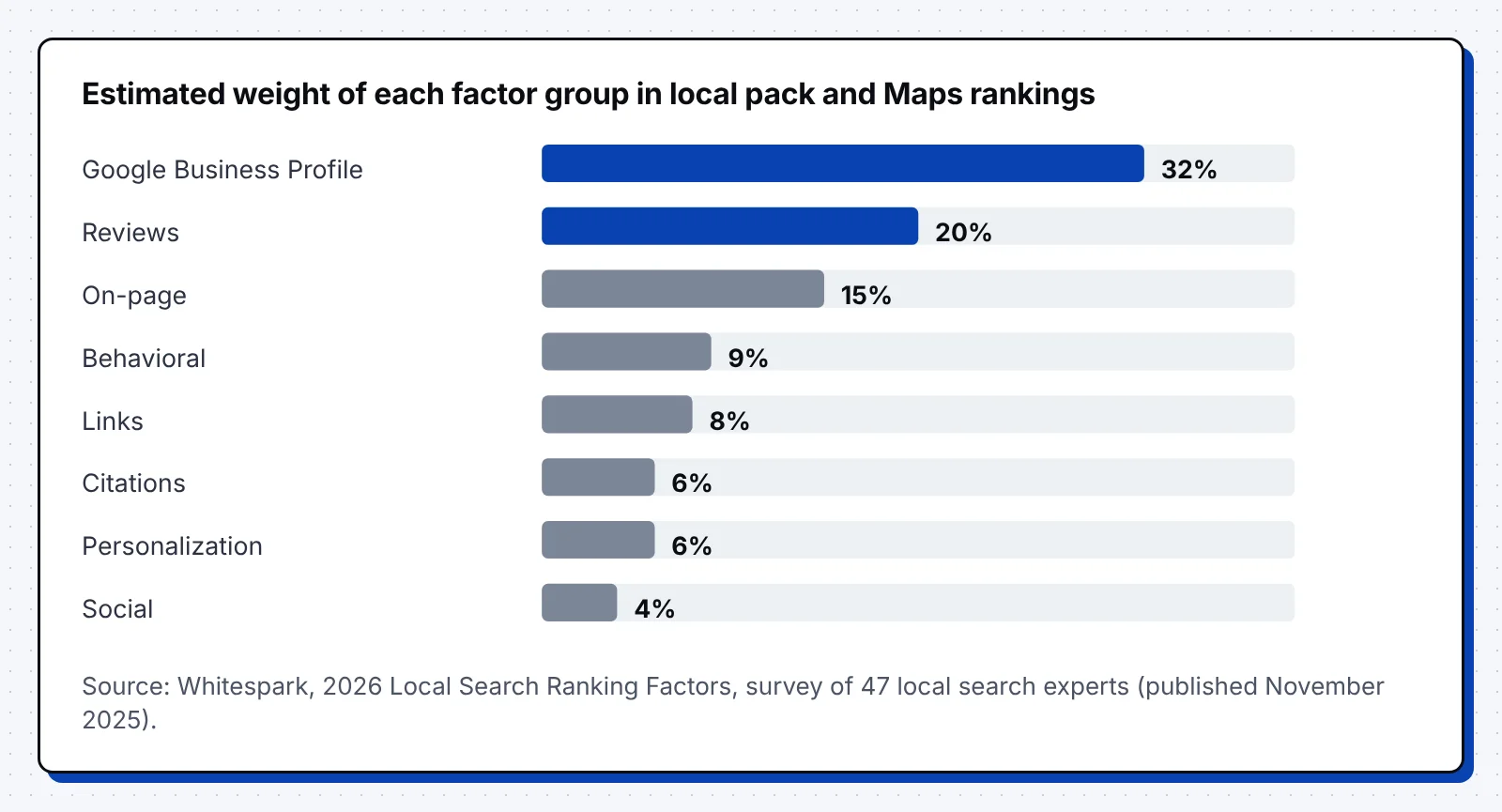
Whitespark’s 2026 survey asked 47 local search experts which signals drive local pack rankings. They gave Google Business Profile signals an estimated 32% of the weight, with reviews next at 20%.
Many MSPs run from a home office or serve clients at their sites, which makes them service-area businesses. Google’s profile guidelines ask these businesses to hide their address and keep the service area within about two hours of driving time.
- Pick the right categories: Choose the primary category that fits your main service, and add others only for services you deliver.
- Set your service area: Hide your address if clients never visit, and list the cities or postal codes you serve instead.
- List real offices only: Add a virtual office or co-working desk only if your own staff work there during business hours.
- Ask for reviews at handover: Request a review when a project closes or a quarterly review ends, and reply to every review you get.
- Keep your details the same everywhere: Use the same business name, address and phone number on your site, your profile and every directory.
6. Prove your work with case studies and certifications
IT buyers give you access to their systems and data, so they look for proof that you have done the same work safely before. Google’s guidance on helpful content ranks trust as the most important part of E-E-A-T.
Case studies persuade best when they read like a project record, and certifications work the same way because an outside party has checked your work:
- Set the scene: Give the client’s industry, size and the systems they ran before the project. Thankfully, most of this already sits in your ticket history and project notes.
- Use the client’s words for the problem: Quote what started the project, such as a failed audit or slow ticket times.
- Show what your team did: List the steps, tools and certifications involved, so a technical buyer can follow the work.
- Share the numbers the client approved: Add results the client agreed to publish, such as hours saved or downtime avoided, next to a named quote.
- Tag and link every case study: Tag each one by industry and service, then link it from the matching service and industry pages.
- Place certifications where they count: Show ISO 27001, a SOC 2 report, CMMC status or vendor credentials on the service pages they support, close to the request form.
ScienceSoft is an IT consulting and software development company that has served clients since 1989. It publishes 888 success stories from more than 4,300 projects, and buyers can filter them by industry, solution, service, technology and region.
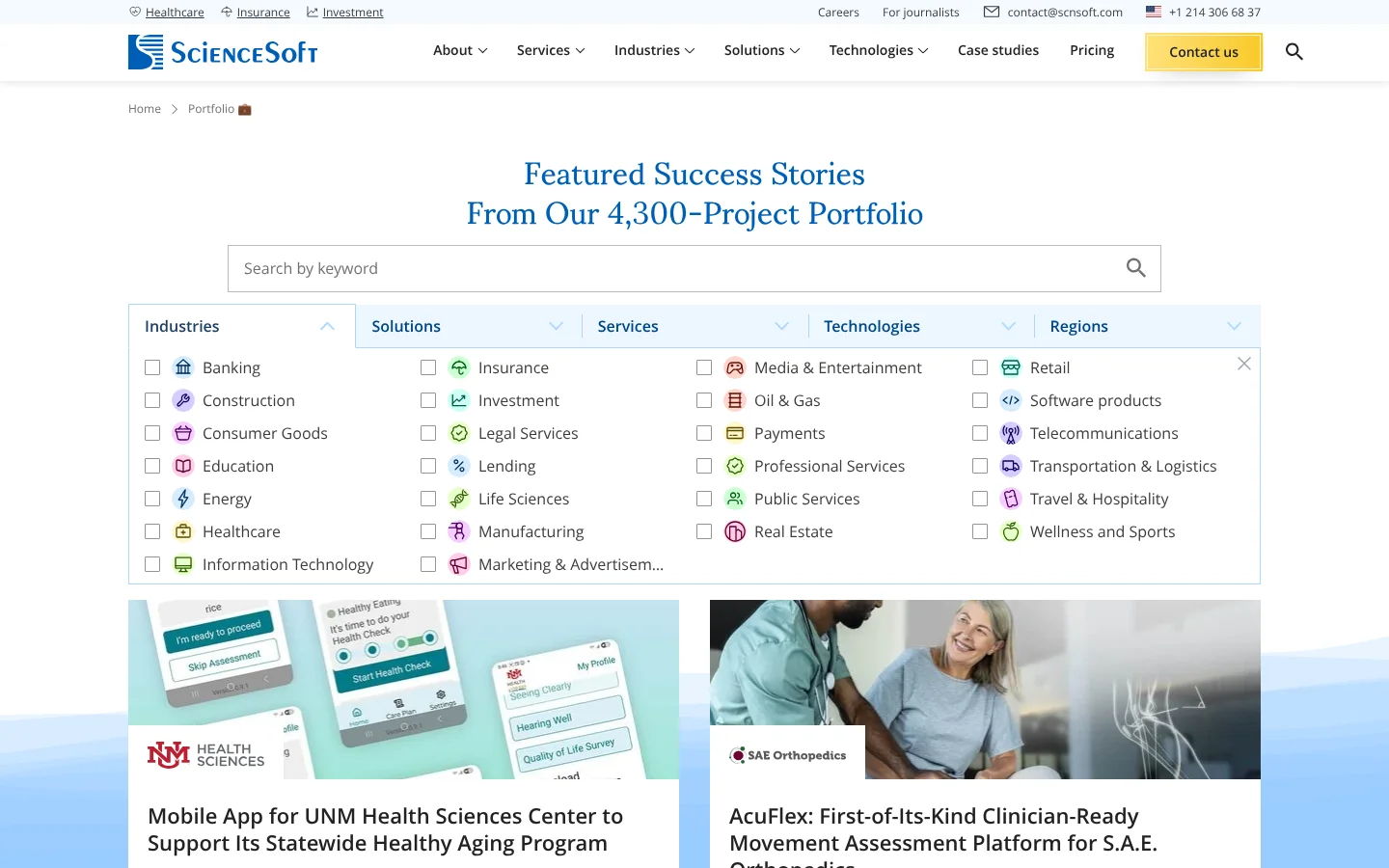
A bank looking for a partner can filter to banking projects in one click, then read how each one was delivered. ScienceSoft also holds ISO 9001 and ISO 27001 certifications and has been a Microsoft partner since 2008.
7. Get listed in partner directories and review sites
Partner directories and review sites send referral visits, add links to your site and give AI tools an outside view of what you do. For IT services firms, the most useful listings come from the vendors you resell or support.
- Earn vendor partner status: Microsoft awards Solutions Partner designations in six solution areas, from Modern Work to Security, once a partner scores at least 70 of 100 points. Show each designation on the service page it matches.
- Join cloud and network partner finders: Vendors such as AWS, Google Cloud and Cisco run partner finders where buyers search for a certified provider. Fill in every field your partner tier allows.
- Build a review profile: Clutch lists more than 350,000 service providers and counts more than 12 million active users a year. Ask clients who have finished a project to review you there.
- Match your names and links: Use the same company name and service names on each listing as on your site, and link every listing to the matching service page.
Happily, reviews on your own site still help buyers decide, even though they won’t earn star ratings in Google. Google shows review stars for local business and organization markup only on sites that collect reviews about other businesses.
8. Track every lead from search to signed contract
Rankings and traffic show whether your pages are visible, but an IT services firm grows when searches turn into qualified meetings. Set up tracking that follows each lead from the first search to the signed contract.
- Mark key events: Set form submissions, calls and chat starts as key events in Google Analytics 4, meaning actions "particularly important to the success of your business."
- Track phone calls: Add call tracking numbers if many of your leads arrive by phone, so calls show up next to forms.
- Save the source in your CRM: Store the landing page and source of every lead, so you can report pipeline by page.
- Send lead stages back: Use the Google Analytics lead events, such as qualify_lead and close_convert_lead, to fill the Lead acquisition report.
- Review service pages monthly: Check Search Console clicks and queries for each service page, and refresh pages whose clicks fall.
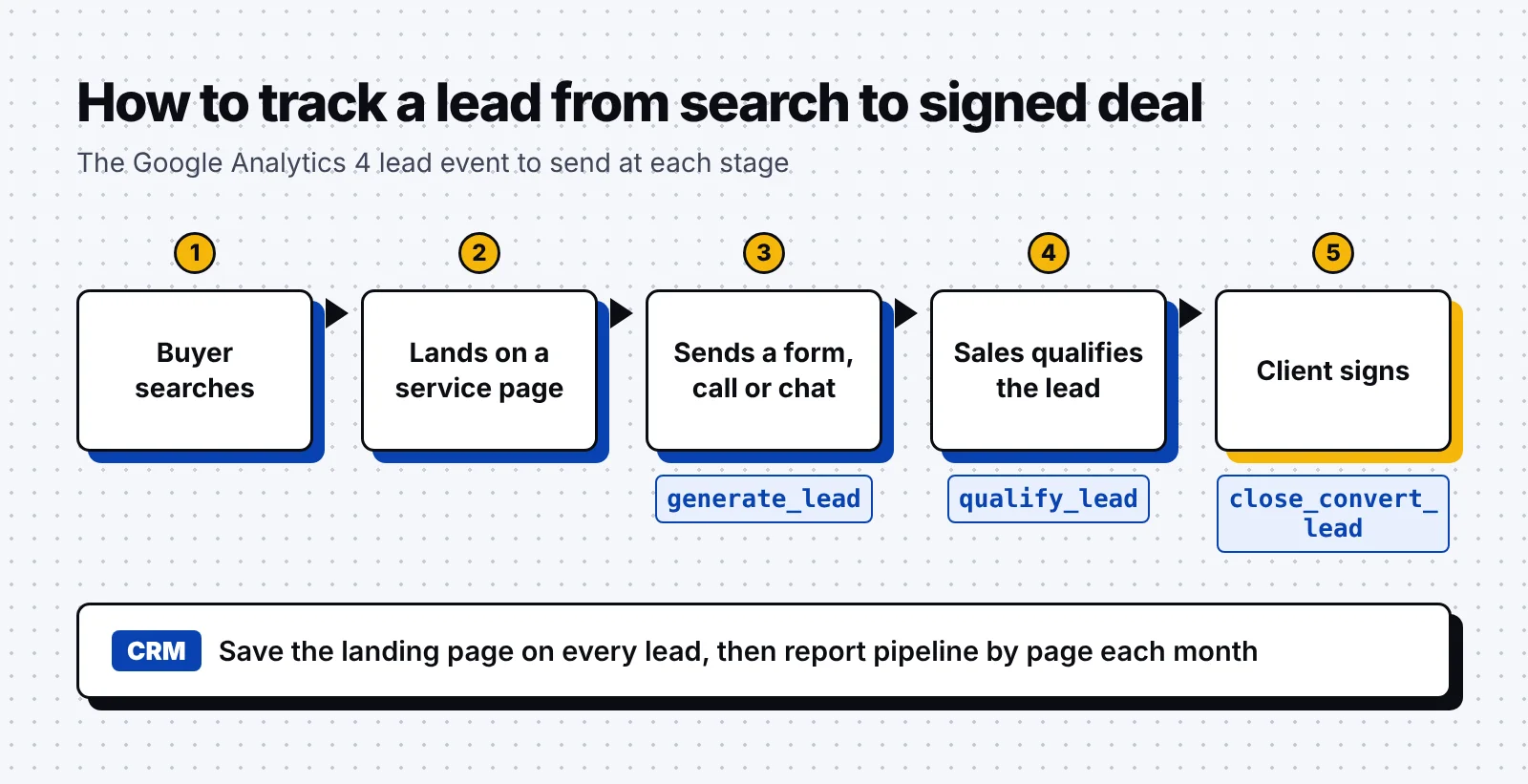
We judge each page by the qualified meetings and pipeline it brings in. Fortunately, a location page with modest traffic can still be one of your best pages if it books meetings with the right clients.
Our SEO and GEO case study used the same setup for a B2B SaaS client, with Zapier sending form leads into Salesforce. Over six months, the program generated about $500K in pipeline, and ranked keywords grew from about 300 to 2,000.
Put the 8 steps to work
Use this list as a checklist for your own site, and work through it in order:
- Map service, industry, location, compliance and problem keywords to one page each.
- Build a page for every service you sell, with its scope, pricing and proof.
- Add industry pages that name each field’s rules, software and case studies.
- Create location pages only for areas where you have clients, staff or response times.
- Set up your Google Business Profile as a service-area business and ask for reviews.
- Write case studies as project records and place certifications near the form.
- Get listed in your vendors’ partner finders and on review sites such as Clutch.
- Track forms, calls and chats to their landing page and report pipeline by page.
SEO works best alongside your other channels, and our guides to B2B SEO and B2B marketing for tech companies show how the pieces fit together.
FAQ
How long does SEO take for an IT services company?
SEO for an IT services firm builds over several months, and pages for long, specific service terms usually rank first. Broad terms like "managed IT services" take longer because more providers compete for them.
Do MSPs need a Google Business Profile?
Yes, an MSP needs a Google Business Profile to appear in map results for local searches like "IT support near me." If clients never visit your office, set it up as a service-area business and hide your address.
Should an MSP create a page for every city it serves?
Create a city page only where you have real clients, staff or response times to describe. Google treats near-copies of city pages that funnel visitors to one page as doorway abuse.
What keywords should an IT services company target?
Target service terms first, such as "co-managed IT services," then add industry, location and compliance terms like "HIPAA IT support."
How is SEO for IT services different from SaaS SEO?
IT services SEO centers on service, industry and location pages backed by case studies and certifications. SaaS SEO leans more on product pages, comparisons and free trial sign-ups.
A good first step is to list every service, industry and city you sell to, then mark which ones already have a page of their own. If you’d like help planning those pages, book a discovery call with our team.