Pillar page
A pillar page is a broad guide on one main topic that links out to deeper pages on each subtopic. A pillar on "SOC 2 compliance" might link to pages on SOC 2 costs, the audit process and Type 1 vs Type 2, and together they form a topic cluster.
What is a pillar page?
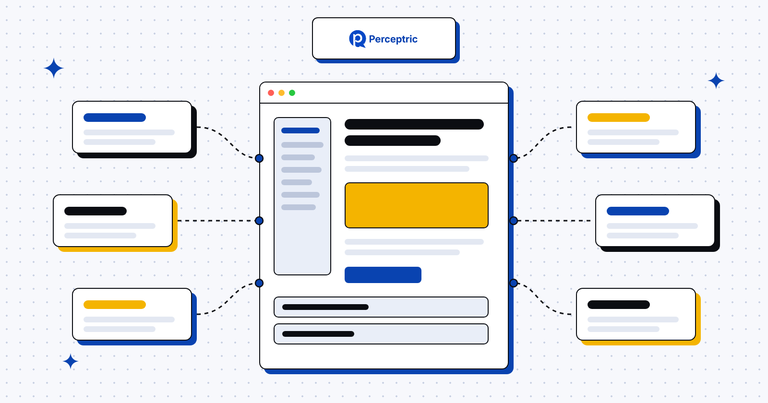
A pillar page is one long page that covers a broad topic from end to end and links out to shorter, deeper articles on each subtopic. Those deeper articles are called cluster content, and each one links back to the pillar. The pillar plus its cluster makes a topic cluster.
Let's say you sell SOC 2 compliance software. Your pillar is "SOC 2 compliance". It opens with a two-line definition. Then each part of the topic gets a short section: who needs SOC 2, how much an audit costs, Type 1 vs Type 2, how long it takes and which tools help. Each section answers the question in a paragraph or two and links to a full article on that subtopic.
A buyer who knows nothing about SOC 2 can read the pillar top to bottom. A buyer who only wants audit costs jumps straight there and clicks through to the deeper page.
Why pillar pages matter for B2B SaaS
B2B buyers research a topic over weeks, often with several people from the same company reading different parts. A pillar gives all of them one address to start from, and it gives your blog a shape. Without pillars, a SaaS blog tends to become a long list of posts that don't point to each other.
Here's why I plan pillars before any single post:
- They show depth on one subject: The links between the pillar and its cluster tell Google and AI tools that your site covers the topic fully. That's how you build topical authority on the subjects closest to what you sell.
- They match how AI search works: Google says AI Overviews and AI Mode may run several related searches across subtopics before they answer. A pillar with a clear section for each subtopic, plus deeper pages behind it, gives those searches more of your pages to find.
- They keep earning for years: A good pillar keeps the same URL and gets refreshed in place, so every link it earns keeps pointing at the current version.
- They stop your own pages from competing: When the pillar owns the broad term and each cluster article owns one narrow term, your pages stop fighting over the same search.
How to build a pillar page
Most of the work happens before you write a word. Once the cluster is mapped, the pillar comes together fast. Here's my process:
- Pick a topic next to your product: Choose something broad enough for eight to ten cluster articles that also leads naturally to what you sell. For a SOC 2 tool, "SOC 2 compliance" works. "Cybersecurity" is too wide to own.
- Map every subtopic: Pull questions from keyword tools, sales calls and support tickets, then group them by intent. I research keywords with SEMRush, Google and Reddit, and Reddit is where you find the questions people are too shy to ask a vendor.
- Pick a format: A guide pillar teaches one topic from start to finish. A resource hub is a shorter page that sorts many articles by subject. A product pillar targets a category keyword, like "SOC 2 compliance software", and mixes teaching with product proof.
- Write short sections that link out: Put a plain definition in the first lines and a table of contents right under it. Give each subtopic a short answer and a link to the cluster article, using anchor text that names the subtopic.
- Link both ways: Every cluster article links back to the pillar near the top and to one or two sibling articles. Add the pillar to your blog hub or main menu too. Internal linking is what turns a pile of posts into a cluster.
Pillar page examples
These four B2B companies run pillar pages that are easy to look up and each one shows a different way to build one:
| Company | Pillar | Format | What to borrow |
|---|---|---|---|
| Atlassian | atlassian.com/agile | Resource hub | A side menu from the basics of Scrum and Kanban up to scaling, plus a free Jira template next to the lesson |
| Gong | What is revenue intelligence | Product pillar | It defines the category Gong sells into, with a separate product page for the buying keyword |
| Cloudflare | Learning Center | Resource hub | A plain "what is" page for each term, like DDoS, CDN and DNS, each opening with a one-line definition |
| Contentsquare | The complete guide to heatmaps | Guide pillar | Every chapter sits under one /guides/heatmaps/ folder and shows the date it was last updated |
Gong is the one I'd study first if you sell into a young category. It published the page that explains the category, then linked it to product pages for single jobs like forecasting. You can read all 12 breakdowns in our pillar page examples post.
How to measure a pillar page
A pillar does two jobs: it ranks on its own and it lifts the pages around it. So measure the whole cluster as well as the one URL. Here's what I track:
- Head term and cluster rankings: In Google Search Console, filter the Performance report by the pillar's URL to see every query it shows up for. Then filter by the folder or page list of the cluster to see whether the group is growing together.
- Clicks into the cluster: In GA4, use a path exploration that starts on the pillar. If almost nobody clicks through to a cluster article, the links are hidden or the sections already answer everything.
- Conversions from the topic: Count demo requests and trials from visits that landed on any page in the cluster. In most B2B sites the cluster articles convert better than the pillar, which is fine, since the pillar sent people there.
- AI citations: Run the questions your pillar covers through ChatGPT, Perplexity and Google AI Mode each month, and note which of your pages get cited. Prompt tracking tools do this on a schedule.
- Links earned: Check backlinks to the pillar in SEMRush or Ahrefs. A good pillar becomes the page other writers link to when they mention your topic.
Common pillar page mistakes
- Picking a topic far from the product: A pillar on "remote work" brings readers, but if you sell SOC 2 software, few of them will ever need you. Start where the topic and the product overlap.
- Putting all the depth on the pillar: When the pillar goes deep on every subtopic, it starts ranking for the same narrow terms as your cluster articles. Keep each section short and let the cluster page own the detail.
- Leaving cluster articles unlinked: An article that never links back to the pillar sits outside the cluster as far as search engines can tell. Check every new post for that link before it goes live.
- Publishing it once and forgetting it: Prices, rules and tools change. Refresh the pillar each time you publish a new cluster article, and keep the same URL.
- Hiding it behind a form: A gated pillar can't rank and can't be quoted by AI tools. Keep the page open and offer a checklist or template inside it instead.
Here's a first step for this week. Pick the one topic you'd most want your brand known for, and list the subtopics your sales team explains on every call. Do you have a page for each of them yet?
Read more


FAQ
How long should a pillar page be?
Long enough to answer each subtopic in a short section and link to the page that goes deeper. There's no set word count, because the depth lives in the cluster articles.
What's the difference between a pillar page and a topic cluster?
The pillar page is one page. The topic cluster is the whole group, meaning the pillar plus every cluster article it links to and that links back to it.
How many cluster articles does a pillar page need?
Plan for at least eight to ten before you write the pillar. You don't need them all live on launch day, but each section should already know which article it will link to.
Should a pillar page be gated?
No form in front of the page itself. Search engines and AI tools can't read what sits behind a form, so offer a template or checklist inside the page for readers who want to leave their email.