I build a lot of topic clusters for B2B and SaaS clients, and the first page I plan in every cluster is the pillar page. It's the page that holds the whole topic together, so when it's thin or messy, every article around it struggles to rank.
In this guide, I'll walk you through 12 pillar page examples from B2B and SaaS companies like HubSpot, Atlassian, Cloudflare and Gong. For each one, I'll show you how the page is built and what you can borrow for your own site.
This guide covers:
- What a pillar page is and how it differs from a regular blog post
- The three common types of pillar pages you'll see in B2B
- The anatomy of a pillar page, part by part
- 12 real pillar page examples, grouped by type
- The steps to build your own pillar page
What is a pillar page?
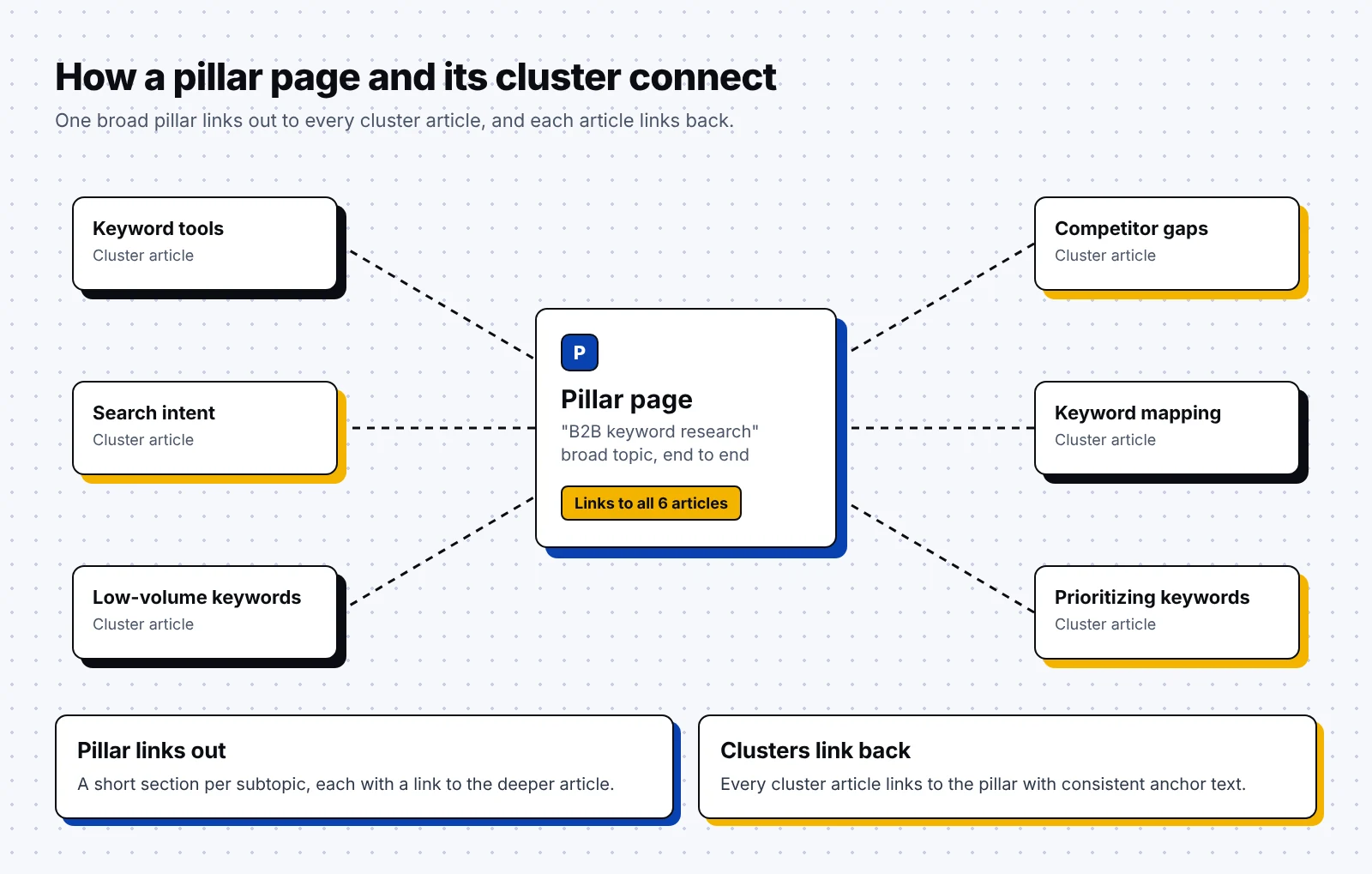
A pillar page is a long page that covers one broad topic from end to end and links out to shorter, deeper articles on each subtopic. Those shorter articles are called cluster content, and each one links back to the pillar.
Together, the pillar and its cluster form a topic cluster. The links between them show search engines (and AI search tools) that your site covers the topic in depth, and they give readers an easy path from the basics to the details.
Honestly, the easiest way to understand a pillar page is to compare it with the other pages in a cluster:
| Pillar page | Cluster article | Regular blog post | |
|---|---|---|---|
| Scope | One broad topic, end to end | One subtopic, in depth | Any single idea |
| Typical target keyword | Short head term, like "B2B keyword research" | Longer question, like "how to find B2B keywords with low volume" | Varies |
| Links | Out to every cluster article | Back to the pillar and to sibling articles | Ad hoc |
| Navigation | Table of contents or chapter menu | Standard article layout | Standard article layout |
| How often it changes | Refreshed often, same URL for years | Updated when the subtopic changes | Often left as is |
The three types of pillar pages
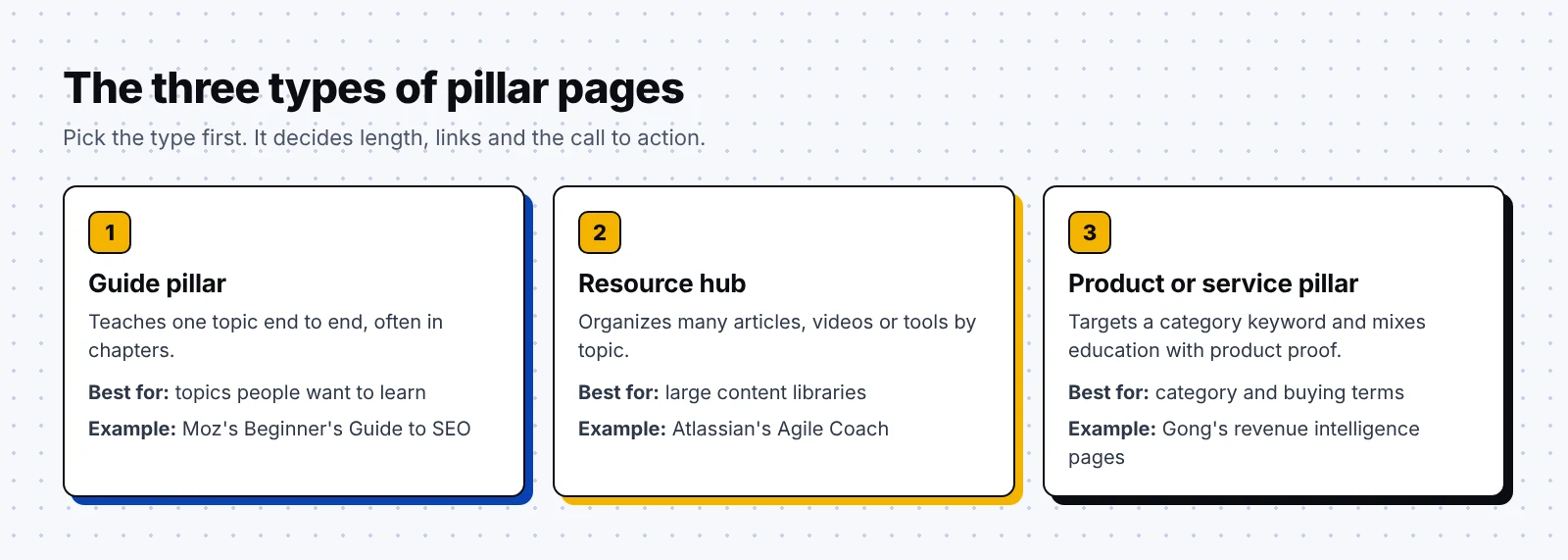
Most pillar pages I see in B2B fall into one of three types. Knowing which type you're building helps you decide how long the page should be and what the call to action looks like.
- A guide pillar teaches one topic from start to finish on a single long page, often split into chapters, and links out to deeper articles along the way.
- A resource hub is a shorter landing page that organizes many articles, videos or tools by topic, so the reader picks a path instead of reading top to bottom.
- A product or service pillar targets a category keyword (like "revenue intelligence software") and mixes education with product proof, linking to use cases and demos.
You don't have to pick only one, since many SaaS companies run a guide pillar for the problem and a product pillar for the solution, and link the two together, as you'll see with Gong below.
Anatomy of a pillar page
Whatever the type, strong pillar pages share the same building blocks. I use the anatomy below as a checklist when I review a client's pillar page.
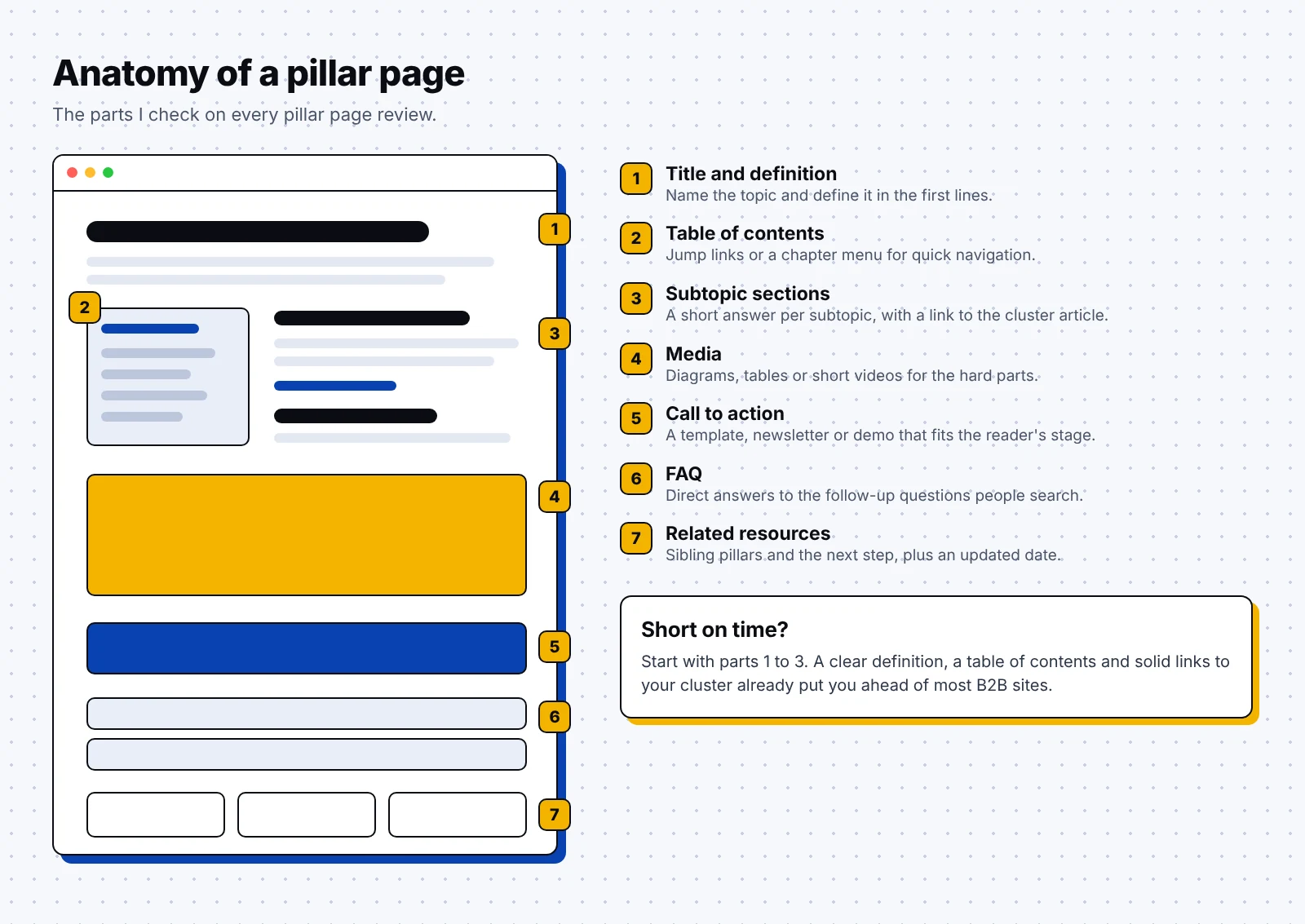
- The title and first lines name the topic and define it in a sentence or two.
- A table of contents or chapter menu lets readers jump straight to the part they need.
- Each section gives a short answer on one subtopic and links to the cluster article that goes deeper.
- Diagrams, tables or short videos explain the parts that are hard to put into words.
- A call to action fits the reader's stage, like a free template for early readers or a demo for buyers.
- An FAQ answers the next questions people search for.
- A related resources block points to sibling pillars and the next step.
- A visible "updated" date shows readers the page is maintained.
Thankfully, you don't need all of these on day one. A clear definition, a table of contents and solid links to your cluster articles already put you ahead of many B2B sites.
12 pillar page examples from B2B and SaaS companies
I've grouped these pillar page examples by type, starting with guide pillars, then resource hubs, then product pillars. I describe each page based on what the company publishes, so open each link and look at the live version as you read.
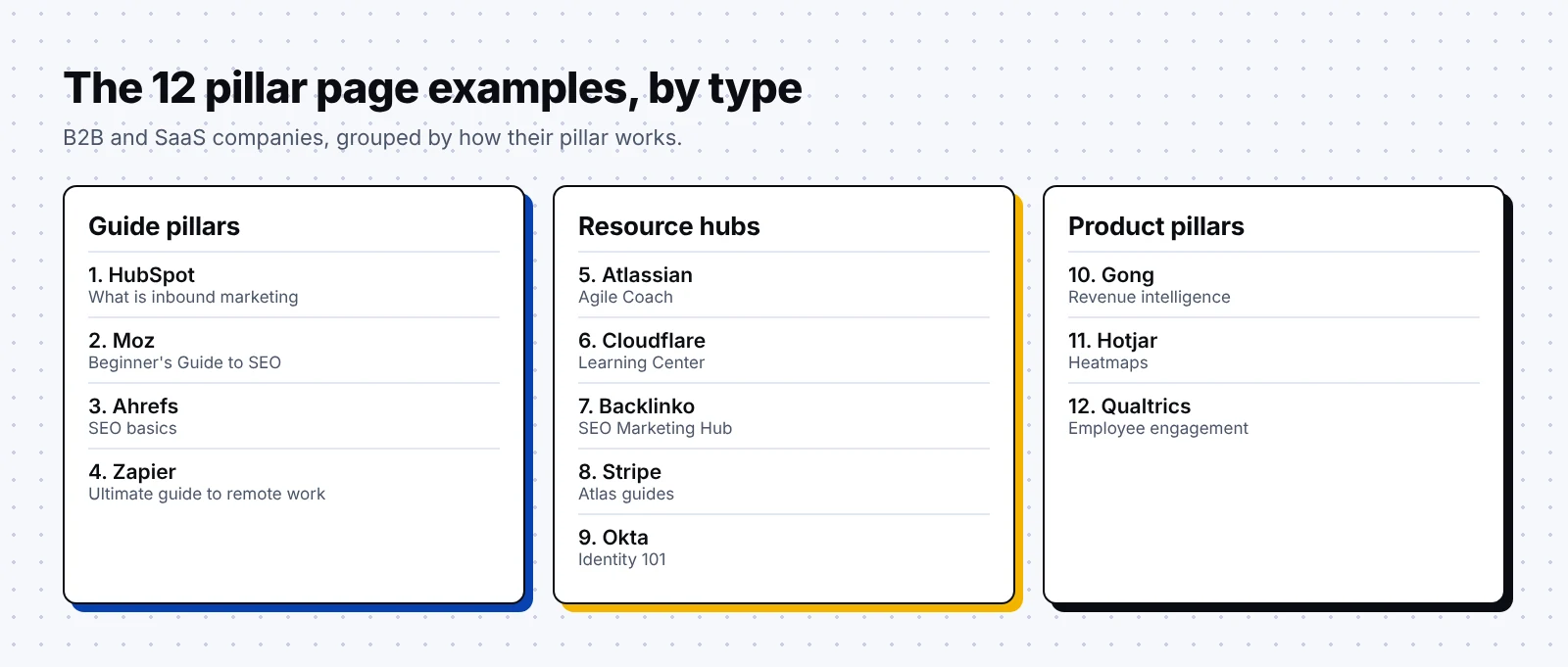
1. HubSpot: What is inbound marketing
HubSpot is a software company that sells a marketing, sales and service platform, and its co-founders are credited with coining the term "inbound marketing." Its inbound marketing page shows up in most roundups of pillar page examples, including Siege Media's.
How the page is built:
- It opens by defining inbound as drawing people in with useful content that answers their questions.
- The body is organized around the method's three stages, Attract, Engage and Delight, which together form HubSpot's flywheel.
- It mentions HubSpot's newer Loop Marketing framework and explains that Loop builds on inbound without replacing it.
- Sister pillars like inbound sales and the methodology page cover the same idea for other teams.
What you can borrow:
- Name your own method and use its stages as the H2s of your pillar.
- When your thinking changes, update the pillar and explain how the new idea relates to the old one.
- Build sibling pillars for each audience and link them to each other.
2. Moz: The Beginner's Guide to SEO
Moz is an SEO software company that makes tools for keyword research and link analysis. Its Beginner's Guide to SEO has been around for years. Remarkably, a 2012 PDF edition from the SEOmoz days still sits on a university course site.
How the page is built:
- The guide is split into chapters that build on each other in the order a beginner learns.
- It starts with how search engines crawl, index and rank pages before moving on to topics like keyword research, on-page SEO and links.
What you can borrow:
- Order your chapters in the sequence a newcomer needs them, from basics to advanced.
- Keep one URL for your pillar and refresh it, so years of links keep pointing to the same page.
3. Ahrefs: SEO basics
Ahrefs is an SEO software company known for its backlink and keyword research tools. Its beginner's guide to SEO is its pillar for SEO basics, and Ahrefs later turned the same material into other formats.
How the page is built:
- Ahrefs printed the material as the SEO Book for Beginners, with 7 chapters and 140 pages by Tim Soulo, Joshua Hardwick and Patrick Stox, covering everything from how search engines work to keyword research and link building.
- According to AIN, the book lists the main takeaways after each chapter and points readers to further sources, and only about 2,000 copies were printed.
- The online guide stays free to read, so you can study how it's structured.
What you can borrow:
- End each section of your pillar with a short takeaway list readers can skim.
- Reuse a finished pillar as a book or an email course.
4. Zapier: The ultimate guide to remote work
Zapier is an automation software company that connects web apps so teams can move data between them without code, and it's a fully remote company. Its ultimate guide to remote work comes straight from that experience.
How the page is built:
- The guide sorts its tips into seven categories: automation for remote work, teamwork on a remote team, remote work for managers, remote work for employees, remote workspaces, remote work tools and the state of remote work.
- A separate remote work FAQ page answers common questions in more depth.
- Zapier also publishes localized copies of the guide in French and Japanese.
- Interestingly, an earlier edition became a free ebook, which is listed on Leanpub with 15 chapters.
What you can borrow:
- Write your pillar about something your team does every day, so the advice comes from real experience.
- Make the first section the one where your product naturally helps, the way Zapier leads with automation.
5. Atlassian: Agile Coach
Atlassian is a software company that makes team tools like Jira and Confluence. Its Agile Coach is a free resource hub with agile lessons for beginners through experts, drawn from the company's long history in software development.
How the hub is built:
- The topics run from agile project management, Scrum and Kanban to product management, DevOps and scaling agile with frameworks like SAFe.
- An about page explains its guiding principles, including that the content is peer reviewed and crowdsourced.
- It says there's no single right way to practice agile, so it covers culture and values as well as practices.
- A companion series of short videos and a community forum called The Agile Corner extend the hub, and the pages come in several languages.
What you can borrow:
- Publish a short "about this hub" page that explains who writes it and how it's reviewed.
- Pair your most popular articles with short videos for readers who'd rather watch.
- Send discussion to a community space so the hub stays clean.
6. Cloudflare: Learning Center
Cloudflare is an internet infrastructure company that provides security and performance services for websites and networks. Its Learning Center describes itself as a set of resources on cyber security, web performance and how the internet works.
How the hub is built:
- Sections cover topics like DDoS, CDNs, DNS and web application security.
- Entries such as What is a DDoS attack? explain the idea in plain words, in this case a network of computers working together to overwhelm a service.
- For readers who want to set things up, Cloudflare's developer docs include learning paths like Prevent DDoS attacks that go a level deeper.
What you can borrow:
- Group your hub by the problems your buyers face, with one "what is" page per term.
- Start every page with a one or two sentence definition that a search engine or AI tool can quote, then link to your docs for readers who are ready to set things up.
7. Backlinko: SEO Marketing Hub
Backlinko is an SEO training and blog company founded by Brian Dean, and it joined Semrush in January 2022. Its SEO Marketing Hub is a library of SEO resources organized by topic.
How the hub is built:
- It covers keyword research, technical SEO, on-page optimization, content UX and more.
- Happily for readers, it's free, and Brian Dean launched it on Product Hunt like a product.
- A 2.0 version followed with hundreds of edits, additions and updates.
What you can borrow:
- Treat a big hub as a launch, with its own announcement and outreach.
- Give major refreshes a version number so returning readers know what changed.
8. Stripe: Atlas guides
Stripe is a payments company, and Stripe Atlas is its product that helps founders set up a new company. The Atlas guides form a resource hub for the jobs founders face right after they incorporate.
How the hub is built:
- The guides cover incorporation, bookkeeping, taxes and risk management.
- Stripe's launch post says the first guide focused on incorporation and taxes, with more planned.
- The guides launched on Product Hunt in October 2017.
- Stripe notes that Atlas doesn't provide legal, tax or accounting advice, which matters on regulated topics.
What you can borrow:
- Build your hub around the tasks your buyer faces just before or after they buy.
- Start with one strong guide and add more over time, the way Stripe started with a single guide.
- Add a clear disclaimer when you cover legal, tax or financial topics.
9. Okta: Identity 101
Okta is an identity and access management company that helps businesses manage logins and access for employees and customers. Identity 101 is its educational section on identity topics.
How the hub is built:
- Identity 101 sits in the main Resources menu next to webinars, the blog, the newsroom, customer stories and events, so it's one click away from any page.
- The "101" name tells readers right away that the content starts from the basics.
What you can borrow:
- Give your hub a name that signals the reading level, like "101," "Academy" or "Glossary."
- Put the hub in your main navigation so it collects internal links from every page on the site.
10. Gong: What is revenue intelligence
Gong is a revenue intelligence company whose platform records and analyzes customer calls, emails and meetings for sales teams. Its What is revenue intelligence page is a category pillar, and Gong says it pioneered the category in 2019.
How the pages are built:
- The pillar defines revenue intelligence as capturing customer interactions, analyzing them for insights and using those insights to decide the next best action.
- A separate product pillar, revenue intelligence software, targets the buying keyword.
- Pages for single jobs go deeper, like deal execution and forecasting, which covers deal warnings that flag risks.
What you can borrow:
- Naturally, if you sell into a new category, you want to write the definition page before anyone else does.
- Run an education pillar and a product pillar side by side, and link them both ways.
- Treat each page for a single use case as a cluster article for the product pillar.
11. Hotjar: Heatmaps
Hotjar is a product analytics company that sells heatmaps, session recordings and surveys for websites. Its heatmaps section works as a product pillar that also teaches the topic.
How the section is built:
- Chapter pages like How to create a heatmap sit under the same /heatmaps/ path.
- That chapter defines a heatmap as a data view that uses color, from blue (cold) to red (hot).
- It suggests starting with your homepage, landing pages and underperforming pages.
- The chapter shows when it was last updated, which was May 23, 2024 at the time of writing.
What you can borrow:
- Teach the method first and let the product appear as the easiest way to do it.
- Keep every chapter under one folder so the URLs mirror the cluster, and show the date each chapter was last updated.
12. Qualtrics: Employee engagement
Qualtrics is an experience management software company that helps businesses run customer and employee research. Its employee engagement page is a product pillar for one of its core use cases.
How the page is built:
- It frames the product as a way to go past traditional engagement scores.
- It gives a concrete detail buyers can check: more than 300 benchmarkable items covering topics like intent to stay, inclusion and well-being.
- Qualtrics also has a free employee engagement survey template, an easy next step for readers who aren't ready for a demo.
What you can borrow:
- Use specific product facts on a product pillar so it reads as proof.
- Offer a free template or tool as the call to action for readers earlier in their research.
What these pillar pages have in common
Surprisingly, these pages look quite different from one another. Moz splits its guide into chapters, while Cloudflare's Learning Center works more like a menu of short explainers. Still, a few habits show up again and again:
- The topic is broad and sits close to what the company sells.
- The page defines its topic early, in plain words.
- Readers get a way to jump around, whether that's a chapter list or a menu.
- Links go out to deeper pages, and the URL stays the same over time.
Here's a quick do and don't list I share with clients before they start writing:
- Do pick a topic you can support with at least eight to ten cluster articles.
- Do link to every cluster article from the pillar, with clear anchor text.
- Do refresh the pillar whenever you publish a new cluster article.
- Don't cram every detail into the pillar, since that's what the cluster articles are for.
- Don't hide the call to action at the very bottom of a very long page.
- Don't launch the pillar without any cluster articles behind it.
How to build a pillar page, step by step
Building a pillar page is mostly planning, and once the cluster is mapped, the writing goes fast. Here's the process I follow with clients when we build one together.
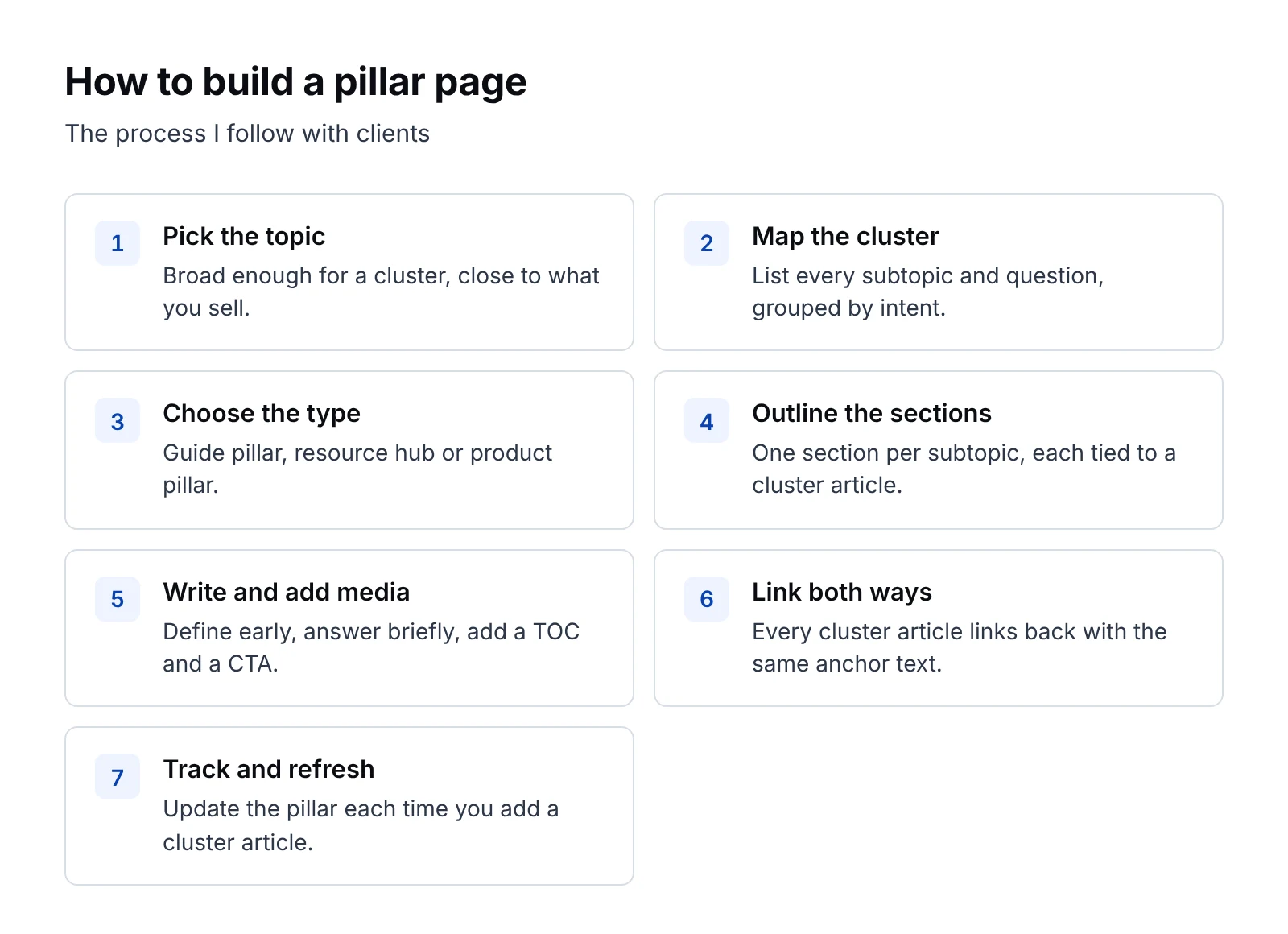
- Pick a topic that's broad enough for a cluster but close to what you sell, like "B2B keyword research" for an SEO tool. My guide to B2B keyword research covers how to size these topics.
- List every subtopic and question people ask about it, using keyword tools and your sales and support conversations, and group them by intent.
- Choose the type that fits: a guide pillar for a topic people want to learn, a resource hub for a big library, or a product pillar for a category keyword.
- Outline one section per subtopic, and note which cluster article each section will link to.
- Write the pillar with a definition in the first lines, short answers in each section and a link to the deeper article.
- Add a table of contents and a few diagrams or tables, then place a call to action that fits the reader's stage.
- Link back from every cluster article to the pillar with consistent anchor text, and link to the pillar from your main navigation or blog hub.
- Publish, track rankings for the head term and the cluster terms, and refresh the pillar each time you add a new cluster article.
If you're planning a whole B2B blog strategy, I'd plan your first two or three pillars before you write any single post, since they decide how the rest of the blog fits together.
Hopefully you'll also see a lift in AI search. A page that defines a topic clearly and links to deep answers is easy for ChatGPT, Perplexity and Google's AI features to pull from, and that idea shapes how we approach GEO for B2B brands.
FAQ
What is a pillar page?
A pillar page is a long page that covers one broad topic and links to shorter, deeper articles on each subtopic, called cluster content. Each cluster article links back to the pillar, so the group works as a topic cluster.
How long should a pillar page be?
There's no fixed length, though guide pillars often run several thousand words, while resource hubs can be much shorter because they mostly organize links. Write enough to answer each subtopic briefly and leave the depth to your cluster articles.
What are the types of pillar pages?
The three common types are guide pillars, which teach one topic end to end, resource hubs, which organize a library of content by topic, and product or service pillars, which target a category keyword and link to use cases and demos.
How many cluster articles does a pillar page need?
I aim for at least eight to ten cluster articles per pillar, though you can launch with fewer and add more over time. The pillar should link to every one of them, and each one should link back.
What's the difference between a pillar page and a blog post?
A blog post usually covers one idea in depth. A pillar page covers a whole topic at a higher level, uses a table of contents or chapters, and links out to many blog posts that each go deep on one part of it.
Can a product page be a pillar page?
Yes, a product or service pillar can work well when it targets a category keyword, explains the category and links to use case pages and demos. Gong's revenue intelligence pages and Qualtrics's employee engagement page are good examples.
If you'd like help planning your pillar pages and the clusters around them, our B2B SaaS content marketing team builds these for SaaS and tech companies. Book a call and we'll map your first pillar together.