Evergreen content is an article or page that keeps bringing people to your site for years after you publish it. A news post gets a burst of readers in its first week, while a good evergreen guide picks up new readers every month because people keep searching for the same answer.
I build evergreen content for B2B teams, and in this guide I'll show you the whole process I follow, from picking topics to keeping each page fresh. We'll cover:
- What evergreen content is and how it differs from timely content
- Why it matters even more now that buyers also search in ChatGPT and Google's AI answers
- The formats that stay useful the longest
- Five real evergreen content examples from B2B brands
- How to find evergreen topics and write them so they last
- An evergreen content strategy built around a simple refresh routine, with a checklist you can copy
What is evergreen content?
Evergreen content answers a question that people keep asking, year after year. The name comes from evergreen trees, which keep their leaves through every season.
A post about "what is a sales pipeline" will be just as useful next spring as it is today. A post about a product launch from last Tuesday will feel old within a month, even if it was great on the day it went live.
I use four quick tests to tell if a topic can become evergreen:
- People search for it every month, and the search volume stays fairly flat over the years.
- The core answer doesn't depend on this week's news, a price that changes often or a single event.
- You could update the details later without rewriting the whole article.
- A buyer would still find it useful if they landed on it two years from now.
Evergreen vs timely content
Timely content covers news, trends, launches and events. It can bring a big spike of readers and social shares, and it's great for showing that your brand is paying attention to the market.
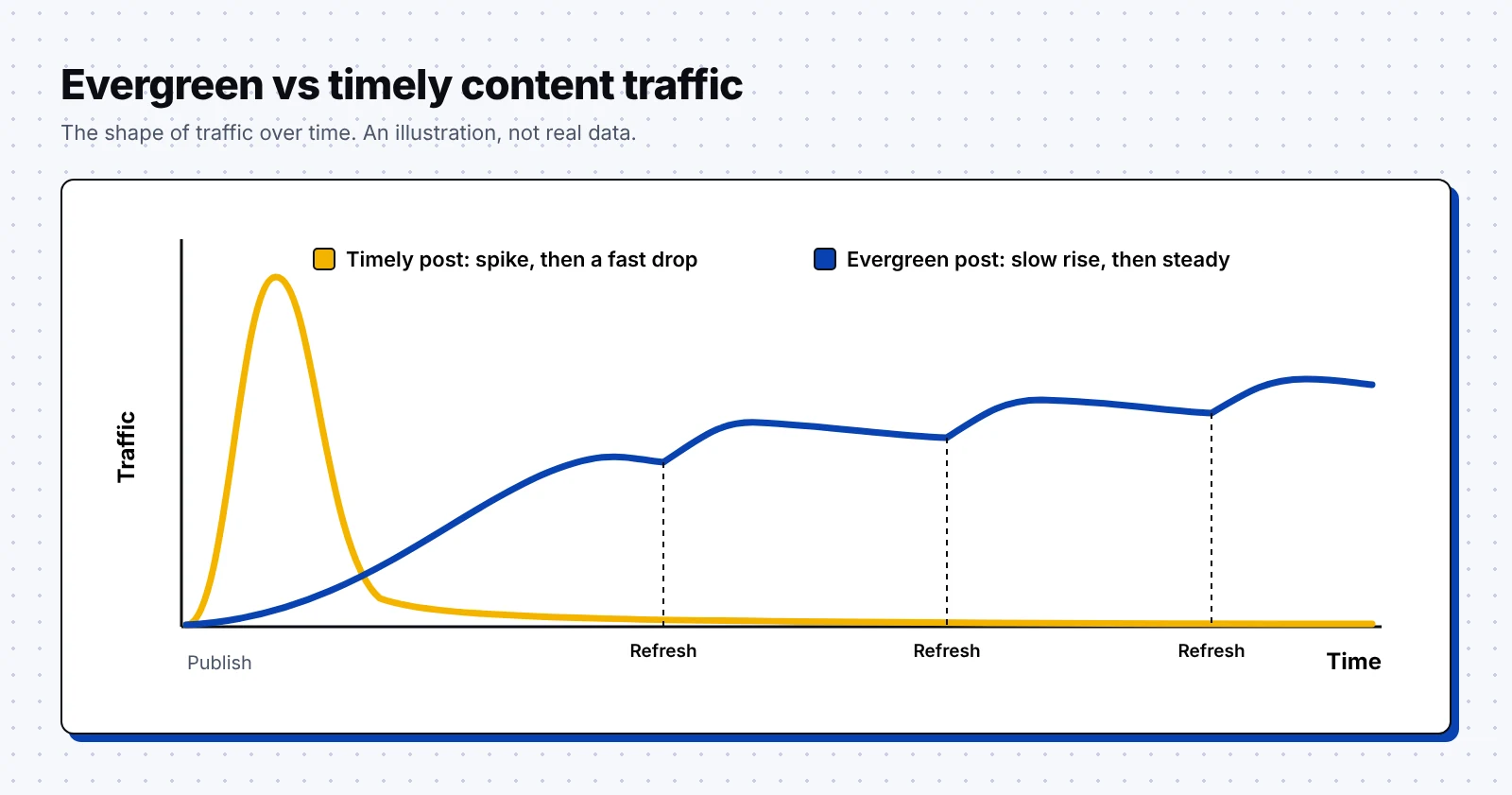
Evergreen content grows slower, and then it keeps bringing in readers for a long time. Most healthy B2B blogs need both, so here's how the two compare side by side:
| Evergreen content | Timely content | |
|---|---|---|
| Main job | Answers a question people always ask | Covers news, trends or events |
| Traffic shape | Slow start, then steady for years | Big spike, then a fast drop |
| Main channels | Google search and AI answers | Social media, newsletters and news sites |
| Upkeep | A planned refresh every few months | Usually none after the first week |
| Examples | Tutorials, glossaries, templates, comparisons | Industry news, event recaps, launch posts |
The traffic shape is the easiest way to see the difference. This drawing shows the shape only, since every site's numbers are different:
Why evergreen content matters even more in the age of AI search
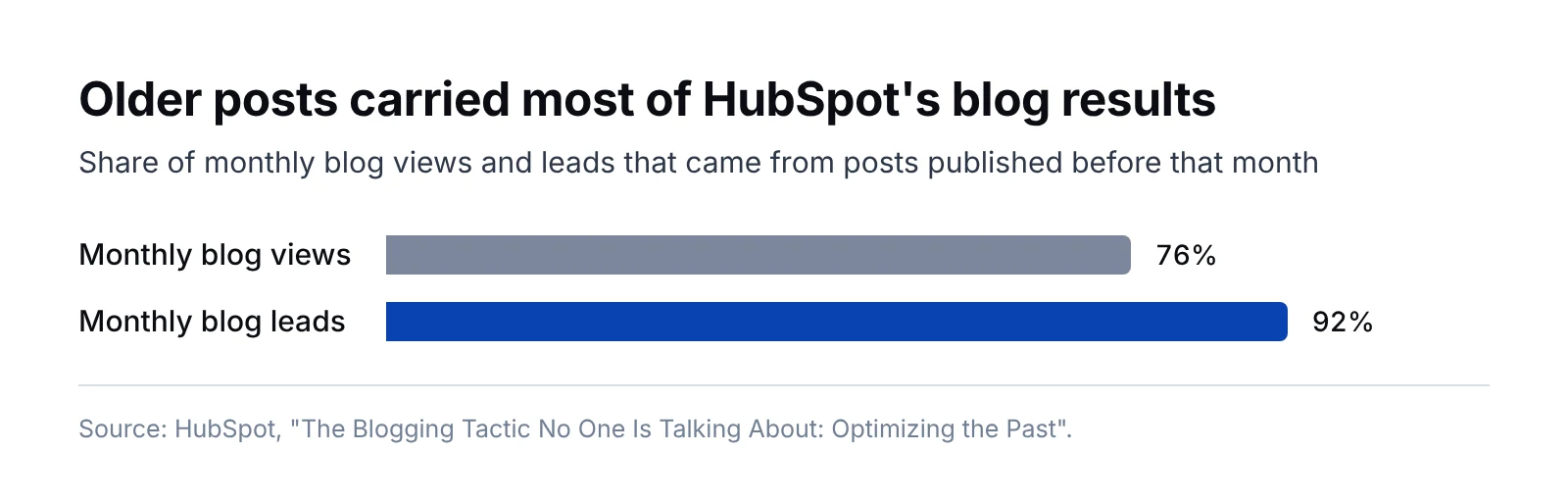
Honestly, the best proof that evergreen content works comes from blogs that have published for a long time. When HubSpot studied its own blog, it found that 76% of its monthly blog views and 92% of its monthly blog leads came from older posts published before that month.
Older pages also hold most of the top spots in Google. In Ahrefs' study of 1.3 million keywords, 72.9% of the pages in Google's top 10 were more than three years old, up from 59% in its 2017 study.
AI answers work a little differently. Ahrefs looked at about 17 million citations and found that AI assistants cite pages that are 25.7% fresher on average than the pages in Google's organic results, with ChatGPT showing the strongest pull toward newer content.
Put those findings together and you get a clear plan for your evergreen pages:
- Pick topics with lasting demand, so the page has years to build links and rankings.
- Refresh the page on a schedule, so AI tools see current facts and recent update dates.
- Write clear answers near the top of each section, so both Google and AI tools can quote you.
- Track the page in AI answers as well as in Google, since the two can cite different sources.
If you want help with the AI side, our GEO agency team tracks where your pages show up in ChatGPT, Perplexity and Google's AI answers.
Formats that stay evergreen
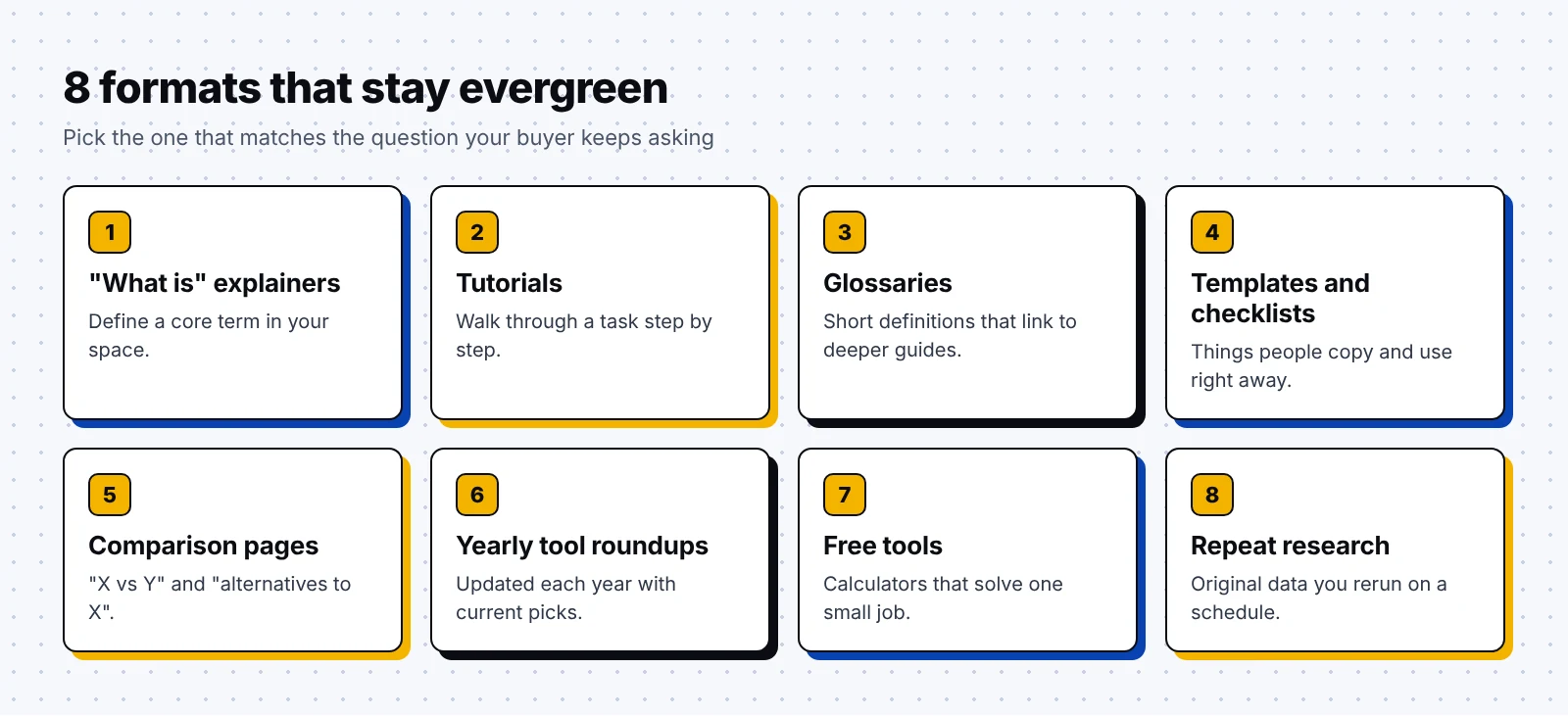
Some formats age much better than others. These are the ones I lean on most for B2B clients:
- "What is" explainers that define a core term in your space, such as "what is a CRM".
- Tutorials that walk a reader through a task step by step.
- Glossaries that give short definitions and link to deeper articles.
- Templates and checklists that people can copy and use right away.
- Comparison pages, such as "X vs Y" or "alternatives to X", for buyers close to a decision.
- Roundups of the top tools that you update each year with current picks and prices.
- Free tools and calculators that solve one small job for your buyer.
- Original research that you rerun on a set schedule.
Some formats are hard to keep evergreen, though they still have a place in your plan:
- News posts and hot takes on this week's industry story
- Event recaps and webinar announcements
- Posts built around one statistic that will be outdated next year
- Trend predictions for a single year, unless you plan to publish a new version each year
Luckily, you can often turn a timely post into an evergreen one. A recap of a pricing change, for example, can grow into a lasting guide on how to choose a plan, with the news as one section you swap out later.
Evergreen content examples worth studying
Here are five real evergreen pages from B2B brands. Each one uses a different format, so you can borrow the one that fits your team best.
1. Salesforce: What Is CRM?
Salesforce is a software company that makes customer relationship management tools for sales and service teams. Its What Is CRM? page explains the term from the ground up, describing CRM as both a business strategy and the software that supports it.
Salesforce's CRM guides go on to explain what a CRM system stores, such as contact details, sales leads and service cases. They also cover newer features like AI that automates data entry and routes leads, which keeps an old topic current.
What you can borrow:
- Own the "what is" page for the main category your product sits in.
- Add new sections when your category changes, and link out to deeper pages on the same topic, as Salesforce does with its page on CRM systems.
2. Atlassian: The Agile Coach
Atlassian is a software company that makes team tools like Jira and Confluence. Its Agile Coach is a large hub of lessons on agile work, which Atlassian describes as made for beginners and pros alike.
The hub covers topics such as Scrum, Kanban, product management and DevOps. Each lesson answers a question that agile teams keep asking, so the hub can stay useful for a long time.
Why it works:
- It teaches the method first, so readers trust it before they ever see a product page.
- One hub holds many related lessons, which makes it easy to link them together.
- The topics match the daily work of the people who buy Jira.
- It speaks to beginners and experienced teams, so one hub serves a wide range of readers.
3. Zapier: The best free project management software
Zapier is an automation company that connects business apps so they can share data and run tasks for you. Its guide to the best free project management software in 2026 compares tools such as Trello, Asana, ClickUp, Wrike, Airtable and Jira.
A roundup of tools goes out of date fast, since tools and prices change. Zapier keeps the current year in the title, which tells readers the picks are meant to be current.
What you can borrow:
- Use a year in the title only when you will refresh the page every year.
- Give each tool a clear "best for" label, so readers can scan for their own use case.
- Check prices and plan names at every refresh, since they change the most.
4. Mailchimp: Marketing Glossary
Mailchimp is a marketing company that offers email, SMS and automation tools for businesses. Its Marketing Glossary holds short definitions of marketing terms, and many entries link to longer articles, such as its guides to drip campaigns and keywords.
Why it works:
- Every entry targets a term that new marketers search for again and again.
- Short definitions are easy for Google and AI tools to quote, and each one sends readers on to a deeper guide.
5. Stripe: Atlas guides
Stripe is a payments company, and its Atlas service helps founders incorporate a new company. Stripe publishes guides for founders, such as Your first 10 customers and a startup checklist for founding teams.
Every new founder faces these questions, so new readers arrive each year. The guides also sit right next to the product, since a founder reading about incorporation is a good fit for Atlas.
What you can borrow:
- Write guides for the moment right before someone needs your product.
- Turn long guides into checklists, which people save and share.
- Keep legal or tax details in their own sections, so you can update them without touching the rest.
How to find evergreen topics
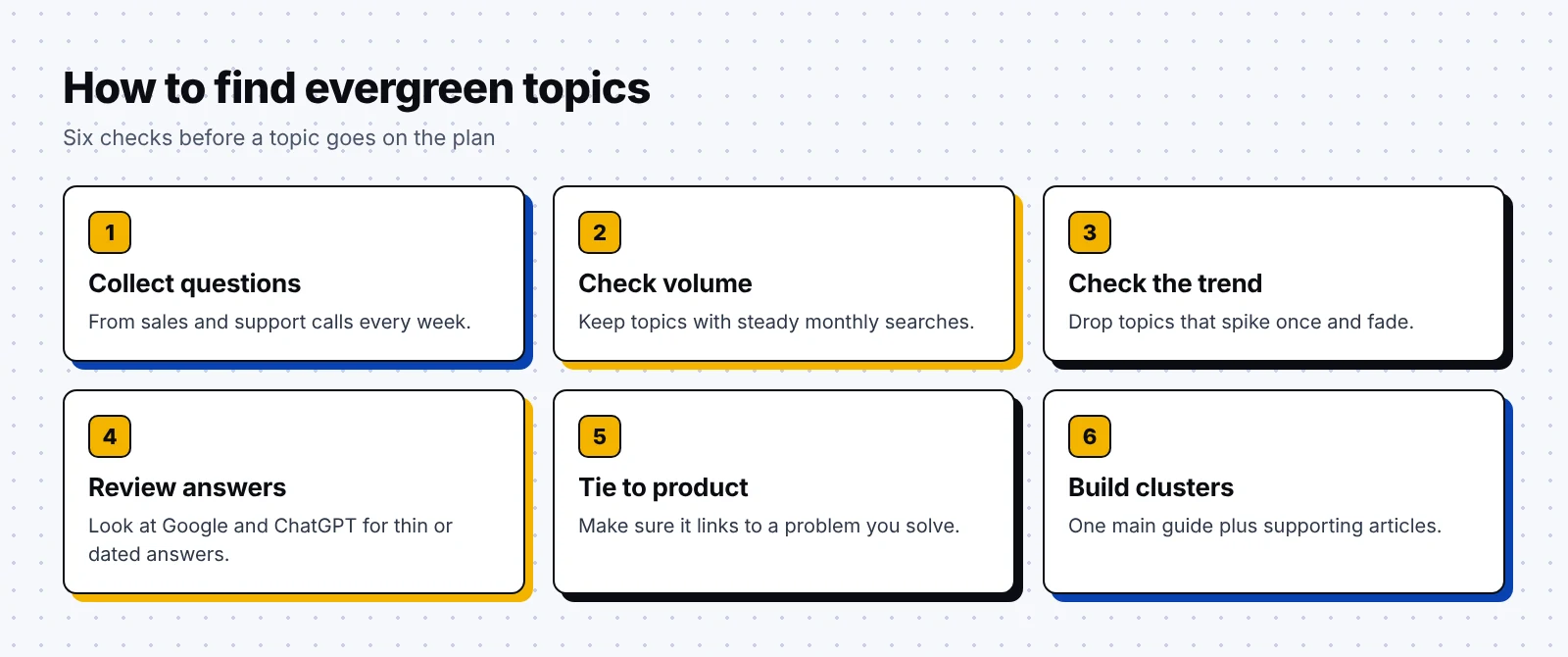
Thankfully, you don't need a fancy tool to find good evergreen topics. This is the process I use with clients:
- List the questions your sales and support teams hear every week, since those questions rarely change.
- Put each question into a keyword tool and keep the ones with steady monthly searches.
- Look at the search trend over several years in Google Trends, and drop topics that spike once and fade.
- Search the topic in Google and in ChatGPT, then check whether the current answers are thin, dated or missing your angle.
- Check that the topic connects to a problem your product solves, so the traffic can turn into pipeline.
- Group related topics into clusters, with one main guide and several supporting articles.
I go deeper into the research side in my guide to B2B keyword research. The same process works for evergreen topics, with an extra check on how stable the demand is over time.
How to write evergreen content that lasts
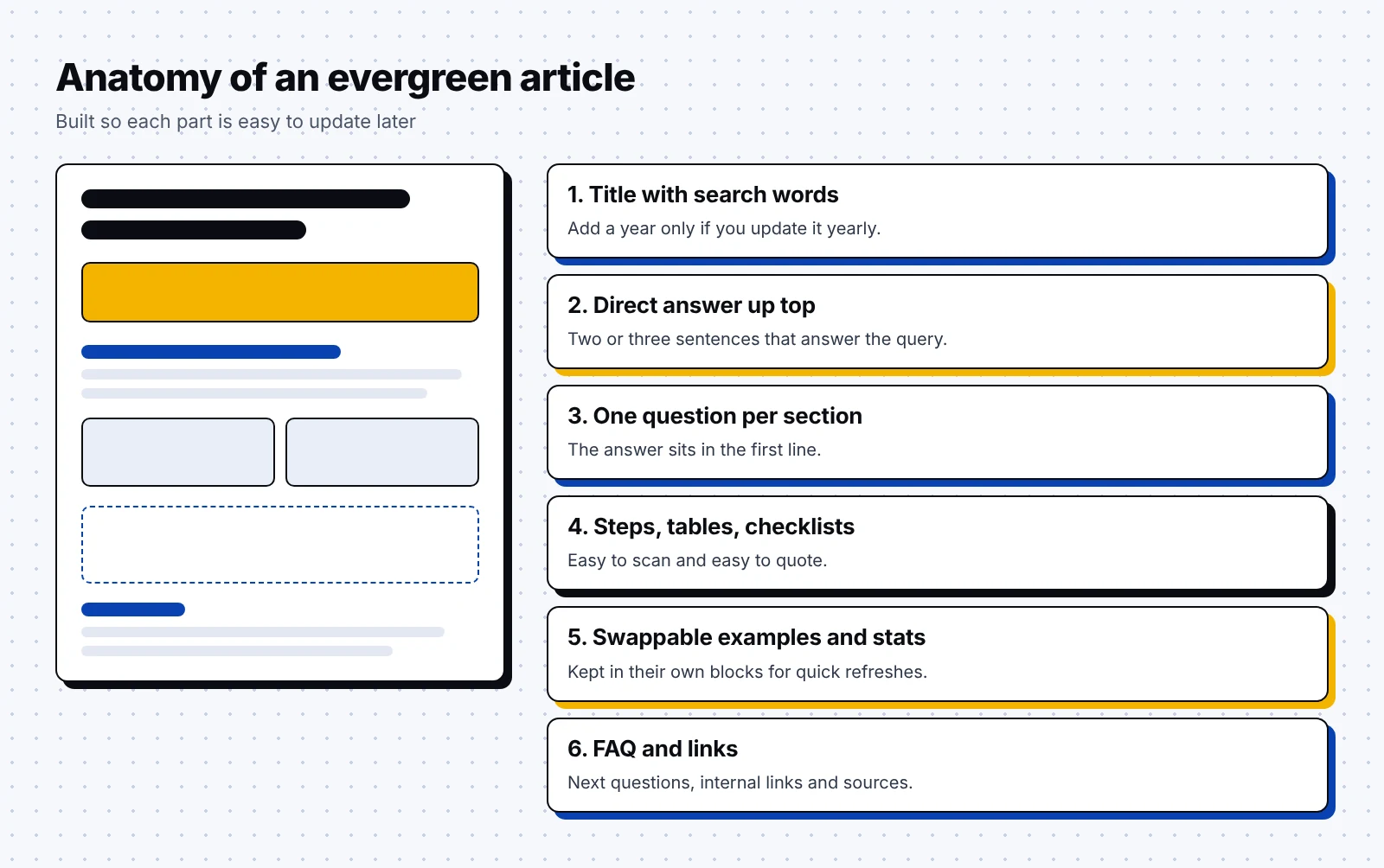
The way you write and structure the page decides how easy it is to keep fresh. I build every evergreen article from the same parts:
- A title that uses the words people search for, with a year only if you will update it yearly.
- A short, direct answer in the first two or three sentences.
- Sections that each answer one question, with the answer in the first line.
- Steps, tables and checklists wherever a reader would want to scan.
- Examples and numbers kept in their own blocks, so you can swap them during a refresh.
- An FAQ at the end that covers the next questions people tend to ask.
- Links to related guides on your site, and links out to every source you cite.
A few writing habits keep a page from dating itself:
- Do add the month and year next to every stat you cite, so readers know how old it is.
- Do explain the reason behind each step, since the reason ages slower than the tool.
- Don't write "this year", "recently" or "last month", since those words go stale.
- Don't fill the page with screenshots of software menus that change every few months.
- Don't pin your advice to one tool when the steps work in any tool.
Surprisingly, the hardest part for most teams is the first line of each section. Writers want to warm up, but readers and AI tools both look for the answer first, so I ask writers to cut their opening sentence and see if the section reads better.
If you'd like a team to plan and write these pages for you, take a look at our B2B SaaS content marketing agency work.
Evergreen content strategy: the refresh routine
An evergreen page still needs care, and a refresh routine is what keeps it ranking. HubSpot's project to update its older posts lifted their monthly organic search views by 106% on average.
Google is also clear that a refresh has to be real. Its guide to helpful content asks site owners, "Are you changing the date of pages to make them seem fresh when the content has not substantially changed?"
When to refresh a page
I put every evergreen page on a calendar and also watch for a few warning signs. Refresh a page when any of these happen:
- Its clicks or rankings in Google Search Console drop for two or three months in a row.
- A stat, price, tool or screenshot on the page is out of date.
- The top results in Google now answer a question your page skips.
- ChatGPT or Perplexity answers the topic without citing your page.
- Your product, your market or the law behind the topic has changed.
- Six to twelve months have passed since the last real update.
The evergreen content refresh checklist
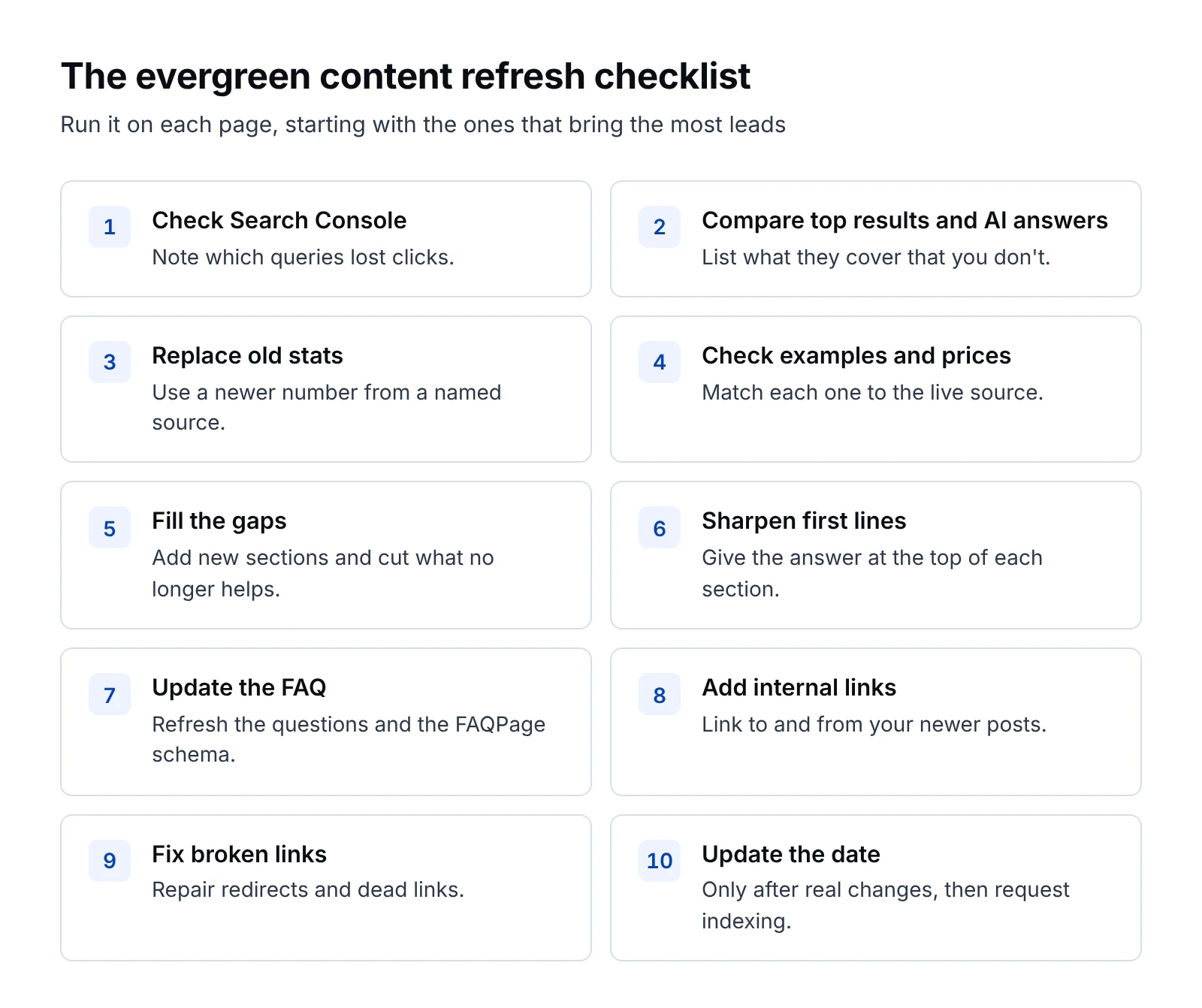
I run this checklist on every refresh, and you can copy it into your own project tool and work through it page by page:
- Pull the page's queries from Google Search Console and note which ones lost clicks.
- Read the current top results and AI answers for the main keyword, and list what they cover that you don't.
- Replace every outdated stat with a newer one from a named source, and link to it.
- Check every example, price, screenshot and product name against the live source.
- Add new sections for the gaps you found, and cut parts that no longer help.
- Rewrite the first line of each section so it gives the answer straight away.
- Update the FAQ and its FAQPage schema with the questions people ask now.
- Add links from your newer posts to this page, and from this page to your newer posts.
- Fix broken links and redirects on the page.
- Change the updated date only after you've made real changes, then request indexing in Search Console.
Fortunately, you don't need to refresh everything at once. Start with the ten pages that bring the most leads, then work through the rest each quarter, so the routine fits into a normal content calendar.
For more on fitting refreshes into your wider plan, see my B2B blog strategy guide and our list of SEO best practices.
FAQ
What is evergreen content?
Evergreen content is an article or page that stays useful for years because it answers a question people keep asking. Common examples are "what is" explainers, tutorials, glossaries, templates and comparison pages. It brings in steady search traffic long after it is published, as long as you refresh the details from time to time.
What is the difference between evergreen and timely content?
Timely content covers news, trends and events, so it gets a spike of readers and then fades. Evergreen content answers lasting questions, so it starts slower and keeps drawing readers from Google and AI answers for years. Most B2B blogs need both, with evergreen pages carrying the steady traffic.
How often should you update evergreen content?
Review your most important evergreen pages every six to twelve months, and sooner if clicks drop or a stat, price or screenshot goes out of date. Only change the updated date when you have made real changes, since Google's helpful content guidance warns against making pages seem fresh when the content has not substantially changed.
Is evergreen content still worth it with AI search?
Yes, and Ahrefs found that 72.9% of pages in Google's top 10 were more than three years old, and its study of about 17 million AI citations found that AI assistants lean toward fresher pages. Evergreen pages that you refresh on a schedule can benefit from both patterns.
What is an evergreen content strategy?
An evergreen content strategy is a plan to build pages around lasting questions and keep them current. It covers how you pick topics with steady demand, how you structure each page so it is easy to update, and a refresh routine with a checklist and a calendar for the pages that bring the most leads.
Your next step is simple: open Google Search Console, sort your pages by clicks over the last twelve months, and pick the three that bring the most steady traffic. Those are your evergreen pages, so give each one its first refresh this month.